
A focused Smartly alternative for high-volume paid social teams
Smartly is built to manage a broad enterprise advertising stack. Kitchn is built to solve a more specific problem: getting hundreds or thousands of paid social ads prepared, reviewed and live without turning ad operations into a full-time uploading function.
Kitchn starts when the creative is finished and stops when the ads are live. Smartly spans considerably more of the stack.
If your team needs DCO, enterprise creative production, programmatic media and predictive optimisation in one platform, Smartly may make sense.
If your creative already exists and your media buyers are spending too much time getting it into ad accounts, Kitchn is the more focused fit.
Kitchn vs Smartly: which is the better fit?
| Your team needs to… | Better fit |
|---|---|
| Launch hundreds or thousands of finished ads efficiently | Kitchn |
| Reduce repetitive work for media buyers | Kitchn |
| Work from spreadsheet-style launch workflows | Kitchn |
| Standardise how ads are prepared across teams and accounts | Kitchn |
| Validate structural setup before ads are created | Kitchn |
| Review high-volume launches with clients or teammates | Kitchn |
| Copy launch workflows across accounts or markets | Kitchn |
| Launch across the paid social platforms Kitchn supports | Kitchn |
| Generate large volumes of creative variations from templates | Smartly |
| Use DCO and feed-driven creative personalisation | Smartly |
| Automatically build campaign structures from feeds | Smartly |
| Manage programmatic or CTV alongside social | Smartly |
| Run predictive budget optimisation | Smartly |
The difference is focus.
Smartly tries to cover much more of the advertising stack. Kitchn goes deeper on the operational workflow between finished creative and live ad.
If your bottleneck is launching ads, Smartly may be more platform than you need
Most high-volume paid social teams don't have a problem creating another dashboard. They have a problem getting the work done.
The creative is already finished.
The copy is already written.
The media buyer already knows where the ads need to go.
But somebody still has to:
- Download the assets
- Move copy between spreadsheets and ad managers
- Configure the ads
- Apply URLs and tracking
- Check the setup
- Send previews
- Handle feedback
- Repeat the process across hundreds of ads
That's the workflow Kitchn is built around. Smartly covers many more areas of advertising, but if those extra areas aren't your bottleneck, breadth doesn't make the day-to-day launch process more useful.
Kitchn is built around the Launch Sheet
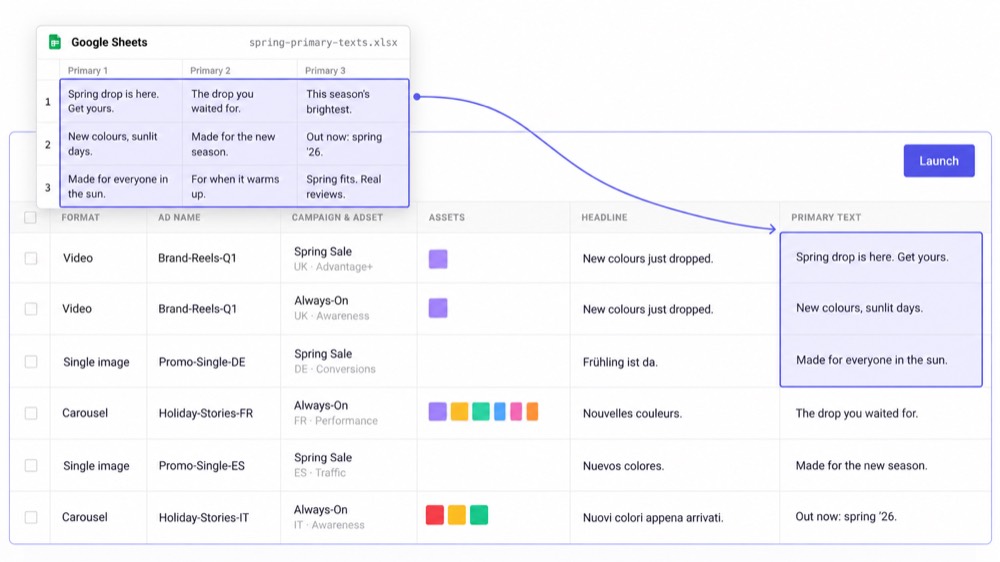
Kitchn's core workspace is a spreadsheet-like Launch Sheet. One row is one ad. Creative, copy, campaign and ad-set information sit in columns.
Your team can work across a large batch instead of creating every ad separately inside an ad manager.
- Import assets.
- Paste copy.
- Bulk edit the setup.
- Review the rows.
- Launch the batch, then move onto the next piece of work.
For paid social teams already planning campaigns in spreadsheets, the workflow feels much closer to the way the work is actually organised.
Why high-volume teams choose a focused launch workflow
At lower volumes, manual ad creation is annoying. At hundreds or thousands of ads a month, it becomes a capacity problem.
One customer example describes roughly 700 to 1,000 Meta ads per month as enough work to create what was effectively a full-time uploader role.
That's the problem Kitchn is designed to remove. Not by replacing the media buyer. By removing more of the repetitive execution sitting underneath them.
Kitchn.io vs Smartly.io
| Capability | Kitchn.io | Smartly.io |
|---|---|---|
| Best suited to | High-volume paid social operations | Broad enterprise advertising operations |
| Core workflow | Finished creative → reviewed → launched | Creative production → media management → optimisation |
| Spreadsheet-like bulk launching | ✓Core product workflow | Available through broader campaign tooling |
| Bulk ad creation | ✓Supported | ✓Supported |
| Work from existing account structures | ✓Supported | ✓Supported |
| Campaign creation from scratch | ✕Kitchn is primarily an ad-launch workflow | ✓Supported |
| Pre-launch validation | ✓Runs before the ad is created | ✓Supported |
| Row-level launch status | ✓Configurable per row | Different workflow model |
| Comments attached to launch rows | ✓Per row | Broader collaboration tooling |
| Shareable ad previews | ✓Read-only links | ✓Broader creative review workflows |
| Reusable ad templates | ✓Org-level, per platform | ✓Supported |
| Sheet-level defaults | ✓Set once per sheet | Different configuration model |
| Naming templates | ✓Per sheet and platform | ✓Supported |
| Copy launch workflow to another account or geo | ✓Copy a sheet and remap | Broader automation options |
| Non-blocking batch launches | ✓Leave the sheet while the batch sends | Broader campaign execution platform |
| Creative generation | ✕Not offered | ✓Supported |
| DCO | ✕Not offered | ✓Supported |
| Predictive optimisation | ✕Not offered | ✓Supported |
| Programmatic and CTV | ✕Not offered | ✓Supported |
| Creative reporting | ✓Meta, TikTok, Google Ads and Pinterest | ✓Supported |
| Focused paid social launch product | ✓This is the whole product | ✕Broader enterprise suite |
Kitchn starts where your creative team finishes
Smartly includes tools for creating and adapting creative. Kitchn doesn't try to replace your creative production stack. That is deliberate.
If your designers are already working in Figma, Adobe, Canva, Frame.io or another production workflow, Kitchn starts when those assets are ready to become ads.
That means your team doesn't have to migrate the entire creative-production process just to improve ad operations. Bring the finished assets into the Launch Sheet and move forward from there.
Work the way paid social teams already work
A lot of paid social operations already run through spreadsheets. The spreadsheet contains:
- Creative references
- Primary text
- Headlines
- URLs
- Tracking parameters
- Account information
- Testing variables
The inefficient part begins when somebody has to manually transfer that information into an ad platform. Kitchn reduces that gap.
Instead of treating the spreadsheet as a planning document and Ads Manager as a separate execution environment, the Launch Sheet turns the spreadsheet-style workflow into the launch workflow itself.
Structural QA directly inside the launch process
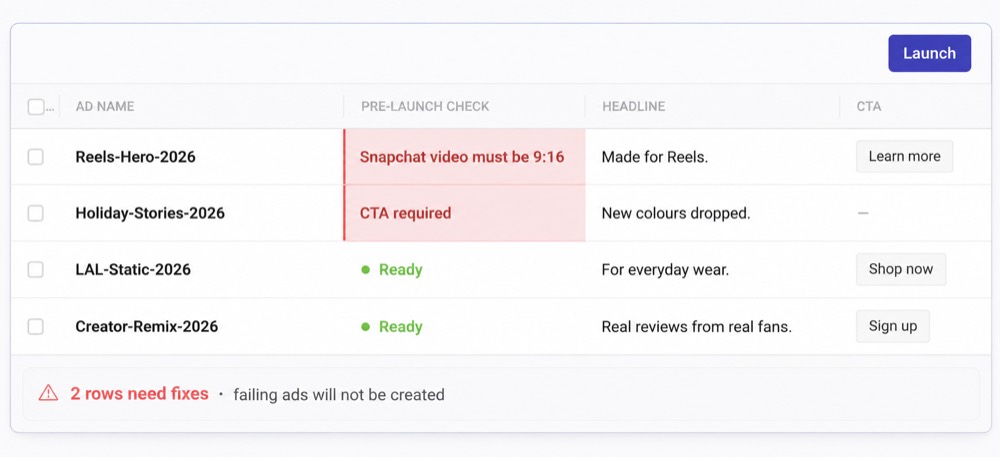
When launch volume increases, manual double-checking becomes another bottleneck. Kitchn validates launch rows before the ad is created. Supported validation includes things such as:
- Required fields
- Schema rules
- Length and pattern requirements
- URL formatting
- URL-parameter formatting
- Platform-specific creative specifications
- Supported Meta creative enhancement settings
If a row fails validation, it enters an error state rather than creating the ad.
Those checks cover the words as well as the setup. A typo or a phrase the client has ruled out is picked up in the same pass as a malformed URL, so both kinds of mistake stop in the same place.
Review hundreds of ads without sending everybody into Ads Manager
High-volume launches often need input from several people. Media buyers. Paid social leads. Creative teams. Clients or stakeholders.
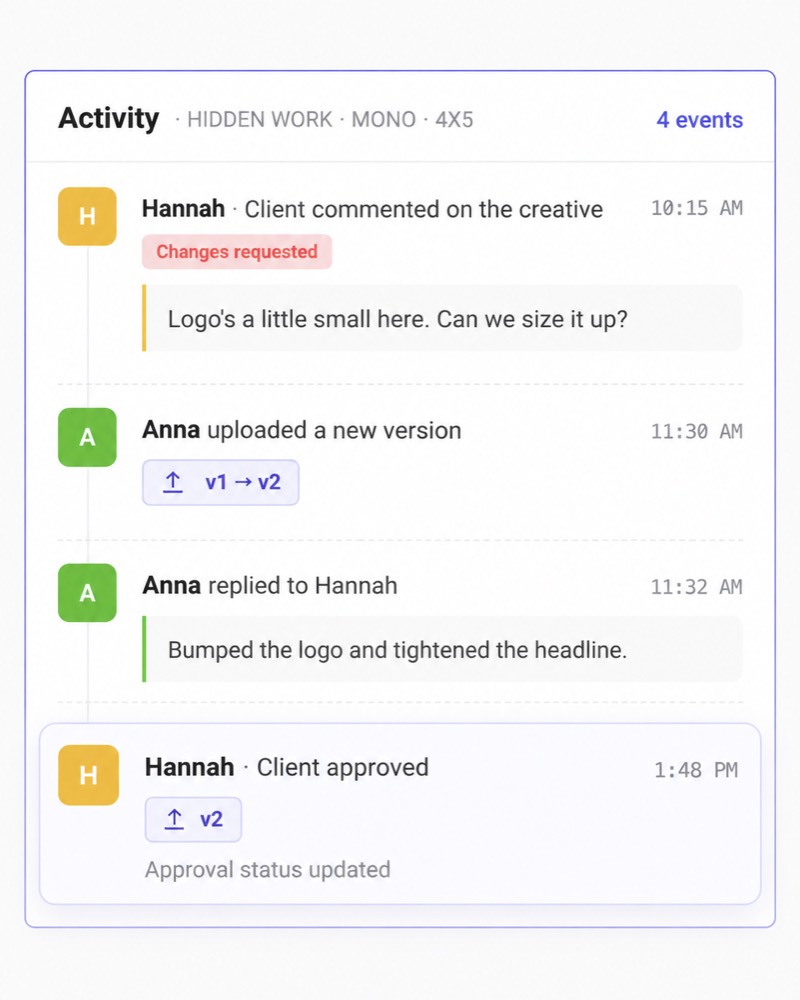
Kitchn keeps that review close to the launch itself with:
- Configurable statuses
- Row-level comments
- Ad previews
- Read-only sharing
That gives the team visibility into the exact ads being prepared rather than creating another approval workflow across Slack, spreadsheets and screenshots.
Approval status does not technically disable the Launch button. The operator still owns the final launch decision.
Standardise execution without overcomplicating it
At scale, speed is only half the problem. The other half is consistency. Kitchn supports reusable:
- Ad Templates
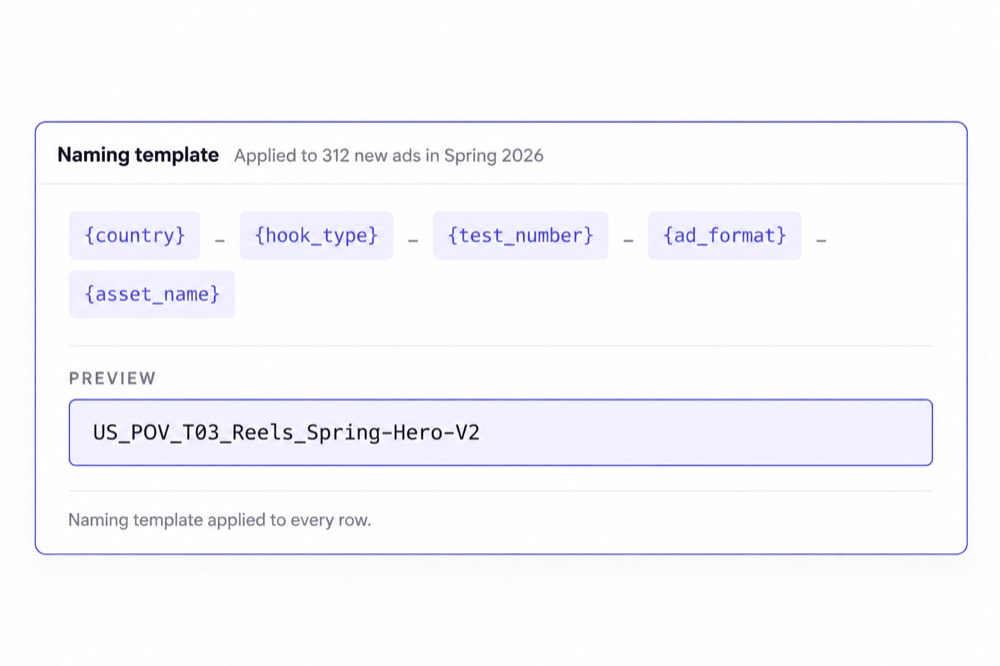
- Naming templates
- Sheet defaults
- Bulk actions
- Launch Sheets
That gives paid social leaders a way to create a more repeatable operating process across accounts and team members.
Kitchn doesn't pretend every standard is technically enforced. Naming templates can be applied but aren't hard-gated at launch. The point is to make the correct workflow easier to repeat.
Launch across accounts and markets without starting again
A successful launch often needs to be reproduced.
Another ad account.
Another brand.
Another geography.
Another market.
Starting the operational work again from zero creates unnecessary workload. Kitchn lets teams copy a Launch Sheet and remap it to the relevant account structure.
That makes multi-account and multi-geo workflows significantly easier to repeat without rebuilding the whole batch manually. For agencies and multi-brand teams, that is a much more common day-to-day problem than needing a new enterprise media-buying suite.
Keep media buyers moving while the batch launches
A batch launch shouldn't mean staring at a loading screen. Kitchn launches are non-blocking.
Once the batch has been sent, the media buyer can move away from the Launch Sheet and continue working while the advertising platform processes the ads.
At serious volume, the time saved isn't only the number of clicks removed. It's also the waiting removed between batches.
Kitchn supports the paid social channels high-volume teams use
Kitchn currently supports ad launching across eight channels.
| Meta (Facebook & Instagram) | Generally available |
| TikTok | Generally available |
| Google Demand Gen | Generally available |
| Generally available | |
| Snapchat | Generally available |
| Beta | |
| Spotify | Beta |
| AppLovin | Beta |
The exact functionality varies by platform. Kitchn does not pretend every channel has identical automation depth.
That matters because the goal is reliable execution, not a bigger checkbox table.
Where Smartly makes more sense
Smartly isn't a bad product. It's simply solving a larger problem.
You need creative production inside the platform
Smartly offers enterprise creative templating, adaptation and AI-powered production. Kitchn expects the creative to already exist.
If generating creative variations is one of your core requirements, Smartly has the stronger product.
You need DCO
Smartly supports dynamic creative and feed-driven personalisation. Kitchn does not.
You want software building campaign structures
Smartly can automate campaign, ad-set and ad creation. Kitchn primarily works with structures the media buyer already controls.
You need predictive media optimisation
Smartly goes considerably further into budget optimisation and media management. Kitchn is not an autonomous media-buying platform.
Paid social is only one part of your media stack
Smartly extends into areas such as programmatic and CTV. Kitchn stays focused on paid social operations.
If consolidating all those areas is the goal, Smartly's breadth is genuinely useful.
But broader doesn't automatically mean better
This is where the buying decision gets muddled. A platform can offer:
Creative generation.
DCO.
CTV.
Programmatic.
Predictive optimisation.
Media intelligence.
And still not be the best answer to:
If that's the problem, you don't necessarily need a larger advertising platform. You need a better launch workflow.
Kitchn is designed for paid social teams operating at real volume
Kitchn customers operate at volumes where launch efficiency materially affects team capacity.



The common thread is not that these teams needed more campaign optimisation software. They needed the work between creative production and launch to stop scaling linearly with output.
Which should you choose?
Choose Kitchn if…
- Your creative is already produced
- Your team launches hundreds or thousands of ads
- Media buyers spend too much time uploading and configuring ads
- Your workflows already involve spreadsheets
- You manage multiple accounts, brands or markets
- You want a more consistent launch process
- Pre-launch structural checks matter
- Client or stakeholder review happens before launch
- You want to increase team capacity without proportionally increasing ad-ops headcount
Choose Smartly if…
- You want to consolidate creative production and media buying
- DCO is important to your strategy
- Feed-driven creative production is central to the workflow
- You want automatic campaign construction
- Predictive budget optimisation matters more than launch efficiency
- You manage programmatic or CTV alongside social
- You need a broader enterprise advertising platform
Smartly is broader. Kitchn is more focused.
That's not a weakness. For paid social teams whose main operational problem is launching finished ads at scale, focus is the point.
Kitchn doesn't try to replace your creative team.
It doesn't try to become your DSP.
It doesn't try to autonomously optimise every media-buying decision.
It gives your team a better operating workflow for getting large volumes of ads prepared, reviewed and live.
If that's where your team is losing the hours,
compare the workflow rather than the feature count.
See how Kitchn fits your paid social operation
Walk through your team's workflows with us.
See how Kitchn works →