
Eine fokussierte Smartly-Alternative für Paid-Social-Teams mit hohem Volumen
Smartly ist dafür gebaut, einen breiten Enterprise-Werbe-Stack zu steuern. Kitchn löst ein konkreteres Problem: Hunderte oder Tausende Paid-Social-Anzeigen vorzubereiten, zu prüfen und live zu bringen, ohne dass Ad Operations zu einem Vollzeitjob fürs Hochladen werden.
Kitchn setzt ein, wenn das Creative fertig ist, und hört auf, wenn die Anzeigen live sind. Smartly deckt deutlich mehr vom Stack ab.
Wenn dein Team DCO, Enterprise-Creative-Produktion, Programmatic Media und prädiktive Optimierung in einer Plattform braucht, kann Smartly sinnvoll sein.
Wenn dein Creative schon existiert und deine Media Buyer zu viel Zeit damit verbringen, es in die Werbekonten zu bringen, ist Kitchn die fokussiertere Wahl.
Kitchn vs Smartly: Was passt besser?
| Dein Team muss … | Passt besser |
|---|---|
| Hunderte oder Tausende fertige Anzeigen effizient launchen | Kitchn |
| Repetitive Arbeit für Media Buyer reduzieren | Kitchn |
| Mit Launch-Workflows im Tabellenformat arbeiten | Kitchn |
| Standardisieren, wie Anzeigen über Teams und Konten vorbereitet werden | Kitchn |
| Das strukturelle Setup prüfen, bevor Anzeigen erstellt werden | Kitchn |
| Launches mit hohem Volumen mit Kunden oder Teammitgliedern prüfen | Kitchn |
| Launch-Workflows auf andere Konten oder Märkte kopieren | Kitchn |
| Auf allen Paid-Social-Plattformen launchen, die Kitchn unterstützt | Kitchn |
| Große Mengen an Creative-Varianten aus Templates erzeugen | Smartly |
| DCO und feed-basierte Creative-Personalisierung nutzen | Smartly |
| Kampagnenstrukturen automatisch aus Feeds bauen | Smartly |
| Programmatic oder CTV neben Social steuern | Smartly |
| Prädiktive Budgetoptimierung fahren | Smartly |
Der Unterschied ist der Fokus.
Smartly versucht, viel mehr vom Werbe-Stack abzudecken. Kitchn geht tiefer in den operativen Workflow zwischen fertigem Creative und Live-Anzeige.
Wenn dein Engpass das Launchen ist, ist Smartly vielleicht mehr Plattform, als du brauchst
Die meisten Paid-Social-Teams mit hohem Volumen haben kein Problem damit, noch ein Dashboard zu erstellen. Ihr Problem ist, die Arbeit erledigt zu bekommen.
Das Creative ist schon fertig.
Die Texte sind schon geschrieben.
Der Media Buyer weiß schon, wohin die Anzeigen müssen.
Aber irgendwer muss trotzdem:
- Die Assets herunterladen
- Texte zwischen Spreadsheets und Ad Managern hin- und herkopieren
- Die Anzeigen konfigurieren
- URLs und Tracking setzen
- Das Setup prüfen
- Vorschauen verschicken
- Feedback einarbeiten
- Den Prozess über Hunderte Anzeigen wiederholen
Genau um diesen Workflow ist Kitchn gebaut. Smartly deckt viel mehr Bereiche der Werbung ab, aber wenn diese zusätzlichen Bereiche nicht dein Engpass sind, macht die Breite den täglichen Launch-Prozess nicht nützlicher.
Kitchn ist um das Launch Sheet gebaut
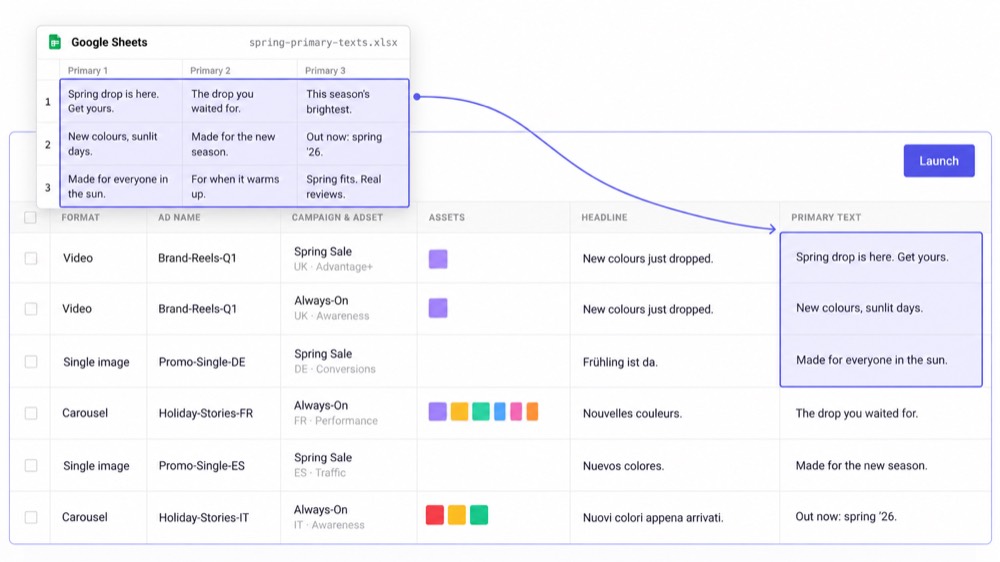
Der zentrale Arbeitsbereich von Kitchn ist ein Launch Sheet im Tabellenformat. Eine Zeile ist eine Anzeige. Creative, Texte sowie Kampagnen- und Anzeigengruppen-Infos stehen in Spalten.
Dein Team arbeitet einen ganzen Batch ab, statt jede Anzeige einzeln im Ad Manager anzulegen.
- Assets importieren.
- Texte einfügen.
- Das Setup in Bulk bearbeiten.
- Die Zeilen prüfen.
- Den Batch launchen und mit der nächsten Aufgabe weitermachen.
Für Paid-Social-Teams, die Kampagnen ohnehin in Spreadsheets planen, fühlt sich der Workflow viel näher an der Art an, wie die Arbeit tatsächlich organisiert ist.
Warum Teams mit hohem Volumen einen fokussierten Launch-Workflow wählen
Bei geringem Volumen ist manuelles Anlegen von Anzeigen lästig. Bei Hunderten oder Tausenden Anzeigen im Monat wird es zum Kapazitätsproblem.
Ein Kundenbeispiel beschreibt rund 700 bis 1.000 Meta-Anzeigen pro Monat als so viel Arbeit, dass daraus praktisch eine Vollzeitstelle nur fürs Hochladen wurde.
Genau dieses Problem soll Kitchn beseitigen. Nicht, indem es den Media Buyer ersetzt. Sondern indem es mehr von der repetitiven Umsetzung unter ihm wegnimmt.
Kitchn.io vs Smartly.io
| Funktion | Kitchn.io | Smartly.io |
|---|---|---|
| Am besten geeignet für | Paid-Social-Operations mit hohem Volumen | Breite Enterprise-Werbe-Operations |
| Kern-Workflow | Fertiges Creative → geprüft → gelauncht | Creative-Produktion → Media-Management → Optimierung |
| Bulk-Launching im Tabellenformat | ✓Zentraler Produkt-Workflow | Über breitere Kampagnen-Tools verfügbar |
| Bulk-Erstellung von Anzeigen | ✓Unterstützt | ✓Unterstützt |
| Arbeit mit bestehenden Kontostrukturen | ✓Unterstützt | ✓Unterstützt |
| Kampagnen von Grund auf erstellen | ✕Kitchn ist in erster Linie ein Workflow zum Launchen von Anzeigen | ✓Unterstützt |
| Validierung vor dem Launch | ✓Läuft, bevor die Anzeige erstellt wird | ✓Unterstützt |
| Launch-Status pro Zeile | ✓Pro Zeile konfigurierbar | Anderes Workflow-Modell |
| Kommentare an Launch-Zeilen | ✓Pro Zeile | Breitere Collaboration-Tools |
| Teilbare Anzeigenvorschauen | ✓Links mit Lesezugriff | ✓Breitere Creative-Review-Workflows |
| Wiederverwendbare Ad Templates | ✓Auf Organisationsebene, pro Plattform | ✓Unterstützt |
| Defaults auf Sheet-Ebene | ✓Einmal pro Sheet festgelegt | Anderes Konfigurationsmodell |
| Namenstemplates | ✓Pro Sheet und Plattform | ✓Unterstützt |
| Launch-Workflow auf ein anderes Konto oder Land kopieren | ✓Sheet kopieren und neu zuordnen | Breitere Automatisierungsoptionen |
| Nicht blockierende Batch-Launches | ✓Das Sheet verlassen, während der Batch gesendet wird | Breitere Plattform für die Kampagnenumsetzung |
| Creative-Generierung | ✕Nicht angeboten | ✓Unterstützt |
| DCO | ✕Nicht angeboten | ✓Unterstützt |
| Prädiktive Optimierung | ✕Nicht angeboten | ✓Unterstützt |
| Programmatic und CTV | ✕Nicht angeboten | ✓Unterstützt |
| Creative Reporting | ✓Meta, TikTok, Google Ads und Pinterest | ✓Unterstützt |
| Fokussiertes Produkt für Paid-Social-Launches | ✓Das ist das ganze Produkt | ✕Breitere Enterprise-Suite |
Kitchn setzt dort an, wo dein Creative-Team aufhört
Smartly enthält Tools zum Erstellen und Anpassen von Creatives. Kitchn versucht nicht, deinen Creative-Produktions-Stack zu ersetzen. Das ist Absicht.
Wenn deine Designer schon in Figma, Adobe, Canva, Frame.io oder einem anderen Produktions-Workflow arbeiten, setzt Kitchn ein, sobald diese Assets bereit sind, Anzeigen zu werden.
Dein Team muss also nicht den gesamten Creative-Produktionsprozess umziehen, nur um die Ad Operations zu verbessern. Hol die fertigen Assets ins Launch Sheet und mach von dort aus weiter.
Arbeite so, wie Paid-Social-Teams ohnehin arbeiten
Viele Paid-Social-Operations laufen schon über Spreadsheets. Das Spreadsheet enthält:
- Creative-Referenzen
- Primärtext
- Headlines
- URLs
- Tracking-Parameter
- Kontoinformationen
- Testvariablen
Der ineffiziente Teil beginnt, wenn jemand diese Informationen von Hand in eine Werbeplattform übertragen muss. Kitchn verkleinert diese Lücke.
Statt das Spreadsheet als Planungsdokument und den Ads Manager als getrennte Umgebung für die Umsetzung zu behandeln, macht das Launch Sheet den Spreadsheet-Workflow selbst zum Launch-Workflow.
Strukturelle QA direkt im Launch-Prozess
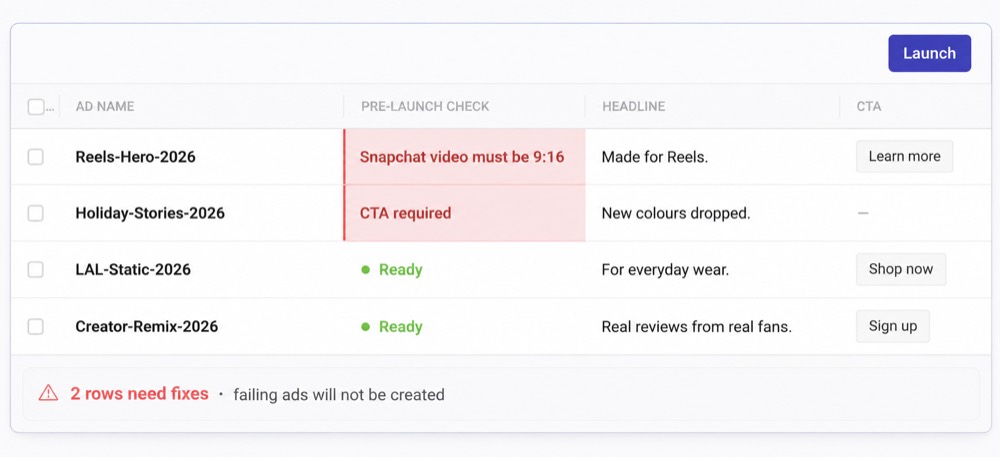
Wenn das Launch-Volumen steigt, wird manuelles Doppelprüfen zum nächsten Engpass. Kitchn validiert Launch-Zeilen, bevor die Anzeige erstellt wird. Zur unterstützten Validierung gehören zum Beispiel:
- Pflichtfelder
- Schema-Regeln
- Vorgaben zu Länge und Muster
- URL-Formatierung
- Formatierung der URL-Parameter
- Plattformspezifische Creative-Specs
- Unterstützte Einstellungen für Metas Creative Enhancements
Besteht eine Zeile die Validierung nicht, geht sie in einen Fehlerstatus, statt die Anzeige zu erstellen.
Diese Checks decken die Texte genauso ab wie das Setup. Ein Tippfehler oder eine Formulierung, die der Kunde ausgeschlossen hat, wird im selben Durchgang gefunden wie eine fehlerhafte URL. Beide Arten von Fehlern stoppen also an derselben Stelle.
Hunderte Anzeigen prüfen, ohne alle in den Ads Manager zu schicken
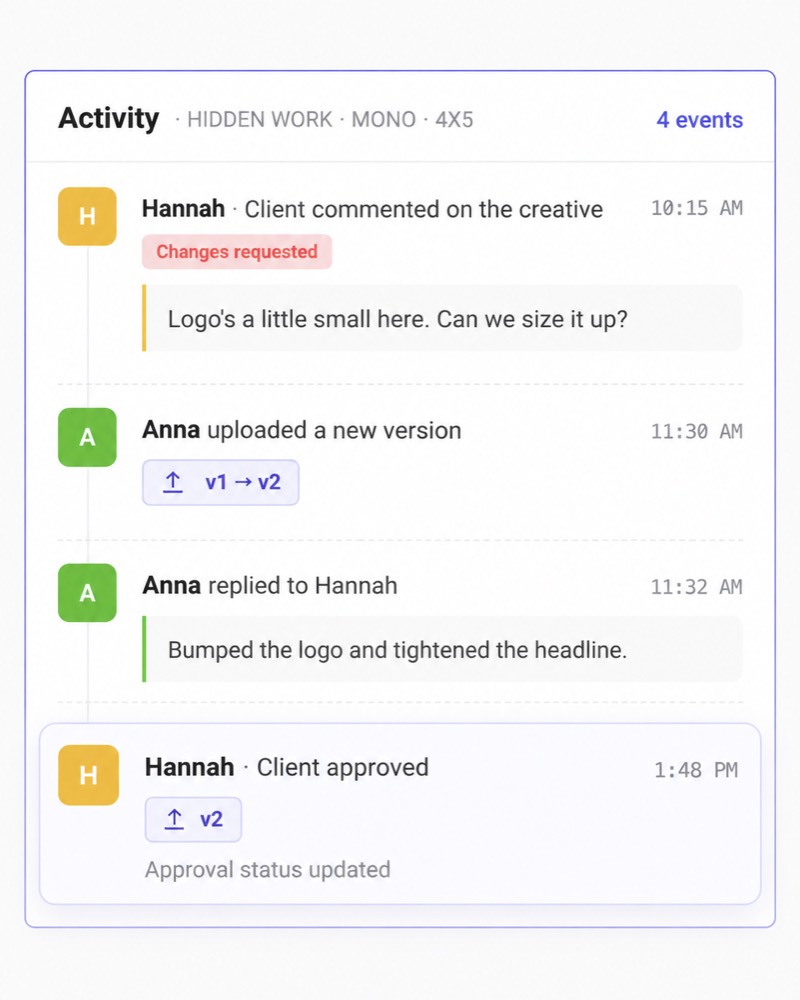
Launches mit hohem Volumen brauchen oft den Input mehrerer Leute. Media Buyer. Paid-Social-Leads. Creative-Teams. Kunden oder Stakeholder.
Kitchn hält dieses Review nah am Launch selbst, mit:
- Konfigurierbaren Status
- Kommentaren auf Zeilenebene
- Anzeigenvorschauen
- Teilen mit Lesezugriff
So sieht das Team genau die Anzeigen, die gerade vorbereitet werden, statt einen weiteren Freigabe-Workflow über Slack, Spreadsheets und Screenshots aufzubauen.
Der Freigabestatus deaktiviert den Launch-Button technisch nicht. Die finale Launch-Entscheidung bleibt bei der Person, die den Launch fährt.
Die Umsetzung standardisieren, ohne sie zu verkomplizieren
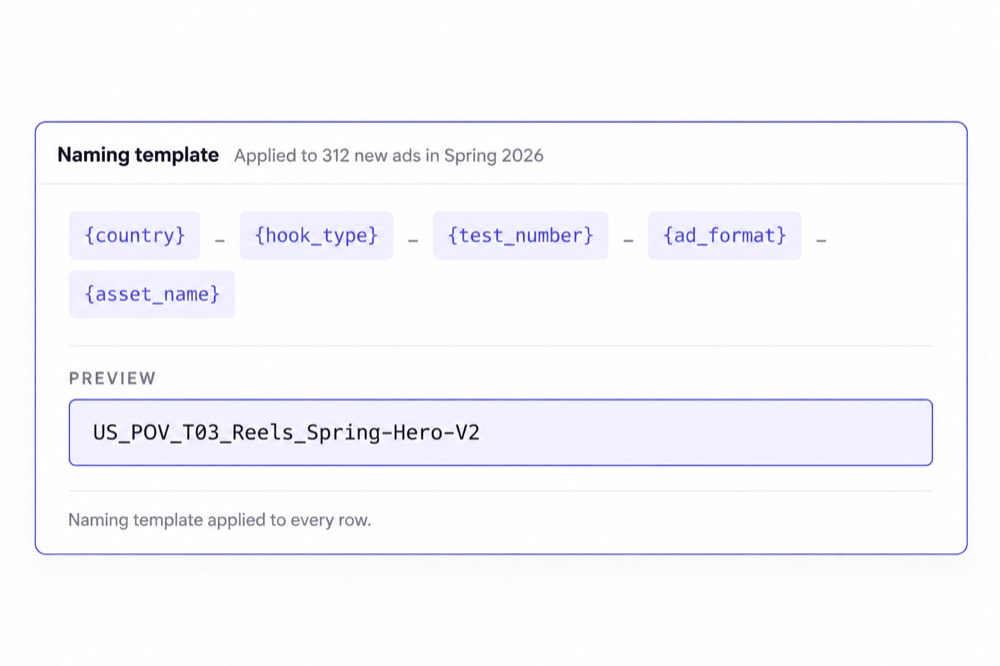
Im großen Stil ist Tempo nur die Hälfte des Problems. Die andere Hälfte ist Einheitlichkeit. Kitchn unterstützt wiederverwendbare:
- Ad Templates
- Namenstemplates
- Sheet-Defaults
- Bulk-Aktionen
- Launch Sheets
So schaffen Paid-Social-Leads einen wiederholbareren Arbeitsprozess über Konten und Teammitglieder hinweg.
Kitchn tut nicht so, als würde jeder Standard technisch erzwungen. Namenstemplates lassen sich anwenden, blockieren den Launch aber nicht. Es geht darum, den richtigen Workflow leichter wiederholbar zu machen.
Über Konten und Märkte launchen, ohne von vorn anzufangen
Ein erfolgreicher Launch muss oft wiederholt werden.
Ein anderes Werbekonto.
Eine andere Marke.
Ein anderes Land.
Ein anderer Markt.
Die operative Arbeit jedes Mal bei null zu beginnen, erzeugt unnötige Arbeitslast. Mit Kitchn kopieren Teams ein Launch Sheet und ordnen es der passenden Kontostruktur neu zu.
Workflows über mehrere Konten und Länder lassen sich so deutlich leichter wiederholen, ohne den ganzen Batch von Hand neu zu bauen. Für Agenturen und Teams mit mehreren Marken ist das im Alltag ein viel häufigeres Problem als der Bedarf an einer neuen Enterprise-Media-Buying-Suite.
Media Buyer arbeiten weiter, während der Batch launcht
Ein Batch-Launch sollte nicht bedeuten, auf einen Ladebildschirm zu starren. Launches in Kitchn blockieren nicht.
Sobald der Batch gesendet ist, kann der Media Buyer das Launch Sheet verlassen und weiterarbeiten, während die Werbeplattform die Anzeigen verarbeitet.
Bei ernsthaftem Volumen besteht die gesparte Zeit nicht nur aus weggefallenen Klicks. Es fällt auch das Warten zwischen den Batches weg.
Kitchn unterstützt die Paid-Social-Kanäle, die Teams mit hohem Volumen nutzen
Kitchn unterstützt das Launchen von Anzeigen derzeit auf acht Kanälen.
| Meta (Facebook & Instagram) | Allgemein verfügbar |
| TikTok | Allgemein verfügbar |
| Google Demand Gen | Allgemein verfügbar |
| Allgemein verfügbar | |
| Snapchat | Allgemein verfügbar |
| Beta | |
| Spotify | Beta |
| AppLovin | Beta |
Der genaue Funktionsumfang unterscheidet sich je nach Plattform. Kitchn tut nicht so, als hätte jeder Kanal dieselbe Automatisierungstiefe.
Das ist wichtig, denn das Ziel ist eine verlässliche Umsetzung, keine größere Tabelle mit Häkchen.
Wo Smartly mehr Sinn ergibt
Smartly ist kein schlechtes Produkt. Es löst einfach ein größeres Problem.
Du brauchst Creative-Produktion in der Plattform
Smartly bietet Enterprise-Creative-Templates, Anpassung und KI-gestützte Produktion. Kitchn setzt voraus, dass das Creative schon existiert.
Wenn das Erzeugen von Creative-Varianten zu deinen Kernanforderungen gehört, hat Smartly das stärkere Produkt.
Du brauchst DCO
Smartly unterstützt dynamische Creatives und feed-basierte Personalisierung. Kitchn nicht.
Die Software soll Kampagnenstrukturen bauen
Smartly kann das Erstellen von Kampagnen, Anzeigengruppen und Anzeigen automatisieren. Kitchn arbeitet in erster Linie mit Strukturen, die der Media Buyer schon kontrolliert.
Du brauchst prädiktive Media-Optimierung
Smartly geht bei Budgetoptimierung und Media-Management deutlich weiter. Kitchn ist keine autonome Media-Buying-Plattform.
Paid Social ist nur ein Teil deines Media-Stacks
Smartly reicht bis in Bereiche wie Programmatic und CTV. Kitchn bleibt auf Paid-Social-Operations fokussiert.
Wenn es darum geht, all diese Bereiche zu bündeln, ist die Breite von Smartly wirklich nützlich.
Aber breiter heißt nicht automatisch besser
Hier gerät die Kaufentscheidung durcheinander. Eine Plattform kann Folgendes bieten:
Creative-Generierung.
DCO.
CTV.
Programmatic.
Prädiktive Optimierung.
Media Intelligence.
Und trotzdem nicht die beste Antwort sein auf:
Wenn das das Problem ist, brauchst du nicht unbedingt eine größere Werbeplattform. Du brauchst einen besseren Launch-Workflow.
Kitchn ist für Paid-Social-Teams mit echtem Volumen gebaut
Kitchn-Kunden arbeiten mit Volumen, bei denen die Effizienz beim Launchen die Kapazität des Teams spürbar bestimmt.



Der gemeinsame Nenner ist nicht, dass diese Teams mehr Software zur Kampagnenoptimierung brauchten. Sie brauchten eine Arbeit zwischen Creative-Produktion und Launch, die nicht mehr linear mit dem Output wächst.
Was solltest du wählen?
Wähle Kitchn, wenn …
- dein Creative schon produziert ist
- dein Team Hunderte oder Tausende Anzeigen launcht
- Media Buyer zu viel Zeit mit Hochladen und Konfigurieren verbringen
- deine Workflows ohnehin über Spreadsheets laufen
- du mehrere Konten, Marken oder Märkte betreust
- du einen einheitlicheren Launch-Prozess willst
- strukturelle Checks vor dem Launch wichtig sind
- Kunden oder Stakeholder vor dem Launch prüfen
- du die Kapazität des Teams steigern willst, ohne das Ad-Ops-Personal im gleichen Maß aufzustocken
Wähle Smartly, wenn …
- du Creative-Produktion und Media Buying bündeln willst
- DCO für deine Strategie wichtig ist
- feed-basierte Creative-Produktion im Zentrum des Workflows steht
- du automatischen Kampagnenaufbau willst
- prädiktive Budgetoptimierung wichtiger ist als effizientes Launchen
- du Programmatic oder CTV neben Social steuerst
- du eine breitere Enterprise-Werbeplattform brauchst
Smartly ist breiter. Kitchn ist fokussierter.
Das ist keine Schwäche. Für Paid-Social-Teams, deren operatives Hauptproblem das Launchen fertiger Anzeigen im großen Stil ist, ist Fokus genau der Punkt.
Kitchn versucht nicht, dein Creative-Team zu ersetzen.
Es versucht nicht, deine DSP zu werden.
Es versucht nicht, jede Media-Buying-Entscheidung autonom zu optimieren.
Es gibt deinem Team einen besseren Arbeits-Workflow, um große Mengen an Anzeigen vorzubereiten, zu prüfen und live zu bringen.
Wenn dein Team genau dort die Stunden verliert,
vergleiche den Workflow, nicht die Zahl der Features.
So passt Kitchn zu deiner Paid-Social-Operation
Geh mit uns die Workflows deines Teams durch.
So funktioniert Kitchn →