
Outgrown AdEspresso? Build a paid social workflow your whole team can run
AdEspresso makes creating, testing and managing Facebook and Instagram campaigns easier. Kitchn solves a different stage of the problem: turning finished creative, copy and existing account structures into reviewed, validated and launched ads across multiple channels.
Creating, split testing, optimising and reporting on Facebook and Instagram campaigns through a guided interface.
When execution stops being a task and becomes a bottleneck
A structured launch workflow across multiple buyers, accounts, clients, markets and batches, on eight channels.
If you want an accessible tool for Meta campaign creation, split testing, optimisation and client reporting, AdEspresso remains a strong fit.
If paid social has become an operational process involving multiple buyers, accounts, clients, markets and launch batches, Kitchn is built for that next layer.
Kitchn vs AdEspresso: which fits the way you work?
| If you need to… | Better fit |
|---|---|
| Create Facebook and Instagram campaigns through a guided interface | AdEspresso |
| Automatically build split-test combinations | AdEspresso |
| Require client approval before a Meta campaign publishes | AdEspresso |
| Produce white-label PDF client reports | AdEspresso |
| Get started at a much lower monthly price | AdEspresso |
| Run launches from a spreadsheet-like operating workflow | Kitchn |
| Prepare and edit large batches as rows | Kitchn |
| Launch across Meta, TikTok, Pinterest, Snapchat and Google Demand Gen | Kitchn |
| Validate structural setup before an ad is created | Kitchn |
| Keep comments, status and previews attached to individual launch rows | Kitchn |
| Standardise recurring launch setup across a team | Kitchn |
| Reuse a launch across another account or market | Kitchn |
Neither product wins every row. They are built around different versions of the paid social problem.
AdEspresso makes campaigns easier. Kitchn makes operations repeatable.
This is the cleanest distinction between the two.
AdEspresso
AdEspresso is built around creating, testing, optimising and reporting on advertising campaigns. Its campaign creation workflow helps teams build Facebook and Instagram campaigns without working directly inside Ads Manager.
Grid Composer adds spreadsheet-driven bulk creation for use cases such as multi-location campaigns. Its split-testing tools generate combinations across creative and audience variables.
After launch, optimisation rules and reporting help teams manage performance.
Kitchn
Kitchn is built around the operational workflow of getting finished ads live. The creative can already exist. The copy can already be approved. The media buyer can already know which campaign and ad set it belongs in.
Kitchn gives the team a Launch Sheet to turn all of that into live ads without rebuilding every ad one at a time. One row is one ad.
- Import the assets.
- Paste the copy.
- Apply the setup.
- Bulk edit the batch.
- Review it.
- Launch it, then reuse the process when the next batch arrives.
Kitchn.io vs AdEspresso at a glance
| Capability | Kitchn.io | AdEspresso |
|---|---|---|
| Primary workflow | Paid social launch operations | Campaign creation, testing and optimisation |
| Spreadsheet-style bulk creation | ✓Core Launch Sheet workflow | ✓Grid Composer |
| Bulk editing before launch | ✓Across any selection of rows | ✓Within campaign workflows |
| Build campaign structures from scratch | ✕Primarily works with existing structures | ✓Supported |
| Automatic split-test combinations | ✕Not offered | ✓Supported |
| Multi-channel ad launching | ✓8 channels, 3 beta | Creation pages focus on Facebook and Instagram; Google Ads documented elsewhere |
| Pre-launch validation | ✓Runs before the ad is created | ✕No equivalent validation layer documented |
| Platform-spec checks before creation | ✓Per channel | ✕No equivalent workflow documented |
| Meta creative-enhancement controls | ✓Forced opt-out at launch | ✕No equivalent launch control documented |
| Approval workflow | ✓Statuses, comments and previews | ✓Campaign approval workflow |
| Mandatory approval before publishing | ✕Status does not gate Launch | ✓On eligible plans |
| Row-level comments | ✓Per row | Campaign-level feedback workflow |
| No-login review links | ✓Supported | ✓Supported |
| Naming templates | ✓Per sheet and platform | ✕No equivalent launch naming-template workflow documented |
| Reusable setup | ✓Ad Templates and sheet defaults | Saved creative, targeting and campaign assets |
| Automatic optimisation rules | ✓Narrower Meta and TikTok operational rules | ✓A major AdEspresso capability |
| Built-in split-test reporting | ✕No dedicated split-test report | ✓Supported |
| Creative reporting | ✓Meta, TikTok, Google Ads, Pinterest | Strong Meta campaign analytics and reporting |
| PDF reports | ✕Not available | ✓Supported |
| White-label reporting | ✕Not available | ✓Depending on plan |
| Scheduled report delivery | ✕Not available | ✓Supported |
| Pricing entry point | From €499/month | From $49/month |
The biggest difference is what happens before launch
Both products can create ads in bulk. That alone isn't a useful comparison. The question is how the rest of the launch is operated around them.
Kitchn treats the whole batch as an operational workspace. Creative, copy, destinations, account structure and setup live in rows. That lets the media buyer work across the launch as a set rather than repeatedly stepping through a campaign builder.
For teams where the real work already starts in Excel or Google Sheets, that matters.
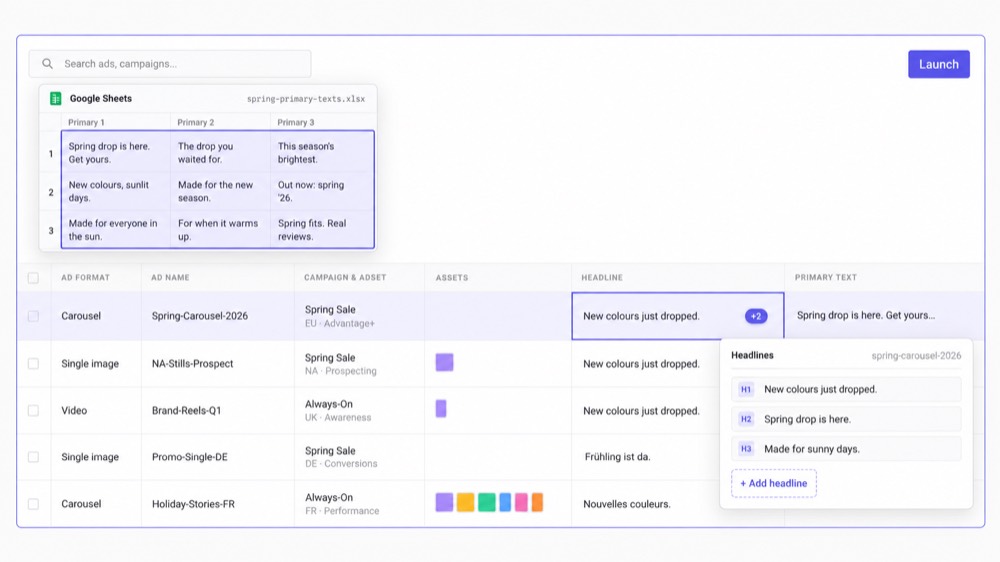
Work directly from the spreadsheet-style process your team already uses
Paid social teams frequently organise launches outside the ad platform first. Creative has filenames. Copy lives in rows. URLs and UTMs sit in columns. Testing variants are already mapped. Account information has already been decided.
With Kitchn, that structure can move directly into the Launch Sheet. You can paste:
- A single cell
- A full column
- A spreadsheet-style matrix
Then work across the imported rows. You don't need to recreate the planning structure inside another campaign wizard before you can execute it.
Bring the assets into the same workflow
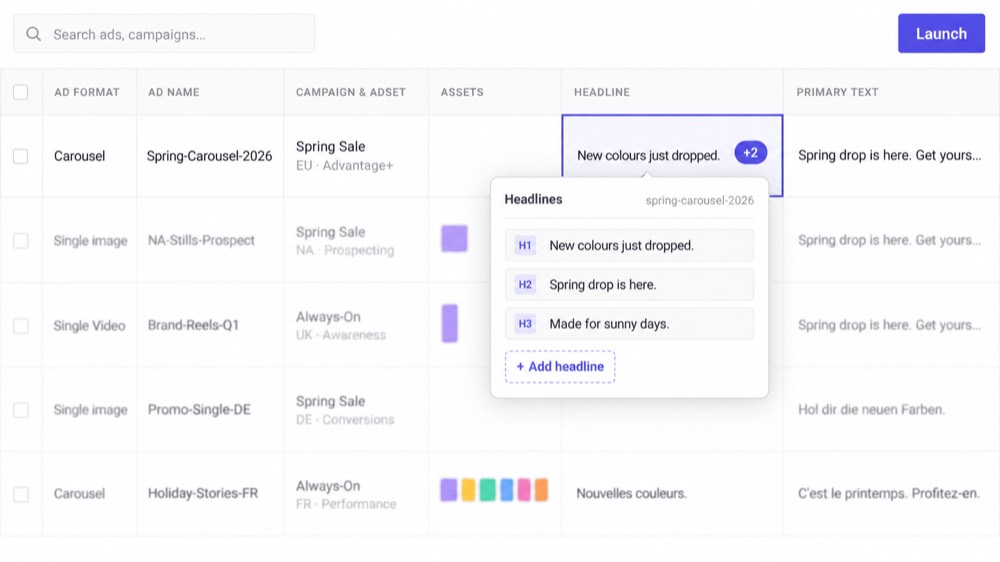
Bulk launching gets much less efficient when half of the job is finding and downloading creative. Kitchn can import finished assets from sources including:
- Google Drive
- Dropbox
- Frame.io
- SharePoint
- iconik
- Native upload
- URL
Assets can also be grouped using filename tokens so related formats can be brought together during bulk import.
The designer finishes the asset. The media buyer shouldn't then spend the afternoon becoming a file-transfer operator.
Validate the launch before the ads are created
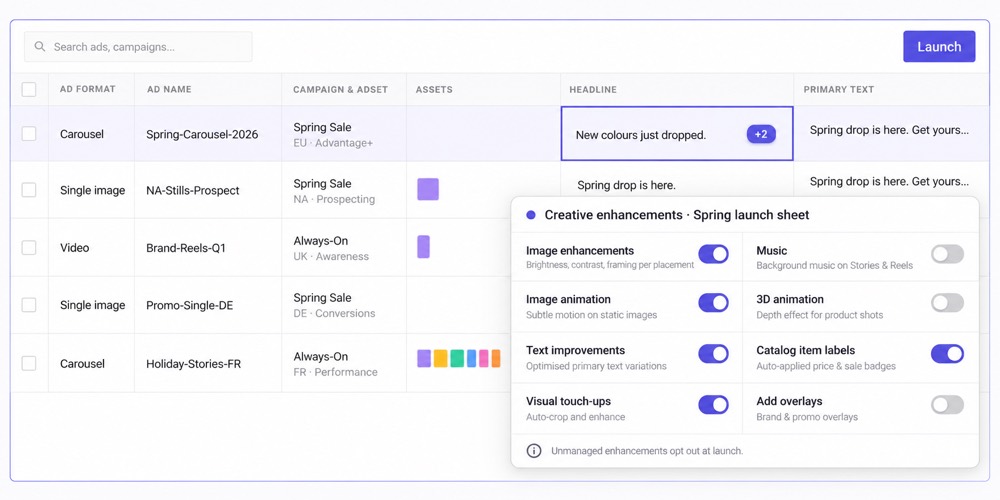
This is one of the clearest differences. Kitchn validates each row before creating the ad. Checks include supported:
- Required fields
- Schema requirements
- Length and pattern rules
- URL formatting
- URL-parameter formatting
- Platform-specific specifications
- Meta creative enhancement settings
If a row fails validation, it enters an error state and the ad isn't created. Kitchn also forces unmanaged Meta creative-enhancement settings to opt out, covering more than 80 enhancement keys at last count.
That matters for teams where preventing setup mistakes is more valuable than finding them after publication.
What Kitchn checks on every row
The spelling.
The wording the client has approved.
The setup, the URLs and the platform specs.
So a misspelt product name stops the batch the same way a broken tracking URL does, and the ads wait until somebody fixes it.
AdEspresso has the stronger hard-approval workflow
This is one area where AdEspresso deserves the win.
AdEspresso's Campaign Approvals allow teams to send the campaign to a client or stakeholder for review. Depending on the subscription, approval can be made mandatory before publication. Reviewers can inspect targeting, budget, scheduling and creative, then approve or reject the campaign.
Kitchn works differently. Each launch row can have configurable approval statuses, comments, public ad previews and read-only sharing. That makes Kitchn useful when review needs to happen across a large batch of individual ads. But Kitchn approval status does not technically stop somebody pressing Launch.
It provides visibility and collaboration around the launch. It is not a hard approval gate. If mandatory client sign-off enforced by the software is essential, AdEspresso has the stronger implementation.
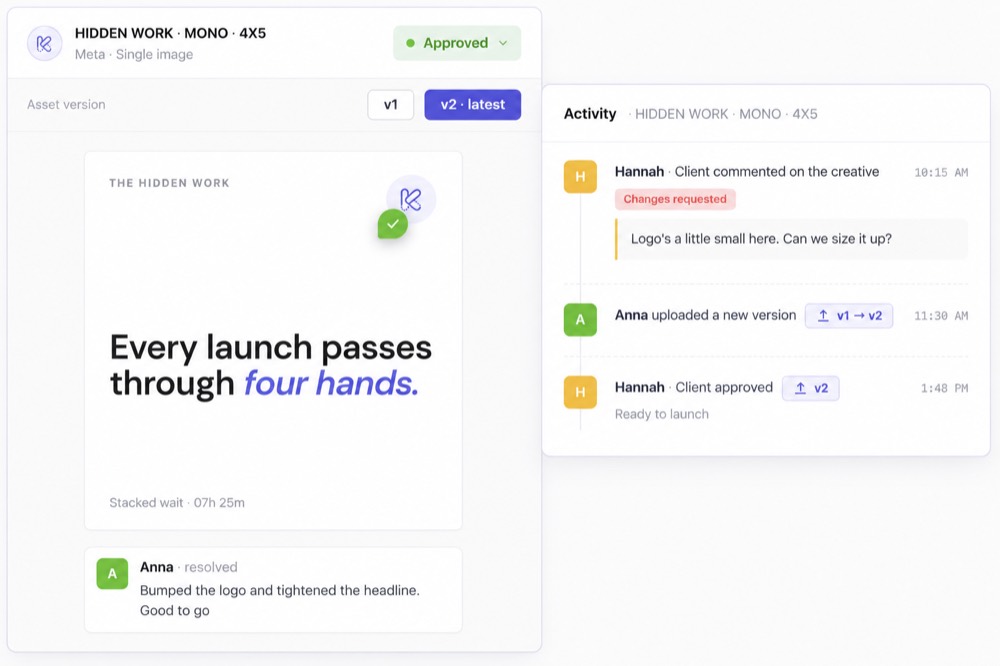
Kitchn keeps review attached to the ads being launched
Where Kitchn becomes useful is when approval isn't one campaign with five ads. It's a sheet with dozens or hundreds of rows.
A reviewer can see the actual ad preview. Comments sit on the relevant row. Status sits on the relevant row. Changes can be traced back through row history.
That makes the review workflow granular enough for teams operating larger creative pipelines. Instead of spreadsheet, screenshots, Slack, approval email and Ads Manager, more of the launch context remains attached to the work itself.
Make recurring setup easier to repeat
A team shouldn't have to rely on every media buyer remembering the account setup from last time. Kitchn gives teams several ways to make recurring launch work repeatable.
- Sheet defaults set common values at sheet level and apply them across the rows
- Ad Templates save reusable ad attributes and deliberately apply them to selected ads
- Naming templates generate names around the conventions the organisation uses
Naming is applied, not hard-enforced. A buyer can manually override it.
That's an important distinction. The goal isn't to pretend software can make every person follow an SOP. It's to make the correct setup easier and faster to repeat.
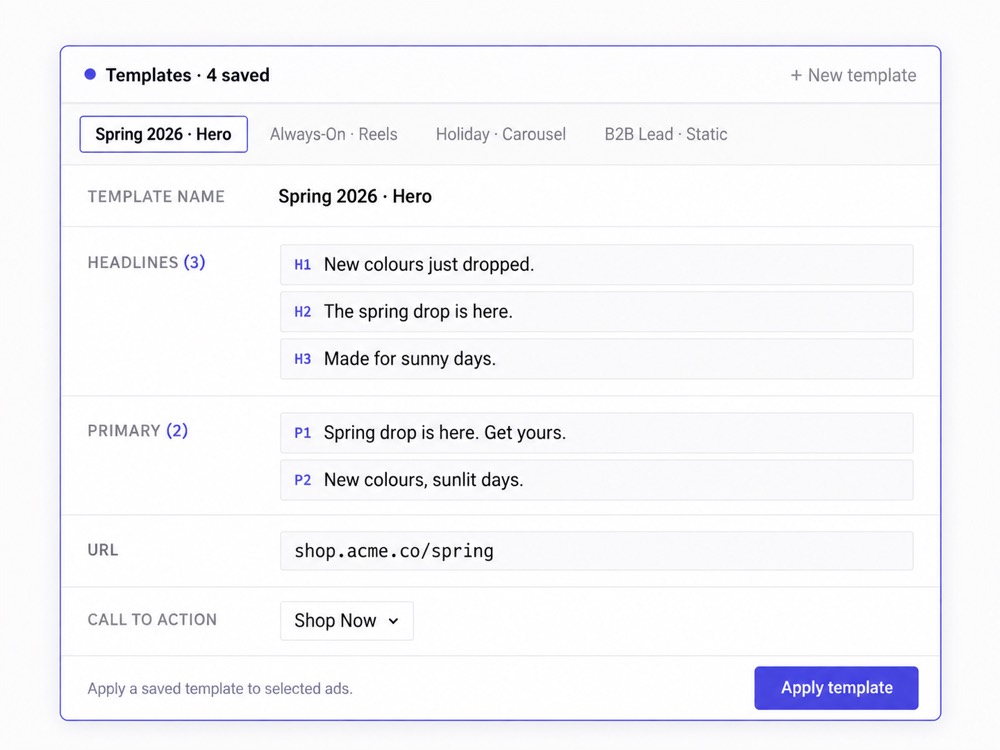
Reuse a launch across accounts and markets
This is where a paid social workflow starts looking less like a campaign builder and more like operations.
A launch works in one market.
Now it needs to go into another.
Or another ad account.
Or another geography.
Kitchn lets the team copy the Launch Sheet into another context and remap the relevant ad sets. The existing launch becomes the starting point.
For agencies, multi-brand teams and international paid social operations, that multiplication adds up quickly.
Eight launch channels instead of a Meta-first workflow
Kitchn currently supports launching ads across eight channels.
| Meta (Facebook & Instagram) | Generally available |
| TikTok | Generally available |
| Google Ads (Demand Gen) | Generally available |
| Generally available | |
| Snapchat | Generally available |
| Beta | |
| Spotify | Beta |
| AppLovin | Beta |
The functionality is not identical across every platform, and Kitchn does not pretend it is. Google Demand Gen, for example, launches ads paused into existing ad groups rather than creating the campaign itself.
The value is having the paid social launch workflow extend beyond Facebook and Instagram as your channel mix expands.
Where AdEspresso is stronger
AdEspresso still makes more sense for several very legitimate use cases.
You want campaign creation from scratch
AdEspresso is a campaign creation product. It guides users through targeting, budget, creative and campaign setup.
Kitchn generally assumes the campaign structure already exists and concentrates on getting ads into it efficiently. If building campaigns is the job you want the software to simplify, AdEspresso has the more complete workflow.
You want automatic split testing
AdEspresso has deep roots in A/B testing. Teams can create variations across images, headlines, copy, audiences and targeting variables, then analyse the resulting experiments.
Kitchn can launch testing variants, but it has no combinatorial generator and no dedicated split-test reporting. If the experiment builder itself is what you're buying, AdEspresso wins.
You want Meta optimisation in the same product
AdEspresso's optimisation tools analyse Facebook campaign performance and can recommend or automate actions using metrics including CPA, CPM, conversions and ROI.
Kitchn also has a Rule Engine, but they should not be framed as identical. Kitchn's rules cover Meta and TikTok and are designed around pausing, renaming, notifications and webhooks, with budget and duplication available on request.
You need traditional agency PDF reporting
AdEspresso has a proper PDF Report Generator covering custom metrics, tables, charts, ad snapshots, branding and white-label themes, and reports can be scheduled for email delivery.
Kitchn Creative Reporting has no PDF export, no scheduled email delivery, no white-label branding and no currency conversion. If your client-service workflow is built around emailing branded PDFs every Monday morning, AdEspresso is better at that job.
And AdEspresso costs substantially less to start
The pricing difference shouldn't be hidden in tiny text. AdEspresso currently starts at $49/month. Its Plus plan is $99/month, and Enterprise starts from $259/month. Kitchn's Launch Team currently starts at €499/month.
Those aren't equivalent entry points. AdEspresso makes considerably more sense for a smaller advertiser or team where the operational problem isn't expensive enough to justify Kitchn.
Kitchn is priced for teams where repetitive paid social operations are already costing meaningful staff time and limiting capacity.
When Kitchn starts making more sense
Kitchn becomes compelling when the paid social function begins to look like an operation rather than a collection of individual campaigns.
More people touch the work.
More creative arrives every week.
More accounts need the same standards.
More markets need similar launches.
Clients or stakeholders need visibility.
Mistakes have a larger cost.
And your best media buyers are still burning hours on mechanical setup.
At that point, making campaign creation easier is only part of the problem. The workflow itself needs structure.
Built for process-driven paid social teams
Kitchn isn't built for anyone who happens to run Facebook Ads. It's built for teams that care about how the paid social work gets done. For agencies, that often means:
- Multiple media buyers
- Multiple client accounts
- Consistent standards
- Client review
- Visibility for Heads of Paid Social
- More account capacity without proportional headcount
For in-house teams, the client dimension becomes stakeholder trust instead. The same operational need remains: make execution repeatable without taking control away from the media buyer.
What that looks like in practice
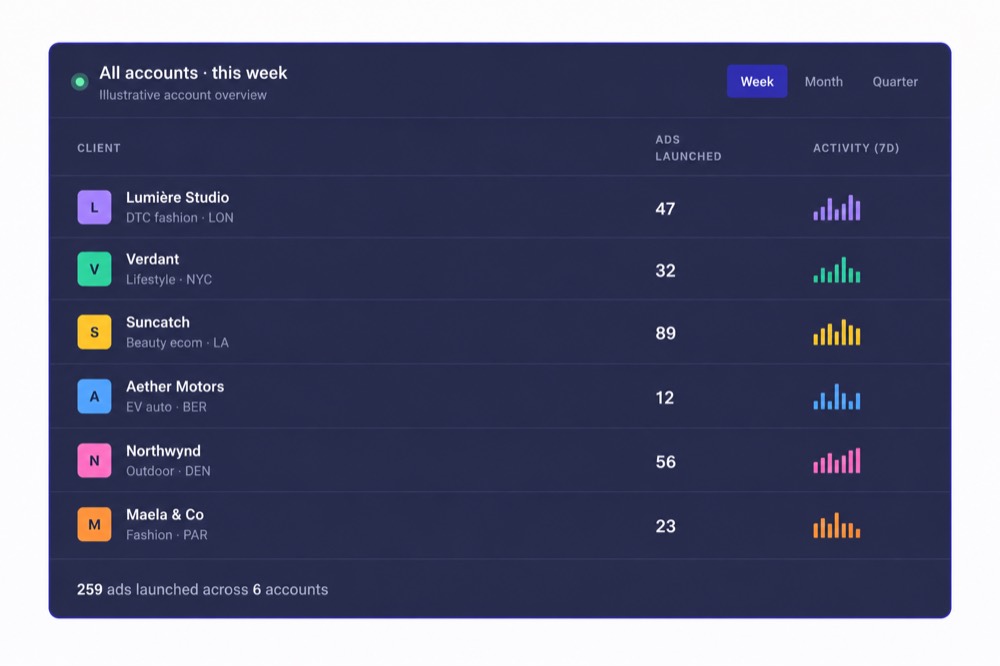
Teams using Kitchn operate in environments where operational leverage changes what the team can handle.



These aren't claims that AdEspresso can't create ads in bulk. It can. They show why the broader operating workflow starts to matter once the cost of repetitive execution becomes significant.
Which one should you choose?
Choose Kitchn if…
- Your team already has finished creative and copy
- A lot of your launch planning already happens in spreadsheets
- Multiple media buyers need a consistent way to execute
- You operate across paid social channels beyond Meta
- Pre-launch structural validation matters
- You need review and comments attached to individual ads
- You repeatedly launch similar work across accounts or markets
- Reducing operational workload matters more than automatic split-test combinations
- Heads of Paid Social need a more repeatable operating process
Choose AdEspresso if…
- Facebook and Instagram are the centre of your workflow
- You want a guided campaign creation experience
- Automatic split-test generation is important
- You want campaign optimisation built into the same product
- Mandatory campaign approvals matter
- White-label PDF reporting is part of your client process
- You're a smaller advertiser and price is a major constraint
- You want the software to create campaign structures rather than work within existing ones
You don't need to pretend AdEspresso is bad to choose Kitchn
AdEspresso solves a real problem. It makes digital advertising easier to create, test, optimise and report on. For plenty of advertisers, that's enough.
Kitchn makes more sense when the problem has changed. When you're no longer asking:
That's the transition Kitchn is built for.
Kitchn.io vs AdEspresso: common questions
Is Kitchn an AdEspresso alternative?
Yes, for teams using AdEspresso primarily to make ad creation and paid social execution more efficient.
But Kitchn is not a direct replacement for every AdEspresso feature. AdEspresso has stronger built-in split-test generation, mandatory approvals and PDF reporting. Kitchn is stronger when the requirement is a structured, multi-channel launch workflow.
What's the biggest difference between Kitchn and AdEspresso?
AdEspresso is centred around campaign creation, experimentation and optimisation.
Kitchn is centred around paid social operations between finished creative and the live ad.
Can both products bulk create ads?
Yes. AdEspresso has Grid Composer and campaign creation tools designed for bulk workflows.
Kitchn uses a spreadsheet-like Launch Sheet where each ad occupies a row and teams can paste, import, edit, review and launch the batch. The difference is the surrounding workflow, not whether both products can make more than one ad.
Which has better approvals?
It depends on what better means. AdEspresso has a genuine mandatory approval option that can require sign-off before eligible campaigns publish.
Kitchn has row-level statuses, comments and shareable previews, which work well when a launch contains many individual ads. Kitchn approval status does not technically block launch.
Which is better for split testing?
AdEspresso, if you want the software to generate combinations and provide dedicated experiment analysis.
Kitchn can launch creative and copy variants at scale and report on creative performance, but it does not automatically generate every combination.
Which supports more paid social launch channels?
Kitchn. It currently launches across Meta, TikTok, Google Demand Gen, Pinterest and Snapchat, with LinkedIn, Spotify and AppLovin in beta.
AdEspresso's current creation pages primarily emphasise Facebook and Instagram, while Google Ads campaign functionality remains documented elsewhere on its site.
Does Kitchn replace AdEspresso's reporting?
Not exactly. Kitchn Creative Reporting is built around creative analysis across Meta, TikTok, Google Ads and Pinterest.
AdEspresso has stronger traditional client-report functionality, including PDF export, white-label presentation and scheduled delivery.
Which is cheaper?
AdEspresso, by a substantial margin at entry level. AdEspresso currently starts at $49/month. Kitchn currently starts at €499/month.
Kitchn is designed for teams where the cost of manual paid social operations is already materially greater than the software subscription.
Is Kitchn only for agencies?
No. Agencies are a big part of it, but process-driven in-house paid social teams with dedicated media buyers can have the same operational problem.
The difference is usually who needs confidence in the workflow: clients for agencies, internal stakeholders for in-house teams.
