
A Birch alternative for teams that want the launch workflow under control
Birch, formerly Revealbot, is excellent at automating what happens around live advertising. Its rules monitor performance, change budgets, pause ads, send alerts and automate reporting across Meta, Google Ads, TikTok and Snapchat. Kitchn goes deeper on a different part of the operation: preparing, reviewing, validating and launching large batches of ads consistently across a paid social team.
Both products are present across the whole operation. Neither is absent anywhere. The difference is where the weight sits.
If performance automation is the bottleneck, Birch is stronger.
If the messy part happens before the ads are live, Kitchn is built around that workflow.
Kitchn vs Birch: the short answer
| If you need to… | Better fit |
|---|---|
| Run sophisticated rules on live campaigns | Birch |
| Automatically change budgets and bids based on performance | Birch |
| Send scheduled cross-channel reports | Birch |
| White-label client reports | Birch |
| Use external performance data inside automation rules | Birch |
| Prepare large launch batches in a dedicated Launch Sheet | Kitchn |
| Validate structural setup before each ad is created | Kitchn |
| Keep statuses, comments and previews attached to launch rows | Kitchn |
| Maintain a before/after history of launch changes | Kitchn |
| Launch on Pinterest and Google Demand Gen | Kitchn |
| Bulk launch more Meta ad formats from the same workflow | Kitchn |
| Keep software pricing separate from media spend | Kitchn |
Both products now overlap on ad creation. The better question is whether your team needs deeper performance automation, or tighter control of the launch operation.
Birch has moved beyond Revealbot
Revealbot was primarily an automation layer for ads that were already live. Birch is broader than that today.
Its current product supports campaign automation across Meta, Google Ads, TikTok and Snapchat, while Launcher creates Meta campaigns and ad sets and Stage can turn Google Drive or Google Sheets workflows into ads on Meta, TikTok and Snapchat.
Birch is no longer only a post-launch tool
Birch no longer starts only after launch. The real difference is how much of each product is designed around the launch itself.
Birch automates performance. Kitchn systemises execution.
Birch
Birch is strongest when the advertising already exists and software needs to monitor what happens next. Its automation rules support complex conditions, performance metrics and actions including start and pause, budget changes, bid changes, alerts, scheduled automation and external data.
Its reporting can also be scheduled to email or Slack and white-labelled for client use.
Kitchn
Kitchn is centred around the operating process before and around launch. The Launch Sheet is a spreadsheet-like workspace where one row is one ad.
The team can bring in finished assets, paste copy and setup from spreadsheets, work across the batch, review the actual ads and run structural validation before anything is created. Then the batch launches without locking the media buyer into the sheet.
That distinction matters when the pain isn't deciding what to do with a live campaign. It's getting hundreds of ads ready correctly in the first place.
Kitchn.io vs Birch at a glance
| Capability | Kitchn.io | Birch |
|---|---|---|
| Primary strength | Structured paid social launch operations | Live campaign automation and optimisation |
| Bulk ad creation | ✓Yes | ✓Yes |
| Spreadsheet-based launch workflow | ✓Launch Sheet | ✓Stage can import Google Sheets |
| Google Drive launch workflow | ✓Yes | ✓Stage |
| Dropbox assets | ✓Yes | ✕Not documented for Stage |
| Frame.io assets | ✓Yes | ✕Not documented for Stage |
| SharePoint assets | ✓Yes | ✕Not documented for Stage |
| Meta Launcher | ✓Yes | ✓Yes |
| TikTok ad launching | ✓Yes | ✓Stage |
| Snapchat ad launching | ✓Yes | ✓Stage |
| Pinterest ad launching | ✓Yes | ✕Not currently documented |
| Google Demand Gen ad launching | ✓Yes | Google is supported for automation and reporting; ad creation is not currently documented |
| LinkedIn launching | Beta | ✕Not documented |
| Spotify launching | Beta | ✕Not documented |
| AppLovin launching | Beta | ✕Not documented |
| Pre-launch validation | ✓Every launch row | ✓Launch and review checks exist, particularly in Launcher and Stage |
| Meta Carousel bulk launch | ✓Yes | ✕Stage currently does not support Carousel |
| Meta Collection bulk launch | ✓Yes | ✕Stage currently does not support Collection |
| Meta Catalog Carousel | ✓Yes | ✕Stage currently does not support Catalog ads |
| Existing Post ads | ✓Yes | Launcher supports existing elements; Stage currently excludes Existing Post ads |
| Approval statuses on individual launch rows | ✓Yes | ✕No equivalent launch-row approval workflow documented |
| Comments on launch rows | ✓Yes | ✕No equivalent documented |
| Public ad previews | ✓Yes | ✓Stage supports pre-launch preview |
| Approval technically blocks launch | ✕No | Not documented |
| Per-row before/after history | ✓Yes | Stage has task history; equivalent row-change history not documented |
| Automated performance rules | ✓Narrower Meta and TikTok scope | ✓Core product strength |
| Budget automation | Available on request | ✓Core feature |
| Bid automation | ✕No equivalent core feature | ✓Yes |
| Scheduled cross-channel reports | ✕No scheduled email reports | ✓Yes |
| White-label reporting | ✕No | ✓Yes |
| Creative Reporting | ✓Yes | ✓Yes |
| Pricing tied to ad spend | ✕No | ✓Yes |
Both can turn spreadsheets into ads now
Birch Stage now connects directly to Google Sheets. Teams can map a sheet once and reuse it to turn launch-ready rows and Google Drive creative into Meta, TikTok or Snapchat ads. Stage can also filter rows using values such as Ready or Drafted, market, campaign or brand.
That's a useful product. Kitchn should not pretend otherwise. The difference is that the spreadsheet-like launch workflow isn't an additional module in Kitchn. It is the core product.
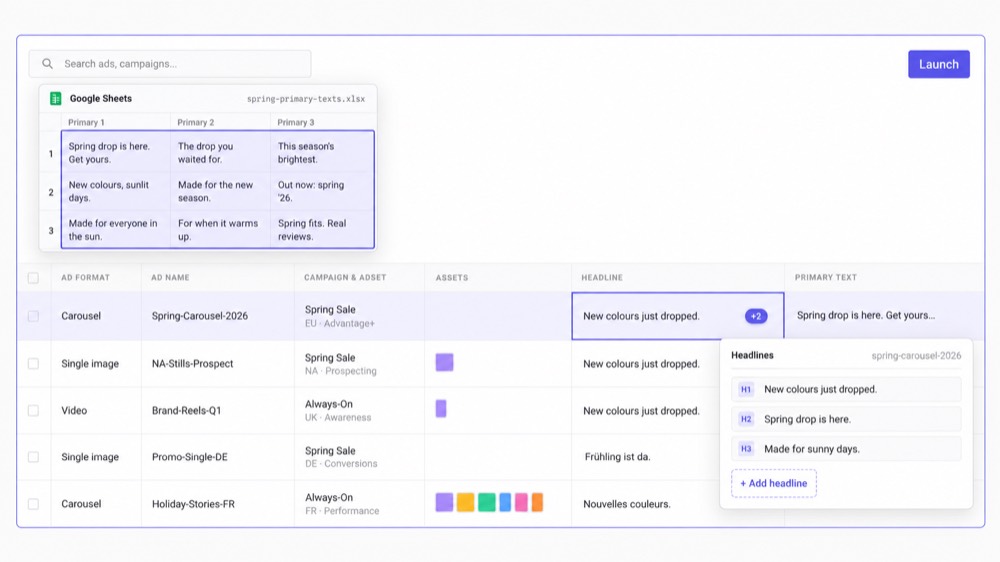
The Kitchn Launch Sheet is built to be the operating workspace
Kitchn allows paid social teams to paste directly from spreadsheets into its own Launch Sheet: one cell, a column, a full TSV matrix or multi-line fields.
- Headlines
- Primary text
- URLs
- CTAs
- Ad setup
- Multiple ad sets
Rows can be bulk edited across all of those, and sheet-level defaults applied across the batch. The result is less movement between the planning document and the actual execution environment. For process-driven teams, that's the point.
Kitchn goes further on the launch-control layer
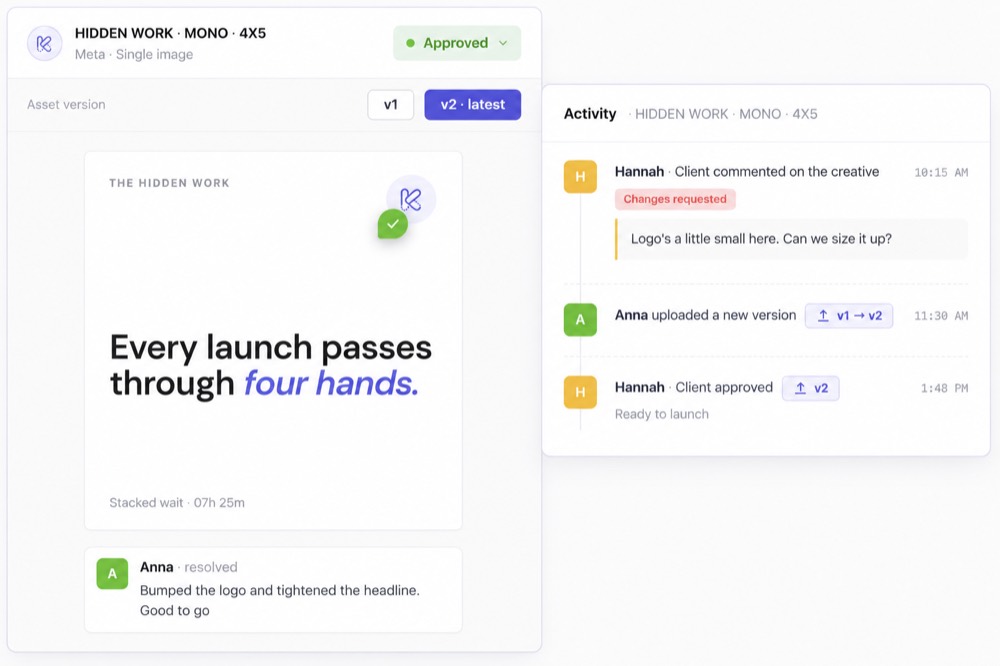
Birch Stage has a Review step and lets teams preview what will be created before launch. Kitchn adds a more explicit operational layer around each launch row.
- A configurable status
- Comments
- Public preview links
- Change history
- Validation state
That matters when a launch is being touched by more than one person. A media buyer can see the setup, a team lead can review it, and a client or stakeholder can see the actual preview. Changes remain attached to the row rather than disappearing into Slack or another version of the spreadsheet.
Approval is visible, but it does not gate the launch
Kitchn supports statuses such as Needs Review, In Progress and Approved, but approval status does not technically prevent Launch. An unapproved row can still be launched by the operator.
So the value is not that Kitchn refuses to launch until a client signs off. It is that review state, comments and previews sit directly on the ads being prepared. The media buyer still owns the final action.
Structural validation happens before Kitchn creates the ad
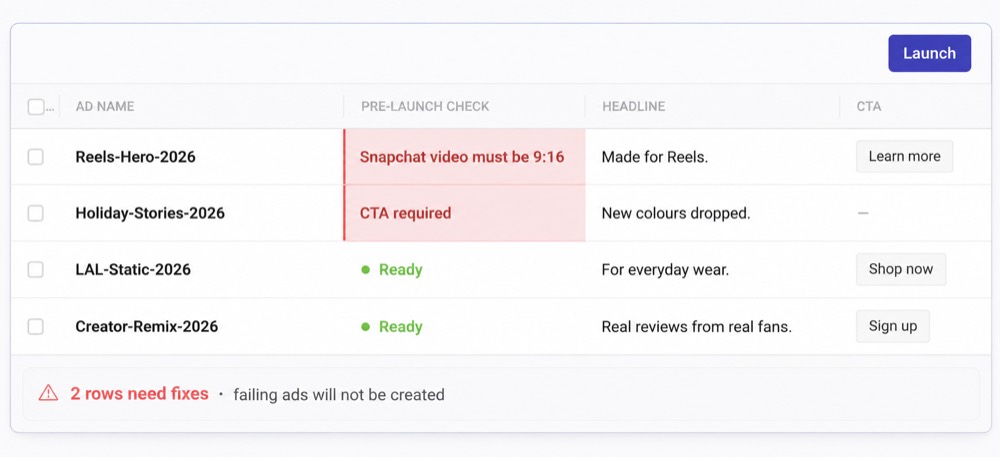
Kitchn validates every launch row before creation. A failing row enters an error state and the ad is not created.
- Required fields
- Schema rules
- Length and pattern requirements
- URL format
- URL-parameter format
- Platform-specific specifications
- Meta creative-enhancement configuration
On Snapchat, for example, an invalid 9:16 video specification can hard-block the launch. Kitchn also manages 86 Meta creative-enhancement keys at last count, forcing unmanaged enhancements to opt out. The point is simple: make structural mistakes visible before they become live ads.
Birch has checks too
Birch has its own checks. Birch Launcher includes a Review stage, and Stage lets the team preview ads before creation and surfaces platform requirements and limitations as part of the workflow.
The better difference is that Kitchn's validation is a dedicated row-by-row gate covering the structural launch data the team is working with, including Kitchn's Meta-enhancement policy.
And it checks the copy, not just the platform rules
Kitchn is not only asking whether Meta will accept the ad. It is also asking whether the ad reads the way your client expects it to.
- Typos and spelling in the ad copy
- Wording the client has approved, and the brand voice they expect
- British or American spelling, whichever the account runs on
- Required fields, character limits and format rules
- Landing page URLs and their tracking parameters
- Creative sized for the placement it will run in
- Meta enhancements nobody on your team switched on
- Ad names that do not follow your conventions
Kitchn supports more Meta formats through the launch workflow
Birch Stage supports
- Single image and video
- Multi-advertiser ads
- Partnership ads
- Lead ads
- Existing Post
- Catalog
- Carousel
- Collection
- Message
- Multi-media ads
Kitchn verified Meta formats
- Single Image
- Single Video
- Carousel
- Collection
- Flexible
- Catalog Carousel
- PAC Carousel
- Existing Post
If those formats are part of the team's regular launch workload, that difference is commercially relevant.
Birch Launcher goes further into campaign construction
This is a legitimate Birch win. Birch Launcher can create Meta ad sets either from scratch or from existing elements. Its creative-testing mode can create one ad set per creative, while Custom launch gives buyers direct control of ad-set structure. It can also create up to 50 ads per ad set through its Multiple Ads option.
Kitchn is not trying to replicate that campaign-building workflow. Kitchn generally works with account structures the media buyer already controls: it creates ads inside existing parent structures and, on supported platforms, can create new ad sets by duplicating an existing one. If the software needs to design and construct the Meta campaign structure itself, Birch Launcher has more capability.
Kitchn's channel coverage is broader for launching
Kitchn currently supports eight launch channels.
| Meta (Facebook & Instagram) | Generally available |
| TikTok | Generally available |
| Google Ads (Demand Gen) | Generally available |
| Generally available | |
| Snapchat | Generally available |
| Beta | |
| Spotify | Beta |
| AppLovin | Beta |
Google Demand Gen ads land paused into existing ad groups. Kitchn does not build Google campaigns from scratch. X can connect but is not currently a launch channel.
Birch Stage currently documents ad creation on Meta, TikTok and Snapchat. Birch also connects Google Ads for automation and reporting, but its current documentation does not describe Google Ads ad creation through Stage.
Deeper automation, scheduled reporting, external data
Deeper automation rules
Birch's rule engine is one of its core products. Meta automation supports start and pause, budget increases and decreases, bid changes, nested AND/OR conditions, metric comparisons, custom conversions, custom scheduling and alerts. Birch also exposes detailed automation logs so teams can see why rules did or did not trigger.
Kitchn has a Rule Engine, but it is narrower: Meta and TikTok rules, with standard actions including pause, rename and notifications. Budget and duplication actions are available on request. If automation depth is the primary requirement, Birch is the better fit.
Scheduled client reporting
Birch reports can combine performance across platforms and be delivered automatically through email, Slack or public links, and can be white-labelled for clients.
Kitchn Creative Reporting is focused more specifically on creative analysis across Meta, TikTok, Google Ads and Pinterest, with custom dimensions, calculated metrics, conditional formatting, an ad screenshot library and public share links. But Kitchn currently has no scheduled email delivery, no PDF export, no white-label branding and no currency conversion. If your agency's reporting process relies on scheduled branded reports, Birch wins that requirement.
External performance data
Birch integrates external data into its automation and analysis workflows. Its current integrations include sources such as Google Analytics and AppsFlyer, while its documentation also describes using third-party metrics within rules and custom metrics. That is particularly useful when a team wants automation decisions made on data beyond the native ad-platform metrics.
Kitchn has reporting connectors and third-party attribution support inside parts of its rule system, but Birch's wider optimisation proposition is more mature. If the buying problem is live performance automation, Birch has the stronger case.
Birch pricing starts much lower
Birch currently publishes spend-based pricing. At up to $10,000 in connected monthly ad spend, Essential starts at $49/month and Pro at $99/month when billed monthly. The Pro plan includes automated rules, Launcher and Stage. Pricing rises as connected ad spend increases.
Kitchn starts substantially higher. That makes Birch an obvious value proposition for smaller advertisers or teams that mainly need rules and basic launch tooling.
Kitchn doesn't charge more because your client spends more
This is one of the cleaner structural differences. If a team doubles client spend without doubling the number of ads it needs to launch, the operational workload hasn't necessarily doubled.
With Birch, connected ad spend is a direct input into subscription pricing.
With Kitchn, ad spend itself is not the pricing variable.
Kitchn's pricing is based around ad accounts and upload volume. For agencies managing larger accounts, that can make costs more predictable around the operational usage the product is actually supporting.
Keep Birch and use Kitchn for launch
This is probably more relevant here than on most competitor pages. You don't necessarily need to choose. A team may genuinely want Kitchn before launch and Birch after it.
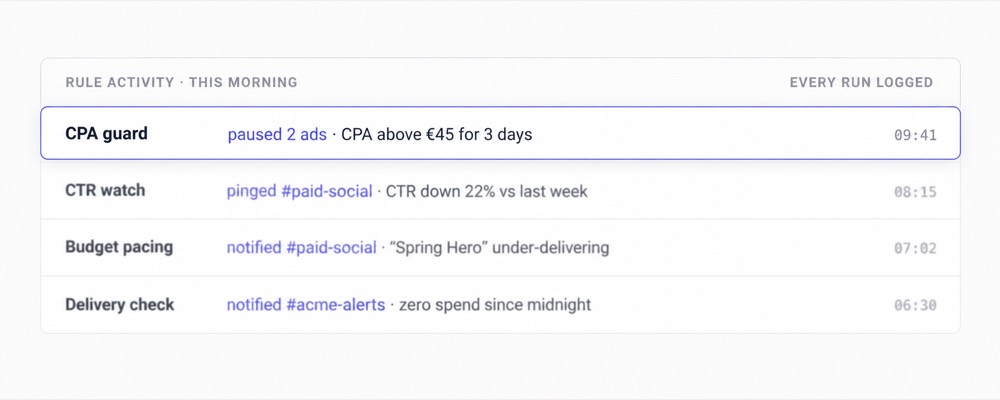
Use Kitchn to prepare the batch, apply the setup, validate the rows, review the previews and launch. Then let Birch monitor the live campaigns, change budgets and bids, trigger automations and send scheduled client reports.
Both products can connect to the same advertising accounts. If the existing Birch rules already work, there is no commercial reason to rip them out merely to prove you switched tools.
Which should you choose?
Choose Kitchn if
- Launch operations are creating more pain than live optimisation
- Your team plans launches in spreadsheets
- Multiple people need visibility into individual ads before launch
- Structural setup errors need to be caught before creation
- You regularly launch Carousel, Collection, Catalog Carousel or Existing Post Meta ads
- You need Pinterest or Google Demand Gen launching
- You operate across several accounts, brands or markets
- You want per-row change history around execution
- You want subscription cost separated from media spend
- The Head of Paid Social needs a more repeatable launch process across the team
Choose Birch if
- Automated optimisation is the main reason you're buying software
- You need sophisticated budget or bid rules
- You want rules across Meta, Google Ads, TikTok and Snapchat
- You want scheduled email and Slack reports
- White-label client reports matter
- You use external metrics to influence automation
- You want Meta campaign and ad-set creation through Launcher
- Your Stage workflow across Meta, TikTok and Snapchat already solves the launch problem
- Your team is smaller and Birch's lower entry pricing is the better commercial fit
Don't switch because a comparison table told you to
Birch is a very capable automation product. And with Stage, its launch workflow is considerably stronger than it was in the Revealbot era. If your team is already launching cleanly through Birch and the real leverage comes from its rules and reporting, there is no compelling reason to move.
But if the paid social operation still looks like this:
Spreadsheet.
Drive folders.
Manual setup.
Repeated checking.
Screenshots.
Slack approvals.
More manual work for every additional account or market.
then the launch layer itself is still unsolved. That's the part Kitchn is built around.
Built for teams where execution has become an operating problem
The teams using Kitchn aren't only trying to shave a few clicks from Ads Manager. They are trying to change what the paid social team can handle.




The recurring outcome is capacity.
Less repetitive work sitting with the media buyer, more consistency for the paid social lead,
and more room to add accounts, markets or testing without growing the manual operation at the same rate.
Kitchn.io vs Birch: common questions
Is Birch the same as Revealbot?
Yes. Revealbot was renamed Birch, styled Bïrch, in 2024.
The current product has expanded beyond its original automation focus and now includes tools such as Launcher, Stage, Explorer and Hub alongside automated rules and reporting.
Is Kitchn a Birch alternative?
Yes, when the main requirement is paid social launch operations.
But Kitchn is not a complete replacement for Birch's deeper live campaign automation, budget and bid rules, or scheduled white-label reporting.
Can Birch launch ads in bulk?
Yes.
Birch Launcher creates Meta campaigns, ad sets and ads, while Stage can create ads using Google Sheets or Google Drive workflows on Meta, TikTok and Snapchat.
What's the main difference between Kitchn and Birch?
Birch's deepest product capability is automation and management of live campaigns.
Kitchn's deepest capability is the structured workflow used to prepare, validate, review and launch ads.
There is overlap, but their centres of gravity are different.
Which has better automated rules?
Birch. Its automation product is broader across platforms and actions and includes deeper budget and bid controls.
Kitchn's rules are narrower and should not be presented as equivalent.
Which supports more channels for ad launching?
Kitchn currently has the broader documented launch footprint. Kitchn supports Meta, TikTok, Google Demand Gen, Pinterest and Snapchat generally, with LinkedIn, Spotify and AppLovin in beta.
Birch Stage currently documents ad creation for Meta, TikTok and Snapchat.
Which has better reporting?
It depends on the job.
Birch is stronger for scheduled cross-platform and white-label client reporting.
Kitchn is stronger when the requirement is analysing the team's own creative through custom dimensions, calculated metrics and ad screenshots across Meta, TikTok, Google Ads and Pinterest.
Does Kitchn have approvals?
Kitchn has configurable row-level approval statuses, comments and shareable previews.
Approval does not technically block launch. It is a review and visibility workflow rather than a hard publishing permission.
Which is cheaper?
Birch has a substantially lower starting price. Its pricing begins at $49/month at the lowest connected-spend tier.
Kitchn is designed for a more operationally mature use case where the cost of repetitive execution is already material.
Can I use Kitchn and Birch together?
Yes. A practical setup is Kitchn for preparing and launching ads, followed by Birch for deeper live automation and scheduled reporting.
If your Birch rules already work, they don't need to disappear just because Kitchn takes over more of the launch workflow.
