
An Adnova alternative for teams that need more control around every launch
Adnova combines creative research, analytics, asset management and bulk ad launching in one creative workflow suite. Kitchn takes a more focused approach: a structured workflow for preparing, reviewing, validating and launching ads, with the operational controls needed when multiple people, accounts and markets are involved.
- Creative inspiration
- Competitor tracking
- Creative Hub and asset versioning
- AI creative research
- Import assets
- Apply defaults
- Edit copy across ads
- Launch large batches
- Structural validation on every row
- Statuses, comments and previews
- Change history and audit log
- Reuse across accounts and markets
If you want creative inspiration, competitor research and asset management alongside a lower-cost bulk launcher, Adnova is a strong option.
If the launch process itself needs to become more repeatable, visible and controlled across your team, that's where Kitchn fits.
Kitchn vs Adnova: the short answer
| If you need to… | Better fit |
|---|---|
| Build and launch large batches of finished ads | Both |
| Work from a spreadsheet-like launch workflow | Kitchn |
| Add structural validation directly before ad creation | Kitchn |
| Track statuses, comments and changes around individual launch rows | Kitchn |
| Apply repeatable launch defaults and naming templates | Kitchn |
| Reuse launch workflows across accounts or markets | Kitchn |
| Launch across Kitchn's wider verified channel set | Kitchn |
| Research competitor creative | Adnova |
| Search a large ad-inspiration library | Adnova |
| Manage creative assets, versions and visual feedback | Adnova |
| Get AI-assisted creative analysis and research | Adnova |
| Buy a standalone Meta bulk launcher at a lower entry price | Adnova |
This isn't a comparison between a tool that can bulk launch and one that can't. Both can. The difference is what each product is built around.
Adnova surrounds the creative workflow. Kitchn surrounds the launch.
The products overlap most clearly at bulk ad launching. But they start from different places.
Adnova
Adnova positions itself as a wider creative workflow platform. Its product suite includes Creative Analytics, Creative Inspiration, competitor tracking, Creative Hub, Ad Templates, a Bulk Ad Launcher and AI-powered creative tooling.
The launcher is one part of that wider creative system.
Kitchn
Kitchn begins when the creative and copy are ready to become ads. The Launch Sheet is the core workspace, and one row is one ad. Creative, copy, destination, campaign and ad-set information sit in columns.
Import the assets. Paste the copy. Apply the setup. Review the batch. Fix structural errors. Launch.
Kitchn is deliberately focused on making that operational process easier to repeat across a paid social team.
Kitchn.io vs Adnova at a glance
| Capability | Kitchn.io | Adnova |
|---|---|---|
| Primary job | Paid social launch operations | Creative workflow and bulk launching |
| Bulk ad launching | ✓Yes | ✓Yes |
| Table or grid workflow | ✓Core Launch Sheet | ✓Table-based bulk workflow |
| Bulk copy editing | ✓Yes | ✓Yes |
| Bulk asset import | ✓Yes | ✓Yes |
| Cloud asset sources | ✓Yes | ✓Yes |
| Reusable defaults | ✓Sheet level | ✓Launch settings |
| Ad templates | ✓Yes | ✓Yes |
| Naming templates | ✓Yes | ✓Naming patterns |
| Meta creative-enhancement control | ✓86 keys at last count | ✓Yes |
| Pre-launch validation | ✓Dedicated copy and setup validation on every row | ✓Required data and launch compatibility checks documented |
| Failed Kitchn validation prevents ad creation | ✓Yes | Different validation model |
| Row-level workflow statuses | ✓Yes | ✕No equivalent launch-row status system documented |
| Comments attached to launch rows | ✓Yes | Comments and annotations primarily sit around creative assets |
| Public ad previews | ✓Yes | ✓Meta ad previews are supported |
| Approval technically blocks launch | ✕No | ✕No equivalent hard launch approval documented |
| Per-row change history | ✓Yes | Creative asset versioning; equivalent launch-row history not documented |
| Organisation audit log | ✓Yes | ✕Equivalent launch audit log not documented |
| Creative asset versioning | ✕Not the core Kitchn product | ✓Yes |
| Creative inspiration library | ✕No | ✓Yes |
| Competitor creative tracking | ✕No | ✓Yes |
| AI creative research | ✕No | ✓Yes |
| Creative performance reporting | ✓Yes | ✓Yes |
| Standalone launcher entry price | Higher | ✓Adnova is cheaper |
Both tools can bulk launch. That's not the interesting part.
A comparison page that said "Kitchn bulk launches ads and Adnova doesn't" would simply be wrong. Adnova has a capable bulk launcher. It can import assets, apply defaults, edit copy across ads and launch large batches.
So the buying decision needs to go one level deeper. What happens when:
Several people touch the launch?
Each client or brand has different standards?
The same workflow moves into another market?
Hundreds of rows need checking?
Somebody changes something before launch?
A structural mistake needs to stop before the ad is created?
That's where Kitchn's operating model becomes more relevant.
The Launch Sheet is the operating workspace
Kitchn doesn't treat bulk uploading as a button attached to another product. The Launch Sheet is where the work happens.
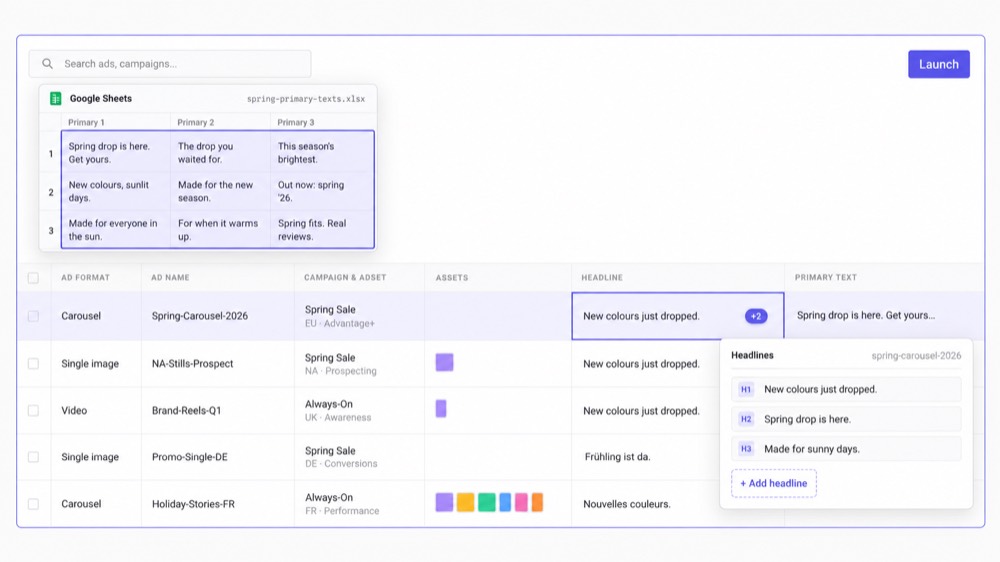
Media buyers can paste directly from Excel or Google Sheets, including individual cells, full columns and spreadsheet-style matrices.
- Individual cells
- Full columns
- Spreadsheet-style matrices
That matters because paid social planning frequently already happens in spreadsheets. The problem isn't necessarily creating another campaign strategy. It's turning what has already been planned into correctly configured ads.
Build the batch without repeating the setup
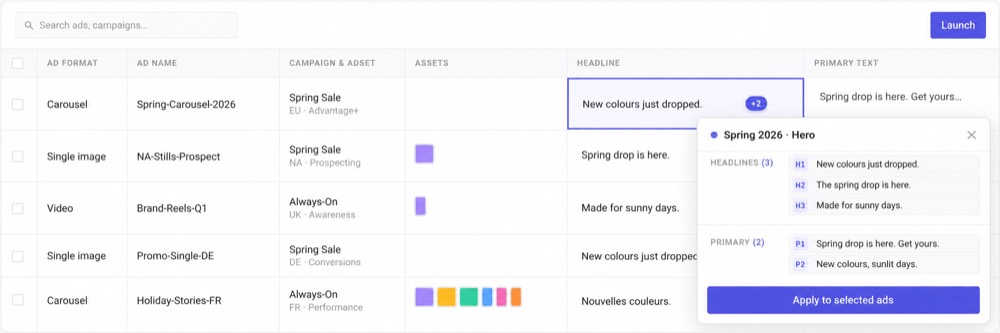
As launch volume grows, small repeated actions become the workload. Kitchn lets teams apply setup across rows rather than recreating it repeatedly.
- Sheet-level defaults
- Bulk editing
- Ad Templates
- Naming templates
- Bulk asset imports
- Multiple ad sets within a sheet
Templates are applied deliberately rather than automatically inherited everywhere, and naming templates are applied but not hard-enforced at launch. That distinction matters. Kitchn helps make the preferred process easier to follow without pretending software completely removes operator judgement.
Structural QA is built directly into the Kitchn launch
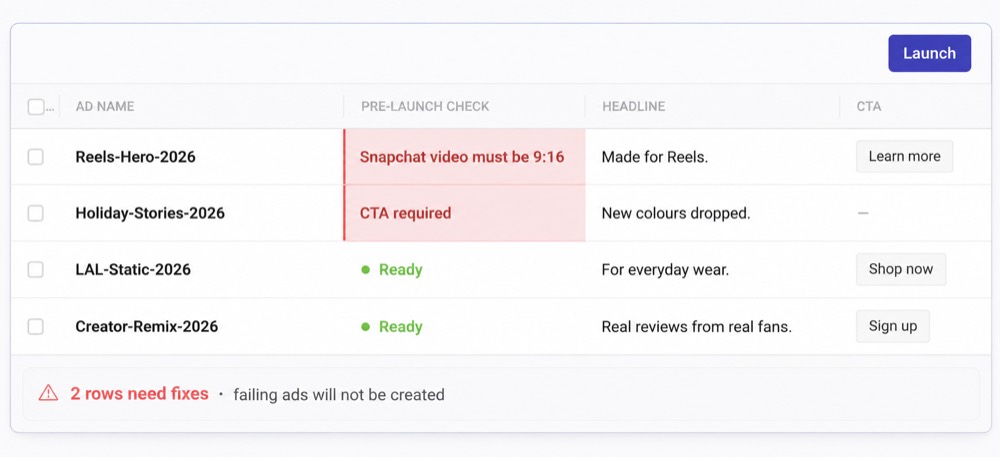
Before an ad is created, Kitchn validates the launch row. If a row fails validation, it enters an error state and the ad is not created.
- Required fields
- Schema rules
- Length and pattern requirements
- URL formatting
- URL-parameter formatting
- Platform-specific specifications
- Meta creative enhancement configuration
For Meta creative enhancements, Kitchn currently manages 86 enhancement keys at last count, opting unmanaged settings out unless they have deliberately been enabled. That gives the media buyer a structural gate immediately before creation.
Adnova does have launch validation
Adnova's current documentation does show validation: its launch API validates requirements including ad-set compatibility, conversion locations, supported ad types, links and scheduling conditions before accepting certain launches. Its launcher interface also requires key launch information before the batch can proceed.
So saying "Adnova has no pre-launch QA" is too broad. The better distinction is that Kitchn has a dedicated structural validation layer designed around every row in the Launch Sheet, covering URL formatting, schema and spec checks and the Meta enhancements policy alongside the basic information necessary to create the ad. That's a more credible comparison than pretending the competitor does nothing.
Kitchn checks the words, not just the wiring
It would be easy to assume the checking stops at whether the ad is built correctly. It doesn't. Kitchn reads the copy as well, so a typo, a phrase the client has ruled out, or the wrong spelling for the market gets picked up on the way through.
- Typos and spelling in the ad copy
- Wording the client has approved, and the brand voice they expect
- British or American spelling, whichever the account runs on
- Required fields, character limits and format rules
- Landing page URLs and their tracking parameters
- Creative sized for the placement it will run in
- Meta enhancements nobody on your team switched on
- Ad names that do not follow your conventions
Anything it finds holds the batch until somebody fixes it. The point is that a mistake, whether it is a broken URL or a misspelt product name, stops before it turns into a live ad.
Keep review attached to the launch
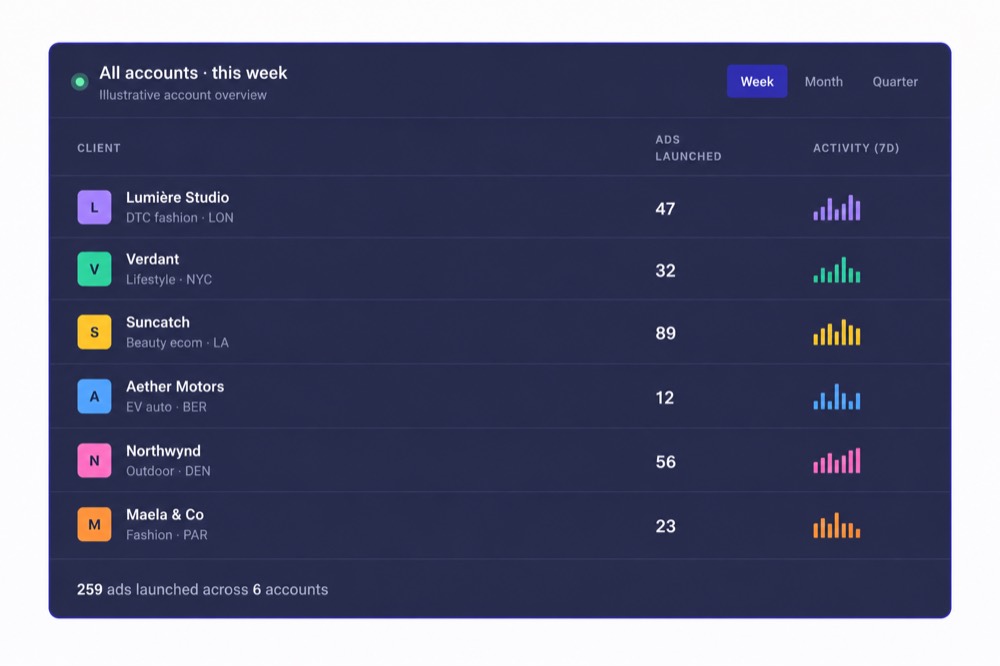
When several people touch paid social execution, review quickly becomes another fragmented process: a spreadsheet, Slack, screenshots, email, Ads Manager. Kitchn gives every launch row its own record instead.
- Configurable status
- Comments
- Change history
- Ad preview
Public preview and guest-sharing workflows let somebody outside the core Kitchn organisation see the relevant ads without operating the account themselves. That keeps more context attached to the actual launch.
Kitchn approval status does not block Launch
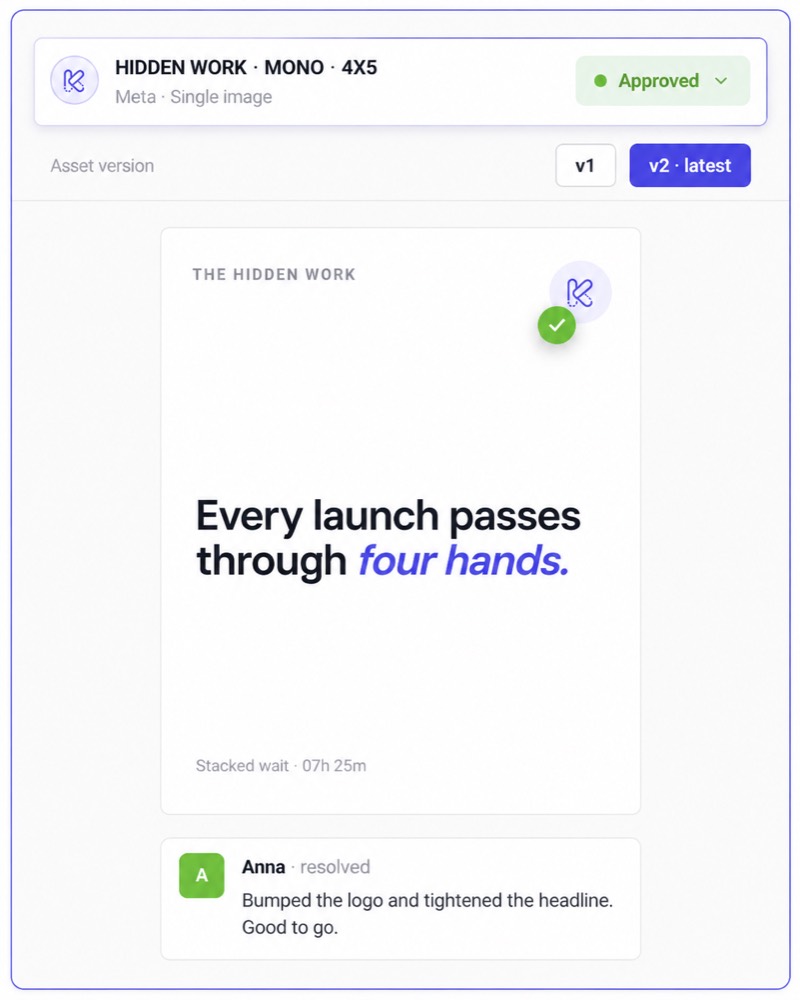
The current Kitchn vs Adnova page leans too far into "approval before launch." Kitchn has approval statuses such as Needs Review, In Progress and Approved, but it does not technically stop an unapproved row from being launched. Nothing at launch checks approval status as a hard gate.
The value is visibility. The team can see whether the ad has been reviewed, comments sit on the row, approval changes are logged, and the preview shows what is actually being prepared. The media buyer still owns the final launch decision.
Adnova is stronger earlier in the creative workflow
Creative Hub
Adnova includes a dedicated asset-management workflow with boards, asset organisation, creative search, comments, visual annotations, video timestamp comments and versioning.
Kitchn integrates with creative storage systems. It doesn't try to replace a full DAM or creative review environment. If consolidating asset management and creative review is the goal, Adnova has the stronger product.
Creative inspiration and competitor research
Adnova also goes substantially further before the creative has been produced, with a large inspiration library and tools for monitoring and analysing competitor advertising: creative tracking, ad inspiration, angles, hooks, messaging, themes, landing-page research and AI-assisted search and analysis.
Kitchn doesn't do this. It is not a competitor-intelligence platform. If your team wants research, inspiration, creative management and launch in one system, that breadth is a genuine Adnova advantage.
Kitchn starts when the creative is ready to ship
That narrower boundary is also one of Kitchn's advantages for the right team. Your organisation may already have designers, Figma, Canva, Frame.io, Google Drive, Dropbox, a creative strategy process and a research stack.
You don't necessarily need to replace all of it just to improve paid social execution.
Kitchn starts at the operational handoff.
The creative exists. Now get it live correctly and efficiently.
For teams whose existing creative process already works, that focus avoids solving problems they don't have.
Reuse an existing launch across accounts and markets
A common paid social problem isn't creating one batch. It's recreating that batch somewhere else: another account, another geography, another market, another brand context.
Kitchn lets teams copy a Launch Sheet into another context and remap the relevant ad sets rather than rebuilding the operational work from zero.
For teams managing several accounts or international launches, that's an important difference between simply having a bulk-upload button and having a repeatable operating process.
Know what changed
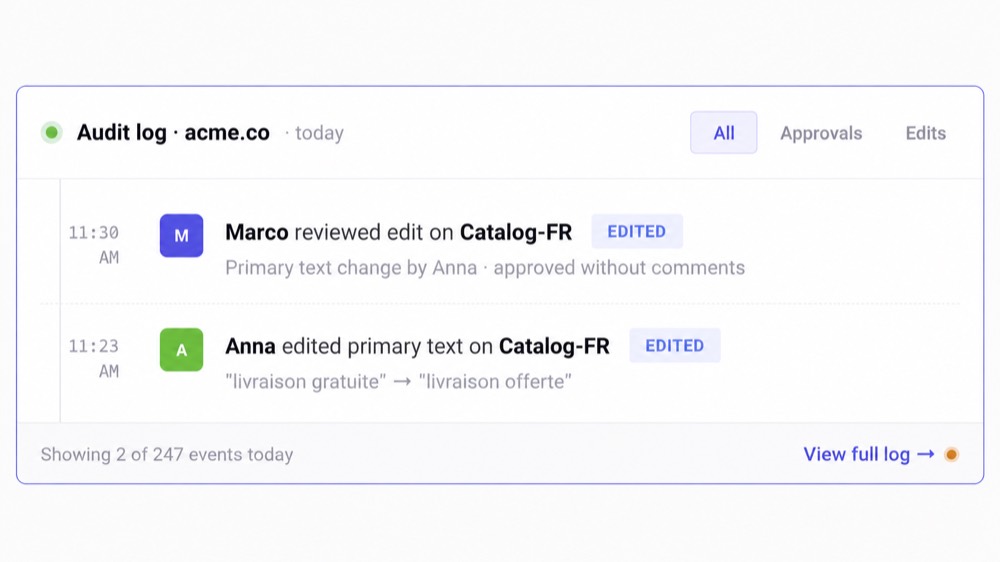
Kitchn maintains per-row change history with before-and-after information and batch undo. Its wider audit system also records operational events including launches, bulk edits, sharing, approval changes, role changes and integrations.
That gives Heads of Paid Social and Operations a clearer answer when somebody asks "what changed?" or "who touched this before it went live?"
Adnova provides creative version history inside its Creative Hub. In the public documentation reviewed, an equivalent audit trail across launch-row changes is not documented. Those are different kinds of history: for creative production, Adnova's asset versioning is useful; for launch governance, Kitchn's audit model is the more relevant one.
Kitchn has broader verified launch coverage
Kitchn currently supports eight launch channels.
| Meta (Facebook & Instagram) | Generally available |
| TikTok | Generally available |
| Google Demand Gen | Generally available |
| Generally available | |
| Snapchat | Generally available |
| Beta | |
| Spotify | Beta |
| AppLovin | Beta |
X can connect to Kitchn but cannot currently launch. Functionality varies by platform, and Kitchn does not claim that every channel has identical automation depth.
A note on Adnova channel support
Adnova's public marketing materials currently mention launch support beyond Meta, including TikTok and AppLovin in several comparison and editorial pages. Its current dedicated Bulk Ad Launcher page, however, is specifically framed around Meta, and its current public Ad Launcher API documentation states that Meta is the only supported API launch platform.
That may simply reflect different availability between Adnova's UI and API. So rather than pretending the answer is cleaner than Adnova's own documentation, we'd recommend confirming the exact channels you need with Adnova before making the decision.
Adnova is much cheaper if you only want a launcher
Adnova currently advertises its standalone Ad Launcher from $79/month for one ad account, with additional accounts at $20 each and unlimited ad launches. Kitchn's Launch Team currently starts at €499/month for five ad accounts and 900 monthly ad uploads.
If you need a low-cost Meta bulk launcher and nothing more, Adnova has the obvious price advantage.
The question is what the manual process is costing you
Kitchn starts making commercial sense when the problem is bigger than "I want a cheaper way to launch 100 ads."
- Several media buyers are involved
- Different accounts have different standards
- Launches need reviewing
- Mistakes create client or stakeholder risk
- The same work needs repeating across markets
- Management needs visibility
- Manual checking is consuming senior time
- Uploading is limiting team capacity
At that point, the buying decision isn't simply cost per launch. It's the cost of keeping the operating process manual.
Overlapping capability, different emphasis
Both products have creative analytics and reporting capabilities.
Adnova
Creative Analytics is central to the wider Adnova proposition. It sits alongside its inspiration and competitor-intelligence products and is designed to feed performance insights back into creative strategy.
Kitchn
Kitchn Creative Reporting covers Meta, TikTok, Google Ads and Pinterest, with custom dimensions, calculated metrics, conditional formatting, top and bottom filtering, an ad screenshot library and shareable reports.
The focus is connecting the team's own paid social performance back to the creative being tested. Kitchn does not provide Adnova-style competitor research.
What that looks like in practice
Teams running launch operations in Kitchn measure the difference in the time the process takes back.



Which should you choose?
Choose Kitchn if
- The launch itself needs to become a repeatable team process
- Multiple people touch paid social execution
- You want structural validation before ads are created
- You want statuses, comments and change history attached to individual launch rows
- Your team already works heavily from spreadsheets
- Different accounts need different repeatable setup
- You regularly reproduce launches across accounts or markets
- You need Kitchn's wider verified paid social channel coverage
- Visibility and operational consistency matter as much as raw upload speed
Choose Adnova if
- You mainly want an inexpensive bulk launcher
- Meta is the main launch workflow you're trying to improve
- Creative research is a major part of what you want the software to solve
- Competitor creative tracking matters
- You want inspiration, analytics and launching in the same suite
- Your team needs a dedicated Creative Hub with annotations and asset versioning
- You want the software involved earlier in the creative lifecycle
You may not need to replace Adnova at all
If your team gets significant value from Adnova's inspiration library, competitor research, Creative Hub, AI research and Creative Analytics, then there may be no reason to throw those workflows away.
The more useful question is whether Adnova also solves the operational control you need around launch. If it does, stay. If it doesn't, Kitchn can be evaluated for that layer without pretending the two products have to be mutually exclusive.
Kitchn is built for the part between approved creative and live ad
That's the simplest way to think about the difference. Adnova covers much more of the creative lifecycle. Kitchn concentrates on making the operational handoff into paid media reliable.
For teams where that handoff has become a mess of spreadsheets, files, manual checking and repeated account setup, focus matters. Because the end goal isn't to own more software.
It's to let media buyers do less repetitive work,
give paid social leaders more control over execution,
and increase what the team can handle without turning ad uploading into another role.
