
Need more than a Meta batch launcher?
Adtool is built to make launching Meta ads faster, and it does that job well: upload finished creative, apply recurring settings, preview the batch and launch hundreds of ads without building every one in Ads Manager. Kitchn solves a broader operational problem, giving paid social teams a structured workflow for preparing, reviewing, validating and launching ads across multiple channels.
So the question stops being which is cheaper, and becomes what the same subscription buys.
- 8 connected Meta ad accounts
- Unlimited ad launches
- Unlimited team members
- Account-level naming, UTMs and enhancements
- Multi-text variation generation
- 8 launch channels, 3 in beta
- Structural validation on every row
- Spreadsheet-style Launch Sheet
- Row-level statuses, comments and history
- Creative Reporting and automation
If Meta batch launching is the entire problem, Adtool may be all you need.
If the launch workflow itself needs to work across your paid social operation, that is where Kitchn goes further.
Kitchn vs Adtool: the short answer
| If you need to… | Better fit |
|---|---|
| Launch large batches of Meta ads quickly | Both |
| Set Meta naming, UTMs and enhancements once and reuse them | Both |
| Get unlimited Meta launches on a paid plan | Adtool |
| Create multiple text variations inside a Meta launch | Adtool |
| Use simple account-level Meta defaults | Adtool |
| Prepare launches in a spreadsheet-like operating workspace | Kitchn |
| Paste structured launch data directly from Google Sheets or Excel | Kitchn |
| Validate structural setup before each ad is created | Kitchn |
| Keep statuses, comments and change history attached to individual ads | Kitchn |
| Repeat launches across accounts and markets | Kitchn |
| Launch beyond Meta to TikTok, Pinterest, Snapchat or Google Demand Gen | Kitchn |
| Bring creative reporting and operational automation into the same system | Kitchn |
The difference isn't whether either product can upload ads in bulk. They both can. The difference is how much of your paid social operation needs to exist around that batch.
Adtool is a very good Meta launcher
Adtool describes itself as a Meta ad launch platform for agencies and in-house performance teams. Its current workflow includes:
- Batch ad creation
- Automatic creative grouping
- Naming conventions
- UTM defaults
- Creative enhancement controls
- Multi-text variations
- Ad scheduling
- Google Drive import
- Campaign and ad-set reuse
- Client preview links
- Per-ad editing
It supports Meta formats including image, video, carousel, flexible, Post ID, partnership, lead form, event response and app promotion ads. Teams routinely launch 50 to 200+ ads in a batch, and Adtool says there is no hard batch limit. If your process is finished creative into Meta and live, Adtool has built a short route through it.
Kitchn is built for when the launch becomes an operating process
The problem changes as more people and accounts become involved. The creative still needs launching. But now somebody also needs to know what's ready, what has errors, what has been reviewed, what changed and who changed it.
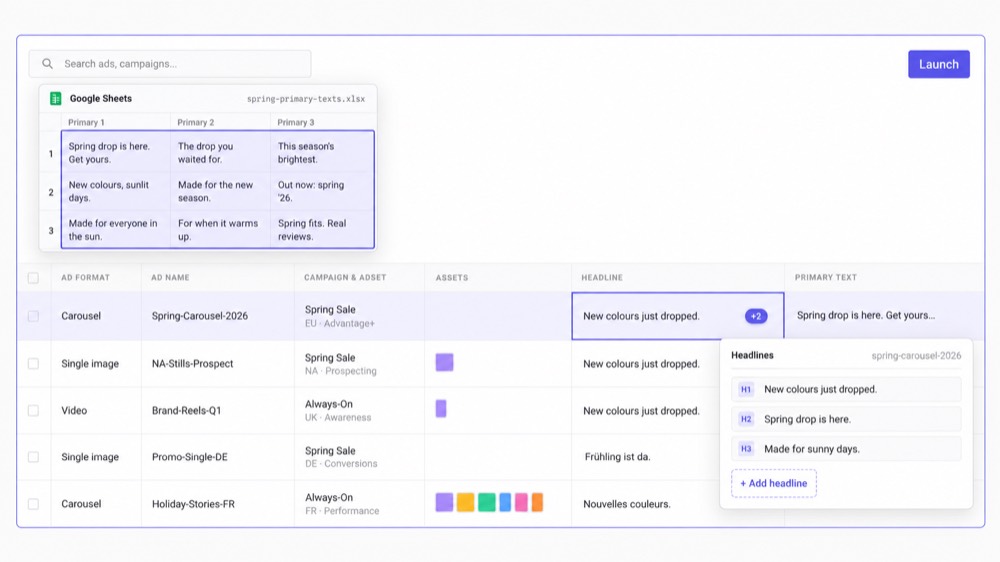
Kitchn's core product is the Launch Sheet. One row is one ad, with creative, copy, destination, campaign and ad-set information in columns.
The team works on the batch as a structured operational workspace rather than only as a group of creative files waiting to be uploaded.
Kitchn.io vs Adtool at a glance
| Capability | Kitchn.io | Adtool |
|---|---|---|
| Primary focus | Paid social launch operations | Meta batch launching |
| Bulk ad creation | ✓Yes | ✓Yes |
| Typical workflow | Sheet, review, validation, launch | Creative upload, configure, preview, launch |
| Spreadsheet-style Launch Sheet | ✓Yes | ✕No equivalent sheet workspace documented |
| Paste from Google Sheets or Excel | ✓Yes | ✕No equivalent spreadsheet-paste workflow documented |
| Per-ad editing | ✓Yes | ✓Yes |
| Bulk editing | ✓Yes | ✓Yes |
| Creative grouping | ✓Filename-token grouping | ✓Automatic placement and dimension grouping |
| Google Drive assets | ✓Yes | ✓Yes |
| Dropbox assets | ✓Yes | ✕Not currently documented |
| Frame.io assets | ✓Yes | ✕Not currently documented |
| SharePoint assets | ✓Yes | ✕Not currently documented |
| Naming templates | ✓Yes | ✓Yes |
| Naming hard-enforced at launch | ✕No | Adtool applies configured naming conventions |
| Creative enhancement controls | ✓Yes | ✓Yes |
| UTM setup | ✓Yes | ✓Yes |
| Reusable defaults | ✓Sheet level | ✓Account and ad-account defaults |
| Reusable previous launches | ✓Yes | ✓Yes |
| Multi-text variations | Supported copy fields, but no combination generator | ✓Dedicated variation workflow |
| Pre-launch validation | ✓Failing rows are not created | ✕No equivalent row-level structural QA layer documented |
| Ad preview | ✓Yes | ✓Yes |
| Client review | ✓Yes | ✓Batch preview links |
| Row-level approval statuses | ✓Yes | ✕No equivalent row-level status system documented |
| Comments on individual launch rows | ✓Yes | ✕No equivalent documented |
| Hard approval gate | ✕No | ✕No hard publishing gate publicly documented |
| Per-row before/after history | ✓Yes | Batch and Meta history rather than equivalent row-change history |
| Multi-channel launching | ✓8 channels, 3 beta | Meta |
| Creative Reporting | ✓Yes | ✕Not positioned as part of the core launcher |
| Paid social automation rules | ✓Yes | ✕Not the core product |
| Starting public price | €499/month | €499/month |
The Launch Sheet changes how the batch is built
Adtool starts naturally from the creative: upload the finished assets, let Adtool group them, configure the recurring Meta settings and launch. Kitchn can import creative in bulk too, but it also gives the buyer a sheet where the rest of the launch can be manipulated as structured data.
- Primary texts
- Headlines
- URLs
- CTAs
- Tracking
- Ad setup
- Multiple ad sets
For teams where creative, copy and testing plans already live in spreadsheets, that removes another translation step from the process.
Adtool is arguably simpler if your workflow is Meta-only
Adtool's account-level defaults are genuinely useful: a team can configure recurring naming, UTMs, enhancements, destinations, site links and other Meta setup, then apply those settings to future batches. For an agency where one Meta account broadly follows one consistent setup, that's a very clean workflow.
Kitchn uses sheet-level defaults instead. That can be more flexible when one account contains several different launch contexts, markets or workflows, but it also means Kitchn isn't simply inheriting one permanent account configuration everywhere. Neither approach wins universally. The structure of your operation decides.
Adtool has stronger built-in text variation generation
Adtool's Multi-Text Variations feature lets teams define sets of headlines, body copy and descriptions and apply them across multiple ads, then handles those combinations inside the Meta launch workflow.
Kitchn supports multiple copy fields per Meta ad and lets teams bulk-edit variations across rows. But Kitchn does not have a general combinatorial generator that automatically creates every possible variation. If automatic copy-combination generation is central to the way your team tests Meta ads, Adtool has the more purpose-built feature.
Kitchn adds a structural gate before creation
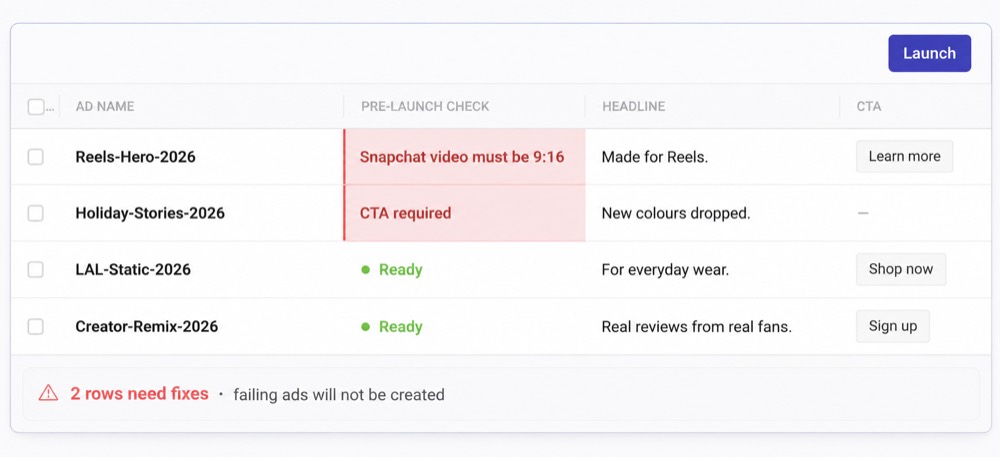
Kitchn validates each Launch Sheet row before the ad is created. If a row fails validation, it enters an error state and the ad is not created.
- Required fields
- Schema rules
- Length and pattern requirements
- URL formatting
- URL-parameter formatting
- Platform-specific specifications
- Meta creative enhancement settings
Kitchn also manages Meta's changing creative enhancement catalogue, with 86 enhancement keys at last count, forcing unmanaged enhancements to opt out unless deliberately enabled.
Adtool controls a lot of the same Meta settings
Adtool takes quality seriously too, with particularly strong controls around Meta creative enhancements: preferences can be set at account or ad-account level and overridden for an individual batch. Naming, UTMs, destinations, site links and schedules can also be applied systematically rather than remembered on every ad, and its preview workflow gives the buyer another point to inspect the batch before publishing.
So the honest difference isn't "Kitchn checks ads and Adtool doesn't." It's that Kitchn has a dedicated row-level structural validation layer around the broader launch data, which matters more when the workflow extends beyond Meta and more fields, platforms and people are involved.
What Kitchn checks before the batch goes out
QA gets used loosely on comparison pages, so here is the specific list. It covers the setup, and it covers the words on the ad.
- Typos and spelling in the ad copy
- Wording the client has approved, and the brand voice they expect
- British or American spelling, whichever the account runs on
- Required fields, character limits and format rules
- Landing page URLs and their tracking parameters
- Creative sized for the placement it will run in
- Meta enhancements nobody on your team switched on
- Ad names that do not follow your conventions
Each problem shows up on the row that caused it, and the batch waits until it is dealt with. Adtool handles naming a different way, at the account level, which is tidier when one account follows one standard.
Client review exists in both products
Adtool is strong here. It generates one preview link containing the ads in the batch, and its current site explicitly positions that link as a way for clients to review and approve creative without needing Meta Business Manager access. That's useful.
Kitchn's review workflow is more granular.
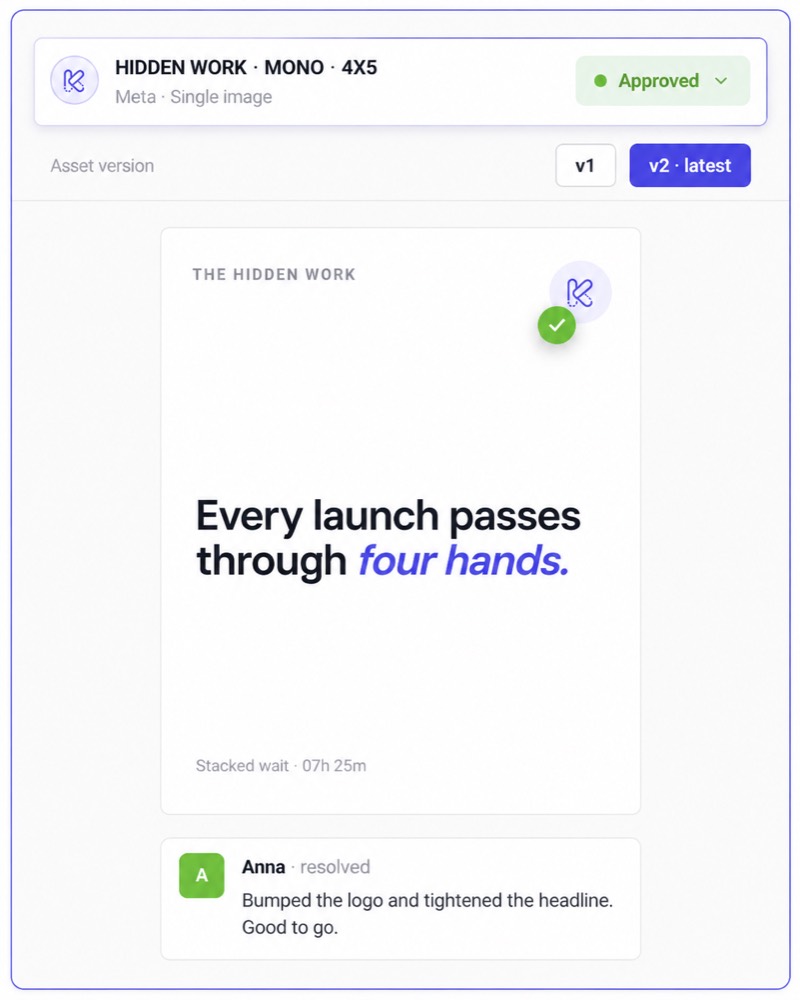
- A configurable approval status
- Comments
- An ad preview
- Change history
That makes the review context live alongside each individual ad rather than only around the batch as a whole.
But Kitchn approval does not block launch
Kitchn can show statuses such as Needs Review, In Progress and Approved, but approval is not a technical publishing gate. An operator can still launch an unapproved row.
So nothing stops an unapproved ad going live. What you get is visibility and accountability around the review. The person running the launch keeps final responsibility for it.
Know what changed, not just what launched
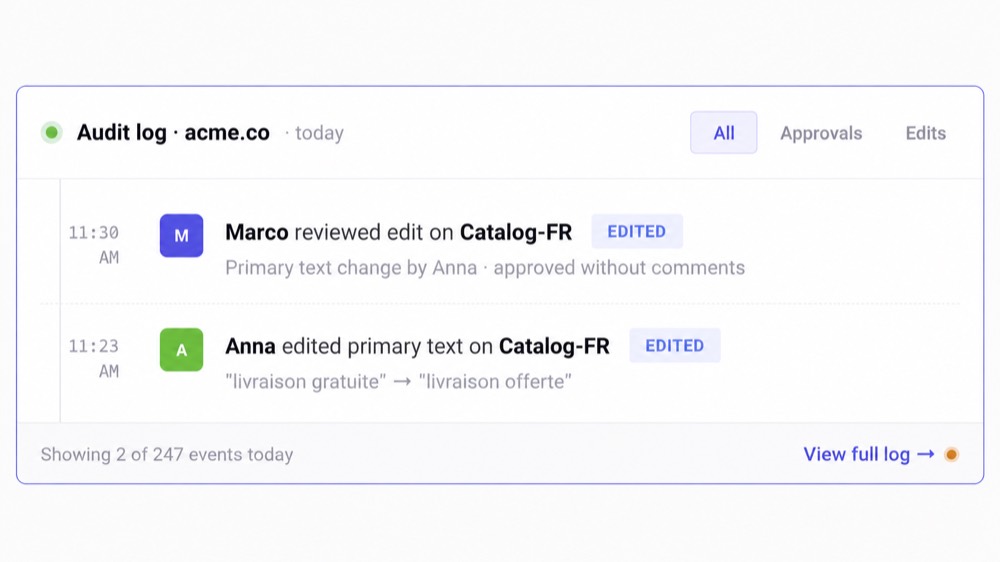
For a single media buyer, this may not matter much. For a paid social operation, it can. Kitchn maintains per-row change history with before-and-after values and batch undo.
Its wider audit trail records operational actions including launches, bulk edits, shares, approval changes, role changes and integrations.
Why is this URL different?
Who changed this before launch?
The answer can live in the system rather than in somebody's memory.
Reuse is strong in both products
Adtool lets teams reuse previous setups: campaign structure, ad-set configuration, naming and settings can be carried forward, then adjusted for the next batch. That's useful for recurring Meta campaigns.
Kitchn also makes launches reusable, but its model works particularly well when the launch needs to move to another account or geography. Copy the Launch Sheet, move it into the new context, remap the relevant ad sets, change whatever is market-specific and launch again.
For multi-account or multi-geo teams, that is a different kind of reuse from simply repeating the same Meta campaign setup.
Adtool stays deliberately focused on Meta
Adtool currently describes itself as a Meta ad launch platform, and its supported placements span the Meta ecosystem, including Facebook, Instagram, Reels, Stories, Threads, Audience Network and Messenger. That focus lets it go deep on Meta-specific workflows.
And for a Meta-only team, more channels doesn't inherently create any value.
If you're not buying on TikTok or Pinterest, you shouldn't care that another tool supports them.
Kitchn extends the launch workflow across eight channels
X can connect to Kitchn but launching is not currently available.
| Meta (Facebook & Instagram) | Generally available |
| TikTok | Generally available |
| Google Ads (Demand Gen) | Generally available |
| Generally available | |
| Snapchat | Generally available |
| Beta | |
| Spotify | Beta |
| AppLovin | Beta |
Functionality varies by platform and Kitchn does not claim identical feature depth across all eight. Google Demand Gen, for example, launches ads paused into existing ad groups rather than creating campaigns from scratch.
The advantage is not checkbox count. It's giving a paid social team a familiar operating workflow when the next account doesn't happen to be Meta.
Adtool publishes its pricing, and it starts where Kitchn does
Adtool now publishes its pricing. Paid plans include unlimited ad launches and unlimited team members, and there is a free tier with three connected ad accounts and 50 lifetime launches.
| Starter · 8 connected Meta ad accounts | €499/month |
| Pro · 20 connected Meta ad accounts | €699/month |
| Scale · 35 connected Meta ad accounts | €1,099/month |
Both publish the same starting price
Kitchn's public paid plans also start at €499/month, built around connected ad accounts and upload volume rather than ad spend. So the useful question is not which is cheaper. It is what you get for roughly the same starting subscription.
Adtool gives you more Meta launch allowance for the starting price
At €499/month, Adtool currently includes eight Meta ad accounts, unlimited launches and unlimited team members. Kitchn's public Launch Team offer starts at the same headline price but is structured differently around ad accounts and monthly upload volume.
If you only need Meta launching and expect to push enormous upload volume, Adtool's pricing model is extremely attractive. Don't hide that. Kitchn has to earn its price through the additional operating layer:
If you don't need those, Adtool may be the cleaner buy.
Where Kitchn starts to pull away
The commercial case for Kitchn becomes stronger when your requirement starts sounding like "we need the team to run paid social consistently" rather than "we need Meta uploads to be faster." That usually means some combination of:
- Multiple media buyers
- Multiple account types
- Multiple channels
- Different client or brand standards
- High creative throughput
- Review before launch
- Repeat launches across markets
- A Head of Paid Social who needs visibility
- Enough complexity that manual QA is becoming a process of its own
That's where the additional structure starts paying for itself.
Which should you choose?
Kitchn is a better fit if
- Your paid social operation extends beyond Meta
- Launch planning already lives heavily in spreadsheets
- You want a dedicated Launch Sheet rather than an upload-first batch builder
- Structural validation needs to happen before each ad is created
- Different ads in a batch need their own review status and comments
- You want before/after history around launch changes
- You regularly repeat launches across accounts, brands or markets
- Creative Reporting should connect back into the same operating system
- Automation and post-launch operational checks matter alongside launching
- The Head of Paid Social needs more visibility into how execution happens
Adtool is a good fit if
- Meta is the platform that matters
- You mainly want finished creative live faster
- Your team launches 100+ Meta ads per month
- Account-level naming, UTMs and enhancement standards cover most of your consistency requirements
- Google Drive is enough for your asset workflow
- Batch preview links give clients enough visibility
- Multi-text variations are important
- Unlimited launch volume matters
- You don't need the broader paid social workflow surrounding each row
Don't switch if Adtool already solves the whole problem
Here is the test. If your team buys almost entirely on Meta, already has a clean creative handoff, doesn't need deeper launch governance or multi-channel execution, is happy with batch preview links, and doesn't need row-level change history or Kitchn's wider reporting and automation stack, then moving tools for the sake of moving tools makes no sense.
Adtool is a focused Meta launcher and its current product is materially stronger than a generic bulk uploader. Keep it if it solves the problem.
Switch when the problem has become bigger than Meta uploading
Kitchn becomes interesting when the organisation has outgrown the idea that launching is just an upload task. The media buyer needs speed. The paid social lead needs consistency. Clients and stakeholders need visibility. The team needs the same operating process to survive more accounts, more markets and more channels.
The question isn't how can we upload Meta ads.
It's how should this team run paid social launches as the operation grows.
Kitchn.io vs Adtool: common questions
Is Kitchn a good Adtool alternative?
Yes, particularly for teams whose requirements extend beyond Meta batch launching into structural QA, row-level collaboration, multi-account workflows, change history and multi-channel execution.
If Meta launching is the only problem, Adtool remains a strong option.
What is the biggest difference between Kitchn and Adtool?
Adtool is a focused Meta ad-launch platform.
Kitchn is a broader paid social launch workflow built around a spreadsheet-like Launch Sheet, structural validation, review and execution across multiple channels.
Can both Kitchn and Adtool launch ads in bulk?
Yes. Both are designed for batch ad creation and launching.
Adtool says its teams regularly launch 50 to 200+ ads in a session and places no hard practical batch limit on the workflow. Kitchn has no row cap in the Launch Sheet and is built for large batches as well.
Does Adtool support client approvals?
Adtool provides a shareable batch preview link that it explicitly positions for client review and approval.
Kitchn gives individual launch rows configurable statuses, comments and preview links. Kitchn approval status does not technically block launch.
Which has better Meta creative-enhancement controls?
Both take the problem seriously. Adtool supports enhancement defaults at account and ad-account level with per-batch overrides.
Kitchn manages its enhancement policy within the Launch Sheet and currently tracks 86 Meta enhancement keys at last count.
The choice should be based on the surrounding workflow rather than pretending only one product can control enhancements.
Which has better naming conventions?
Both support structured naming. Adtool's account-level model is particularly straightforward for Meta agencies that want one recurring standard.
Kitchn uses naming templates per sheet and platform, which can suit teams with several launch contexts inside the same account. Kitchn naming templates are applied but not technically enforced.
Does Kitchn have automatic multi-text combinations like Adtool?
No. Kitchn supports multiple Meta copy fields and bulk editing, but it does not have a general combinatorial generator.
Adtool's dedicated Multi-Text Variations workflow is stronger for this use case.
Which supports more launch channels?
Kitchn. It currently has five generally available launch channels, Meta, TikTok, Google Demand Gen, Pinterest and Snapchat, plus LinkedIn, Spotify and AppLovin in beta.
Adtool's current product is specifically positioned around Meta.
Which is cheaper?
They currently have the same published entry price: €499/month. But the usage model is different.
Adtool Starter includes eight connected Meta accounts with unlimited launches and unlimited team members. Kitchn's entry plan is structured around fewer accounts and monthly upload volume, while including the wider Kitchn workflow.
For a Meta-only launcher, Adtool can therefore be the better commercial value.
Does Kitchn check ad copy before launch?
Yes. It checks the setup, things like required fields, URLs, creative specs and enhancement settings, and it reads the copy too.
A typo or a phrase the client has ruled out shows up on the row that caused it, and the batch waits until it is fixed.
Can I use Adtool and Kitchn together?
Technically, yes, but there is considerable overlap in the Meta launch workflow.
Unlike pairing Kitchn with a dedicated optimisation product, most teams would probably be better served choosing the launch workflow that matches their operating model rather than paying for two launchers.
