
Brauchst du mehr als einen Batch-Launcher für Meta?
Adtool ist dafür gebaut, Meta-Anzeigen schneller zu launchen, und macht diesen Job gut: fertige Creatives hochladen, wiederkehrende Einstellungen anwenden, den Batch in der Vorschau prüfen und Hunderte Anzeigen launchen, ohne jede einzelne im Ads Manager zu bauen. Kitchn löst ein breiteres operatives Problem und gibt Paid-Social-Teams einen strukturierten Workflow, um Anzeigen auf mehreren Kanälen vorzubereiten, zu prüfen, zu validieren und zu launchen.
Die Frage ist also nicht mehr, was günstiger ist, sondern was dasselbe Abo kauft.
- 8 verbundene Meta-Werbekonten
- Unbegrenzte Anzeigen-Launches
- Unbegrenzte Teammitglieder
- Benennung, UTMs und Enhancements auf Kontoebene
- Erzeugung mehrerer Textvarianten
- 8 Launch-Kanäle, davon 3 in Beta
- Strukturelle Validierung in jeder Zeile
- Launch Sheet im Tabellenformat
- Status, Kommentare und Historie pro Zeile
- Creative Reporting und Automatisierung
Wenn Batch-Launching auf Meta das ganze Problem ist, ist Adtool vielleicht alles, was du brauchst.
Wenn der Launch-Workflow selbst über deine gesamte Paid-Social-Operation funktionieren muss, geht Kitchn weiter.
Kitchn vs Adtool: die kurze Antwort
| Wenn du Folgendes brauchst … | Passt besser |
|---|---|
| Große Batches von Meta-Anzeigen schnell launchen | Beide |
| Meta-Benennung, UTMs und Enhancements einmal festlegen und wiederverwenden | Beide |
| Unbegrenzte Meta-Launches in einem bezahlten Tarif bekommen | Adtool |
| Mehrere Textvarianten in einem Meta-Launch erstellen | Adtool |
| Einfache Meta-Defaults auf Kontoebene nutzen | Adtool |
| Launches in einem operativen Arbeitsbereich im Tabellenformat vorbereiten | Kitchn |
| Strukturierte Launch-Daten direkt aus Google Sheets oder Excel einfügen | Kitchn |
| Das strukturelle Setup prüfen, bevor jede Anzeige erstellt wird | Kitchn |
| Status, Kommentare und Änderungshistorie an einzelnen Anzeigen halten | Kitchn |
| Launches über Konten und Märkte wiederholen | Kitchn |
| Über Meta hinaus auf TikTok, Pinterest, Snapchat oder Google Demand Gen launchen | Kitchn |
| Creative Reporting und operative Automatisierung ins selbe System holen | Kitchn |
Der Unterschied ist nicht, ob eines der Produkte Anzeigen in Bulk hochladen kann. Das können beide. Der Unterschied ist, wie viel von deiner Paid-Social-Operation rund um diesen Batch existieren muss.
Adtool ist ein sehr guter Meta-Launcher
Adtool beschreibt sich als Plattform zum Launchen von Meta-Anzeigen für Agenturen und Inhouse-Performance-Teams. Der aktuelle Workflow umfasst:
- Erstellen von Anzeigen in Batches
- Automatische Gruppierung von Creatives
- Namenskonventionen
- UTM-Defaults
- Steuerung der Creative Enhancements
- Mehrere Textvarianten
- Zeitplanung von Anzeigen
- Import aus Google Drive
- Wiederverwendung von Kampagnen und Anzeigengruppen
- Vorschau-Links für Kunden
- Bearbeitung pro Anzeige
Es unterstützt Meta-Formate wie Bild, Video, Karussell, Flexible, Post-ID, Partnerschaft, Leadformular, Veranstaltungszusage und App-Werbung. Teams launchen regelmäßig 50 bis über 200 Anzeigen in einem Batch, und laut Adtool gibt es keine harte Batch-Grenze. Wenn dein Prozess lautet: fertiges Creative rein in Meta und live, hat Adtool dafür einen kurzen Weg gebaut.
Kitchn ist für den Moment gebaut, in dem der Launch zum Arbeitsprozess wird
Das Problem verändert sich, wenn mehr Leute und Konten beteiligt sind. Das Creative muss weiterhin gelauncht werden. Aber jetzt muss auch jemand wissen, was bereit ist, was Fehler hat, was geprüft wurde, was sich geändert hat und wer es geändert hat.
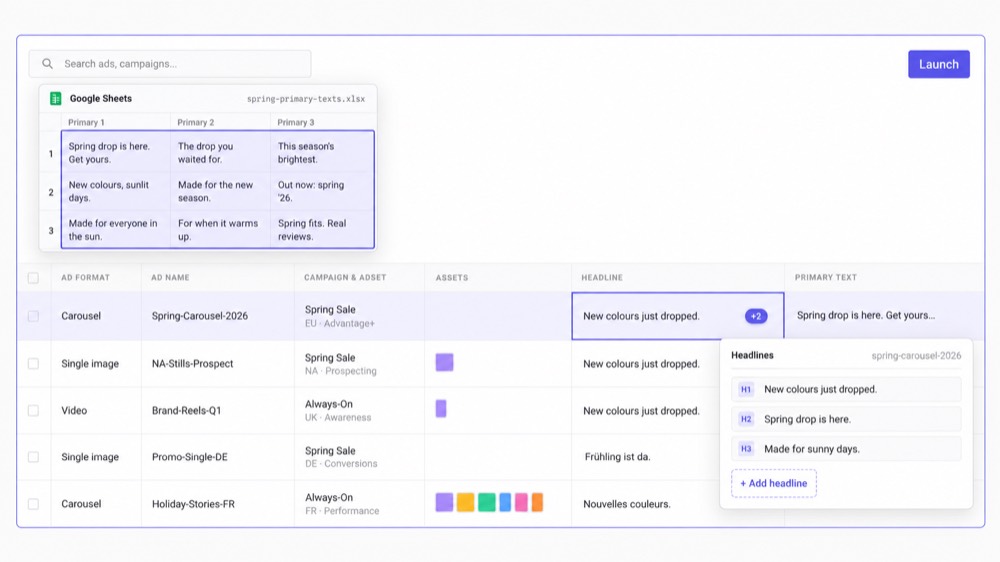
Das Kernprodukt von Kitchn ist das Launch Sheet. Eine Zeile ist eine Anzeige, mit Creative, Text, Ziel-URL sowie Kampagnen- und Anzeigengruppen-Infos in Spalten.
Das Team arbeitet am Batch als strukturiertem operativem Arbeitsbereich, nicht nur als Gruppe von Creative-Dateien, die auf den Upload warten.
Kitchn.io vs Adtool auf einen Blick
| Funktion | Kitchn.io | Adtool |
|---|---|---|
| Hauptfokus | Paid-Social-Launch-Operations | Batch-Launching auf Meta |
| Bulk-Erstellung von Anzeigen | ✓Ja | ✓Ja |
| Typischer Workflow | Sheet, Review, Validierung, Launch | Creative-Upload, Konfiguration, Vorschau, Launch |
| Launch Sheet im Tabellenformat | ✓Ja | ✕Kein vergleichbarer Sheet-Arbeitsbereich dokumentiert |
| Aus Google Sheets oder Excel einfügen | ✓Ja | ✕Kein vergleichbarer Workflow zum Einfügen aus Spreadsheets dokumentiert |
| Bearbeitung pro Anzeige | ✓Ja | ✓Ja |
| Bulk-Bearbeitung | ✓Ja | ✓Ja |
| Gruppierung von Creatives | ✓Gruppierung über Tokens im Dateinamen | ✓Automatische Gruppierung nach Platzierung und Format |
| Assets aus Google Drive | ✓Ja | ✓Ja |
| Assets aus Dropbox | ✓Ja | ✕Derzeit nicht dokumentiert |
| Assets aus Frame.io | ✓Ja | ✕Derzeit nicht dokumentiert |
| Assets aus SharePoint | ✓Ja | ✕Derzeit nicht dokumentiert |
| Namenstemplates | ✓Ja | ✓Ja |
| Benennung beim Launch hart erzwungen | ✕Nein | Adtool wendet konfigurierte Namenskonventionen an |
| Steuerung der Creative Enhancements | ✓Ja | ✓Ja |
| UTM-Setup | ✓Ja | ✓Ja |
| Wiederverwendbare Defaults | ✓Auf Sheet-Ebene | ✓Defaults pro Konto und Werbekonto |
| Frühere Launches wiederverwenden | ✓Ja | ✓Ja |
| Mehrere Textvarianten | Unterstützte Textfelder, aber kein Generator für Kombinationen | ✓Eigener Workflow für Varianten |
| Validierung vor dem Launch | ✓Fehlerhafte Zeilen werden nicht erstellt | ✕Keine vergleichbare strukturelle QA-Ebene pro Zeile dokumentiert |
| Anzeigenvorschau | ✓Ja | ✓Ja |
| Review durch den Kunden | ✓Ja | ✓Vorschau-Links pro Batch |
| Freigabestatus pro Zeile | ✓Ja | ✕Kein vergleichbares Statussystem pro Zeile dokumentiert |
| Kommentare an einzelnen Launch-Zeilen | ✓Ja | ✕Nichts Vergleichbares dokumentiert |
| Harte Freigabesperre | ✕Nein | ✕Keine harte Sperre beim Veröffentlichen öffentlich dokumentiert |
| Vorher/Nachher-Historie pro Zeile | ✓Ja | Historie von Batches und Meta statt vergleichbarer Änderungshistorie pro Zeile |
| Launchen auf mehreren Kanälen | ✓8 Kanäle, davon 3 in Beta | Meta |
| Creative Reporting | ✓Ja | ✕Nicht als Teil des Kern-Launchers positioniert |
| Automatisierungsregeln für Paid Social | ✓Ja | ✕Nicht das Kernprodukt |
| Öffentlicher Einstiegspreis | 499 €/Monat | 499 €/Monat |
Das Launch Sheet verändert, wie der Batch gebaut wird
Adtool setzt naturgemäß beim Creative an: fertige Assets hochladen, Adtool gruppieren lassen, die wiederkehrenden Meta-Einstellungen konfigurieren und launchen. Kitchn kann Creatives ebenfalls in Bulk importieren, gibt dem Buyer aber zusätzlich ein Sheet, in dem der Rest des Launches als strukturierte Daten bearbeitet werden kann.
- Primärtexte
- Headlines
- URLs
- CTAs
- Tracking
- Anzeigen-Setup
- Mehrere Anzeigengruppen
Für Teams, deren Creatives, Texte und Testpläne ohnehin in Spreadsheets liegen, fällt damit ein weiterer Übersetzungsschritt aus dem Prozess.
Adtool ist wohl einfacher, wenn dein Workflow nur Meta umfasst
Die Defaults von Adtool auf Kontoebene sind wirklich nützlich: Ein Team konfiguriert wiederkehrende Benennung, UTMs, Enhancements, Ziel-URLs, Sitelinks und weiteres Meta-Setup und wendet diese Einstellungen dann auf künftige Batches an. Für eine Agentur, bei der ein Meta-Konto im Großen und Ganzen einem einheitlichen Setup folgt, ist das ein sehr sauberer Workflow.
Kitchn nutzt stattdessen Defaults auf Sheet-Ebene. Das kann flexibler sein, wenn ein Konto mehrere unterschiedliche Launch-Kontexte, Märkte oder Workflows enthält, heißt aber auch, dass Kitchn nicht einfach eine dauerhafte Kontokonfiguration überall übernimmt. Keiner der beiden Ansätze gewinnt immer. Die Struktur deiner Operation entscheidet.
Adtool erzeugt Textvarianten stärker von Haus aus
Mit dem Feature Multi-Text Variations von Adtool legen Teams Sets aus Headlines, Haupttexten und Beschreibungen fest, wenden sie auf mehrere Anzeigen an und lassen Adtool diese Kombinationen im Meta-Launch-Workflow abwickeln.
Kitchn unterstützt mehrere Textfelder pro Meta-Anzeige und lässt Teams Varianten über Zeilen hinweg in Bulk bearbeiten. Kitchn hat aber keinen allgemeinen Generator, der automatisch jede mögliche Variante erzeugt. Wenn die automatische Erzeugung von Textkombinationen zentral dafür ist, wie dein Team Meta-Anzeigen testet, hat Adtool das gezielter gebaute Feature.
Kitchn ergänzt eine strukturelle Schranke vor dem Erstellen
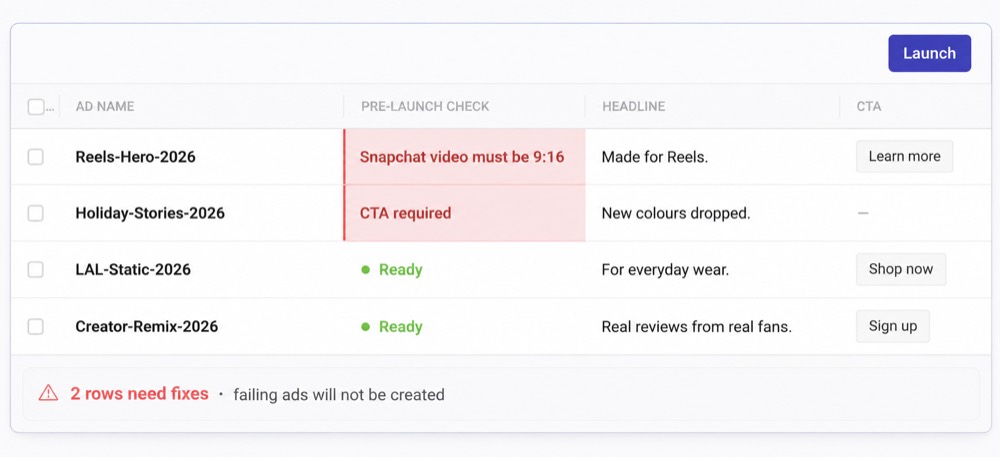
Kitchn validiert jede Zeile des Launch Sheets, bevor die Anzeige erstellt wird. Besteht eine Zeile die Validierung nicht, geht sie in einen Fehlerstatus, und die Anzeige wird nicht erstellt.
- Pflichtfelder
- Schema-Regeln
- Vorgaben zu Länge und Muster
- URL-Formatierung
- Formatierung der URL-Parameter
- Plattformspezifische Specs
- Einstellungen für Metas Creative Enhancements
Kitchn verwaltet außerdem Metas wechselnden Katalog an Creative Enhancements, zuletzt 86 Enhancement-Schlüssel, und schaltet nicht verwaltete Enhancements zwangsweise ab, solange sie nicht bewusst aktiviert wurden.
Adtool steuert viele derselben Meta-Einstellungen
Auch Adtool nimmt Qualität ernst, mit besonders starken Steuerungen für Metas Creative Enhancements: Präferenzen lassen sich auf Konto- oder Werbekonto-Ebene festlegen und für einen einzelnen Batch überschreiben. Benennung, UTMs, Ziel-URLs, Sitelinks und Zeitpläne lassen sich ebenfalls systematisch anwenden, statt bei jeder Anzeige daran denken zu müssen, und der Vorschau-Workflow gibt dem Buyer einen weiteren Punkt, um den Batch vor dem Veröffentlichen zu prüfen.
Der ehrliche Unterschied ist also nicht „Kitchn prüft Anzeigen und Adtool nicht“. Es ist, dass Kitchn eine eigene strukturelle Validierungsebene pro Zeile für die breiteren Launch-Daten hat, die umso wichtiger wird, wenn der Workflow über Meta hinausgeht und mehr Felder, Plattformen und Leute beteiligt sind.
Was Kitchn prüft, bevor der Batch rausgeht
QA wird auf Vergleichsseiten locker verwendet, deshalb hier die konkrete Liste. Sie deckt das Setup ab und die Worte in der Anzeige.
- Tippfehler und Rechtschreibung im Anzeigentext
- Formulierungen, die der Kunde freigegeben hat, und die Markenstimme, die er erwartet
- Britische oder amerikanische Schreibweise, je nachdem, womit das Konto arbeitet
- Pflichtfelder, Zeichenlimits und Formatregeln
- Landingpage-URLs und ihre Tracking-Parameter
- Creatives im richtigen Format für die Platzierung, in der sie laufen
- Meta-Enhancements, die niemand in deinem Team eingeschaltet hat
- Anzeigennamen, die nicht deinen Konventionen folgen
Jedes Problem taucht in der Zeile auf, die es verursacht hat, und der Batch wartet, bis es erledigt ist. Adtool löst die Benennung anders, auf Kontoebene, was aufgeräumter ist, wenn ein Konto einem Standard folgt.
Review durch Kunden gibt es in beiden Produkten
Adtool ist hier stark. Es erzeugt einen Vorschau-Link mit den Anzeigen des Batches, und die aktuelle Website positioniert diesen Link ausdrücklich als Weg, wie Kunden Creatives prüfen und freigeben können, ohne Zugang zum Meta Business Manager zu brauchen. Das ist nützlich.
Der Review-Workflow von Kitchn ist feiner.
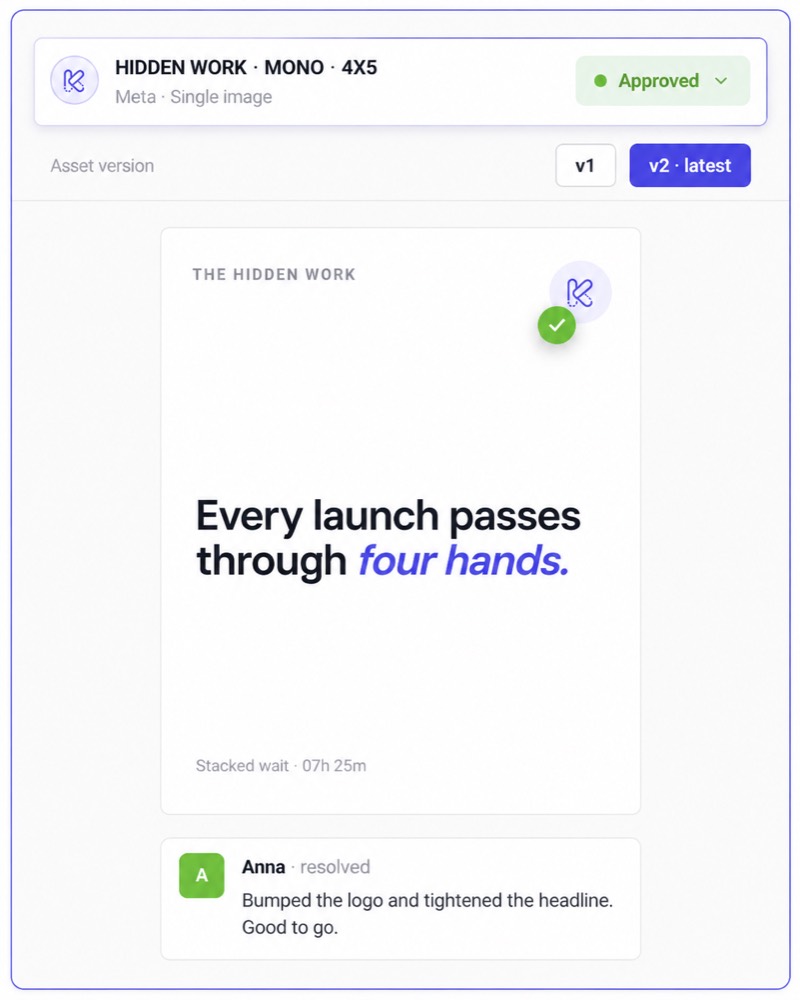
- Einen konfigurierbaren Freigabestatus
- Kommentare
- Eine Anzeigenvorschau
- Änderungshistorie
So lebt der Review-Kontext neben jeder einzelnen Anzeige, nicht nur rund um den Batch als Ganzes.
Aber die Freigabe in Kitchn sperrt den Launch nicht
Kitchn kann Status wie Needs Review, In Progress und Approved anzeigen, aber die Freigabe ist keine technische Sperre beim Veröffentlichen. Wer launcht, kann eine nicht freigegebene Zeile trotzdem launchen.
Nichts hält also eine nicht freigegebene Anzeige davon ab, live zu gehen. Was du bekommst, sind Sichtbarkeit und Verantwortlichkeit rund um das Review. Die Person, die den Launch fährt, behält die finale Verantwortung dafür.
Wissen, was sich geändert hat, nicht nur, was gelauncht wurde
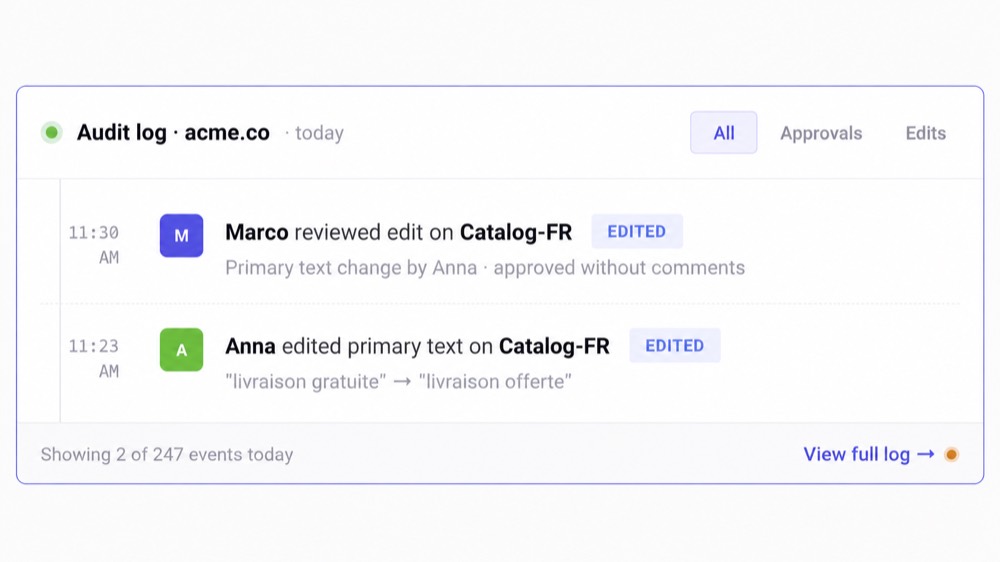
Für einen einzelnen Media Buyer zählt das vielleicht wenig. Für eine Paid-Social-Operation kann es zählen. Kitchn führt pro Zeile eine Änderungshistorie mit Vorher- und Nachher-Werten und bietet ein Batch-Undo.
Sein übergreifender Audit-Trail protokolliert operative Aktionen wie Launches, Bulk-Änderungen, Freigaben zum Teilen, Änderungen am Freigabestatus, Rollenänderungen und Integrationen.
Warum ist diese URL anders?
Wer hat das vor dem Launch geändert?
Die Antwort kann im System stehen statt im Gedächtnis von jemandem.
Wiederverwendung ist in beiden Produkten stark
Mit Adtool verwenden Teams frühere Setups wieder: Kampagnenstruktur, Anzeigengruppen-Konfiguration, Benennung und Einstellungen lassen sich übernehmen und für den nächsten Batch anpassen. Das ist nützlich für wiederkehrende Meta-Kampagnen.
Auch Kitchn macht Launches wiederverwendbar, aber sein Modell funktioniert besonders gut, wenn der Launch in ein anderes Konto oder Land wandern muss. Launch Sheet kopieren, in den neuen Kontext verschieben, die passenden Anzeigengruppen neu zuordnen, Marktspezifisches ändern und erneut launchen.
Für Teams mit mehreren Konten oder Ländern ist das eine andere Art der Wiederverwendung, als dasselbe Meta-Kampagnen-Setup einfach zu wiederholen.
Adtool bleibt bewusst auf Meta fokussiert
Adtool beschreibt sich derzeit als Plattform zum Launchen von Meta-Anzeigen, und seine unterstützten Platzierungen decken das Meta-Ökosystem ab, darunter Facebook, Instagram, Reels, Stories, Threads, Audience Network und Messenger. Dieser Fokus erlaubt es, tief in Meta-spezifische Workflows zu gehen.
Und für ein Team, das nur Meta macht, bringen mehr Kanäle an sich keinen Wert.
Wenn du nicht auf TikTok oder Pinterest einkaufst, sollte es dir egal sein, dass ein anderes Tool sie unterstützt.
Kitchn erweitert den Launch-Workflow auf acht Kanäle
X lässt sich mit Kitchn verbinden, aber das Launchen ist derzeit nicht verfügbar.
| Meta (Facebook & Instagram) | Allgemein verfügbar |
| TikTok | Allgemein verfügbar |
| Google Ads (Demand Gen) | Allgemein verfügbar |
| Allgemein verfügbar | |
| Snapchat | Allgemein verfügbar |
| Beta | |
| Spotify | Beta |
| AppLovin | Beta |
Der Funktionsumfang unterscheidet sich je nach Plattform, und Kitchn behauptet nicht, auf allen acht dieselbe Tiefe zu haben. Google Demand Gen zum Beispiel launcht Anzeigen pausiert in bestehende Anzeigengruppen, statt Kampagnen von Grund auf zu erstellen.
Der Vorteil ist nicht die Zahl der Häkchen. Es ist ein vertrauter Arbeits-Workflow für ein Paid-Social-Team, wenn das nächste Konto zufällig nicht Meta ist.
Adtool veröffentlicht seine Preise, und sie beginnen dort, wo Kitchn beginnt
Adtool veröffentlicht seine Preise inzwischen. Bezahlte Tarife enthalten unbegrenzte Anzeigen-Launches und unbegrenzte Teammitglieder, und es gibt eine kostenlose Stufe mit drei verbundenen Werbekonten und 50 Launches insgesamt.
| Starter · 8 verbundene Meta-Werbekonten | 499 €/Monat |
| Pro · 20 verbundene Meta-Werbekonten | 699 €/Monat |
| Scale · 35 verbundene Meta-Werbekonten | 1.099 €/Monat |
Beide veröffentlichen denselben Einstiegspreis
Auch die öffentlichen bezahlten Tarife von Kitchn starten bei 499 €/Monat, aufgebaut um verbundene Werbekonten und Upload-Volumen statt um den Ad Spend. Die nützliche Frage ist also nicht, was günstiger ist. Sondern was du für ungefähr dasselbe Einstiegsabo bekommst.
Adtool gibt dir für den Einstiegspreis mehr Meta-Launch-Kontingent
Für 499 €/Monat enthält Adtool derzeit acht Meta-Werbekonten, unbegrenzte Launches und unbegrenzte Teammitglieder. Das öffentliche Launch-Team-Angebot von Kitchn startet beim selben Preis, ist aber anders um Werbekonten und monatliches Upload-Volumen aufgebaut.
Wenn du nur Meta-Launching brauchst und ein enormes Upload-Volumen erwartest, ist das Preismodell von Adtool extrem attraktiv. Das sollte man nicht verstecken. Kitchn muss seinen Preis über die zusätzliche operative Ebene verdienen:
Wenn du das nicht brauchst, ist Adtool womöglich der sauberere Kauf.
Wo Kitchn sich absetzt
Das wirtschaftliche Argument für Kitchn wird stärker, wenn deine Anforderung eher nach „Das Team soll Paid Social einheitlich fahren“ klingt als nach „Die Meta-Uploads sollen schneller gehen“. Meist heißt das eine Kombination aus:
- Mehreren Media Buyern
- Mehreren Kontotypen
- Mehreren Kanälen
- Unterschiedlichen Standards von Kunden oder Marken
- Hohem Creative-Durchsatz
- Review vor dem Launch
- Wiederholten Launches über Märkte
- Einem Head of Paid Social, der Einblick braucht
- So viel Komplexität, dass die manuelle QA zu einem eigenen Prozess wird
Genau dort beginnt sich die zusätzliche Struktur auszuzahlen.
Was solltest du wählen?
Kitchn passt besser, wenn
- deine Paid-Social-Operation über Meta hinausgeht
- die Launch-Planung ohnehin größtenteils in Spreadsheets liegt
- du ein eigenes Launch Sheet statt eines Batch-Builders willst, der beim Upload ansetzt
- die strukturelle Validierung vor dem Erstellen jeder Anzeige passieren muss
- verschiedene Anzeigen in einem Batch ihren eigenen Review-Status und eigene Kommentare brauchen
- du eine Vorher/Nachher-Historie zu Launch-Änderungen willst
- du Launches regelmäßig über Konten, Marken oder Märkte wiederholst
- das Creative Reporting in dasselbe Arbeitssystem zurückfließen soll
- Automatisierung und operative Checks nach dem Launch neben dem Launchen zählen
- der Head of Paid Social mehr Einblick braucht, wie die Umsetzung läuft
Adtool passt gut, wenn
- Meta die Plattform ist, auf die es ankommt
- du vor allem fertige Creatives schneller live bringen willst
- dein Team mehr als 100 Meta-Anzeigen pro Monat launcht
- Benennung, UTMs und Enhancement-Standards auf Kontoebene die meisten deiner Anforderungen an Einheitlichkeit abdecken
- Google Drive für deinen Asset-Workflow reicht
- Vorschau-Links pro Batch Kunden genug Einblick geben
- mehrere Textvarianten wichtig sind
- ein unbegrenztes Launch-Volumen zählt
- du den breiteren Paid-Social-Workflow rund um jede Zeile nicht brauchst
Wechsle nicht, wenn Adtool das ganze Problem schon löst
Hier ist der Test. Wenn dein Team fast nur auf Meta einkauft, schon eine saubere Übergabe der Creatives hat, keine tiefere Launch-Kontrolle oder Umsetzung auf mehreren Kanälen braucht, mit Vorschau-Links pro Batch zufrieden ist und weder eine Änderungshistorie pro Zeile noch den breiteren Reporting- und Automatisierungs-Stack von Kitchn braucht, dann ergibt ein Toolwechsel um seiner selbst willen keinen Sinn.
Adtool ist ein fokussierter Meta-Launcher, und das aktuelle Produkt ist deutlich stärker als ein generischer Bulk-Uploader. Behalte es, wenn es das Problem löst.
Wechsle, wenn das Problem größer geworden ist als der Upload auf Meta
Kitchn wird interessant, wenn die Organisation der Vorstellung entwachsen ist, Launchen sei nur eine Upload-Aufgabe. Der Media Buyer braucht Tempo. Der Paid-Social-Lead braucht Einheitlichkeit. Kunden und Stakeholder brauchen Einblick. Das Team braucht einen Arbeitsprozess, der mehr Konten, mehr Märkte und mehr Kanäle übersteht.
Die Frage ist nicht, wie wir Meta-Anzeigen hochladen.
Sondern wie dieses Team Paid-Social-Launches fahren sollte, während die Operation wächst.
Kitchn.io vs Adtool: häufige Fragen
Ist Kitchn eine gute Alternative zu Adtool?
Ja, besonders für Teams, deren Anforderungen über Batch-Launching auf Meta hinausgehen: strukturelle QA, Zusammenarbeit pro Zeile, Workflows über mehrere Konten, Änderungshistorie und Umsetzung auf mehreren Kanälen.
Wenn das Launchen auf Meta das einzige Problem ist, bleibt Adtool eine starke Option.
Was ist der größte Unterschied zwischen Kitchn und Adtool?
Adtool ist eine fokussierte Plattform zum Launchen von Meta-Anzeigen.
Kitchn ist ein breiterer Paid-Social-Launch-Workflow, gebaut um ein Launch Sheet im Tabellenformat, strukturelle Validierung, Review und Umsetzung auf mehreren Kanälen.
Können Kitchn und Adtool beide Anzeigen in Bulk launchen?
Ja. Beide sind für das Erstellen und Launchen von Anzeigen in Batches gebaut.
Adtool sagt, seine Teams launchen regelmäßig 50 bis über 200 Anzeigen in einer Sitzung, und setzt dem Workflow praktisch keine harte Batch-Grenze. Kitchn hat keine Zeilengrenze im Launch Sheet und ist ebenfalls für große Batches gebaut.
Unterstützt Adtool Kundenfreigaben?
Adtool bietet einen teilbaren Vorschau-Link pro Batch, den es ausdrücklich für Review und Freigabe durch Kunden positioniert.
Kitchn gibt einzelnen Launch-Zeilen konfigurierbare Status, Kommentare und Vorschau-Links. Der Freigabestatus in Kitchn sperrt den Launch technisch nicht.
Welches hat die bessere Steuerung von Metas Creative Enhancements?
Beide nehmen das Problem ernst. Adtool unterstützt Enhancement-Defaults auf Konto- und Werbekonto-Ebene mit Überschreibungen pro Batch.
Kitchn steuert seine Enhancement-Richtlinie im Launch Sheet und verfolgt derzeit zuletzt 86 Meta-Enhancement-Schlüssel.
Die Wahl sollte vom Workflow drumherum abhängen, statt so zu tun, als könne nur eines der Produkte Enhancements steuern.
Welches hat die besseren Namenskonventionen?
Beide unterstützen strukturierte Benennung. Das Modell von Adtool auf Kontoebene ist besonders unkompliziert für Meta-Agenturen, die einen wiederkehrenden Standard wollen.
Kitchn nutzt Namenstemplates pro Sheet und Plattform, was zu Teams passen kann, die mehrere Launch-Kontexte im selben Konto haben. Namenstemplates in Kitchn werden angewendet, aber nicht technisch erzwungen.
Hat Kitchn automatische Kombinationen mehrerer Texte wie Adtool?
Nein. Kitchn unterstützt mehrere Textfelder für Meta und Bulk-Bearbeitung, hat aber keinen allgemeinen Generator für Kombinationen.
Der eigene Workflow Multi-Text Variations von Adtool ist für diesen Anwendungsfall stärker.
Welches unterstützt mehr Launch-Kanäle?
Kitchn. Es hat derzeit fünf allgemein verfügbare Launch-Kanäle, Meta, TikTok, Google Demand Gen, Pinterest und Snapchat, dazu LinkedIn, Spotify und AppLovin in Beta.
Das aktuelle Produkt von Adtool ist gezielt auf Meta ausgerichtet.
Was ist günstiger?
Beide haben derzeit denselben veröffentlichten Einstiegspreis: 499 €/Monat. Das Nutzungsmodell ist aber unterschiedlich.
Adtool Starter enthält acht verbundene Meta-Konten mit unbegrenzten Launches und unbegrenzten Teammitgliedern. Der Einstiegstarif von Kitchn ist um weniger Konten und ein monatliches Upload-Volumen aufgebaut und enthält dafür den breiteren Kitchn-Workflow.
Als reiner Meta-Launcher kann Adtool daher das bessere Preis-Leistungs-Verhältnis bieten.
Prüft Kitchn die Anzeigentexte vor dem Launch?
Ja. Kitchn prüft das Setup, also Dinge wie Pflichtfelder, URLs, Creative-Specs und Enhancement-Einstellungen, und liest auch die Texte.
Ein Tippfehler oder eine Formulierung, die der Kunde ausgeschlossen hat, taucht in der Zeile auf, die ihn verursacht hat, und der Batch wartet, bis er behoben ist.
Kann ich Adtool und Kitchn zusammen nutzen?
Technisch ja, aber im Meta-Launch-Workflow überschneiden sie sich stark.
Anders als bei der Kombination von Kitchn mit einem eigenen Optimierungsprodukt fahren die meisten Teams wahrscheinlich besser damit, den Launch-Workflow zu wählen, der zu ihrem Arbeitsmodell passt, statt für zwei Launcher zu zahlen.
So passt Kitchn zu deinem Workflow
Geh mit uns die Workflows deines Teams durch.
So funktioniert Kitchn →