
Automate TikTok campaigns without the manual ad ops
TikTok rewards creative velocity. Your media buyers shouldn't have to pay for that velocity with hours of repetitive uploading, setup and reporting. Kitchn.io helps you prepare and launch TikTok ads in bulk, automate repeatable campaign actions and analyse creative performance from one operational workflow.
Automate TikTok campaigns with Kitchn.io
TikTok automation shouldn't mean handing every media-buying decision to an algorithm. Kitchn focuses on the repetitive operational work around your campaigns.
- Prepare large TikTok ad batches
- Import creative in bulk
- Paste structured launch data from Sheets or Excel
- Bulk edit ads before launch
- Reuse recurring setup
- Launch into existing TikTok campaign structures
- Run rule-based actions on campaigns, ad groups and ads
- Send performance alerts to Slack
- Build TikTok creative reports
The media buyer keeps control of the strategy. Kitchn removes more of the mechanical work around executing it.
Launch TikTok ads in bulk
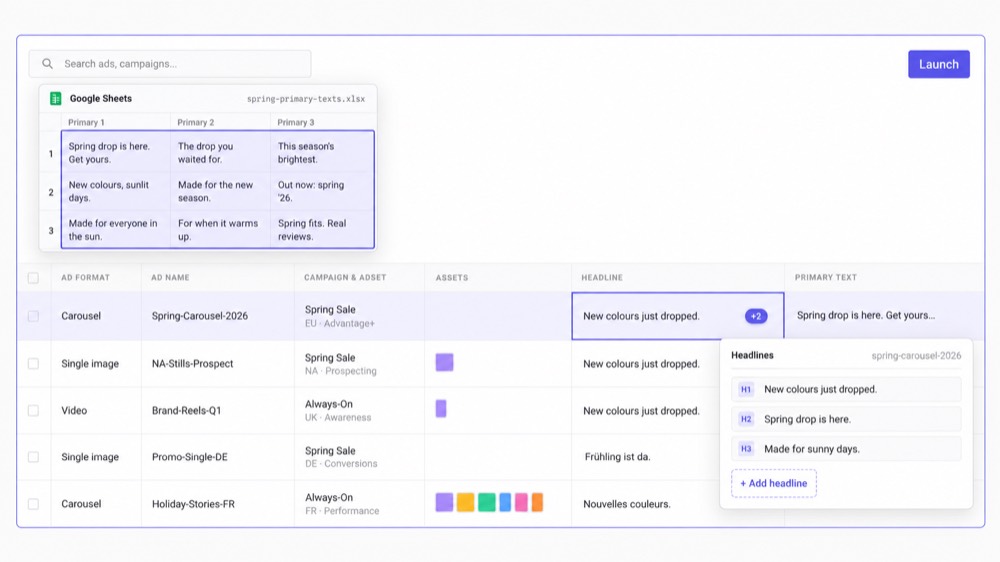
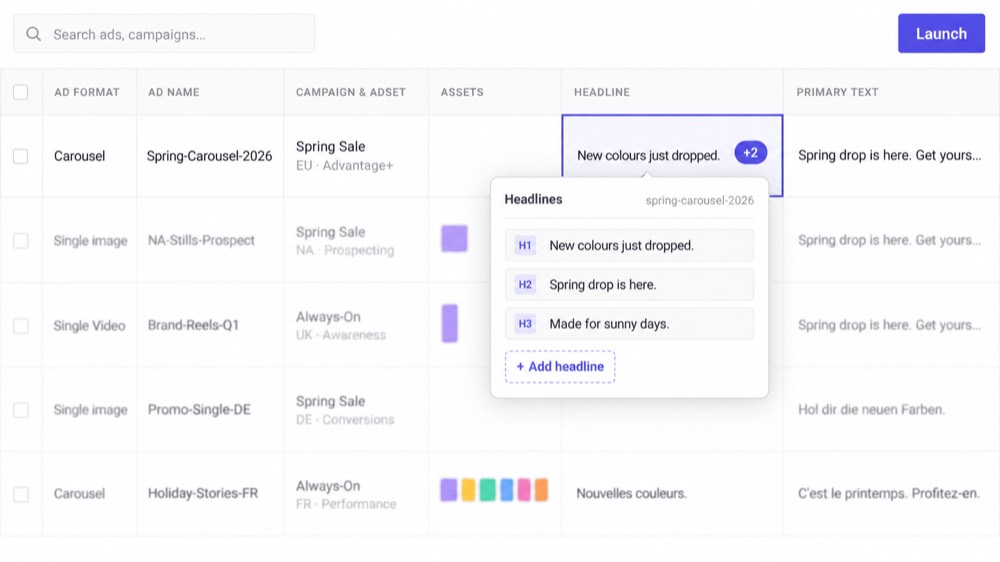
Creative testing gets expensive operationally when every new concept means another trip through TikTok Ads Manager. Kitchn gives you a spreadsheet-like Launch Sheet where ads are prepared as structured rows. One row is one ad.
Bring the creative in bulk.
Paste the launch data.
Edit multiple rows together.
Review the batch.
Launch.
Instead of recreating the same setup ad by ad, the team works across the launch as a single operating grid.
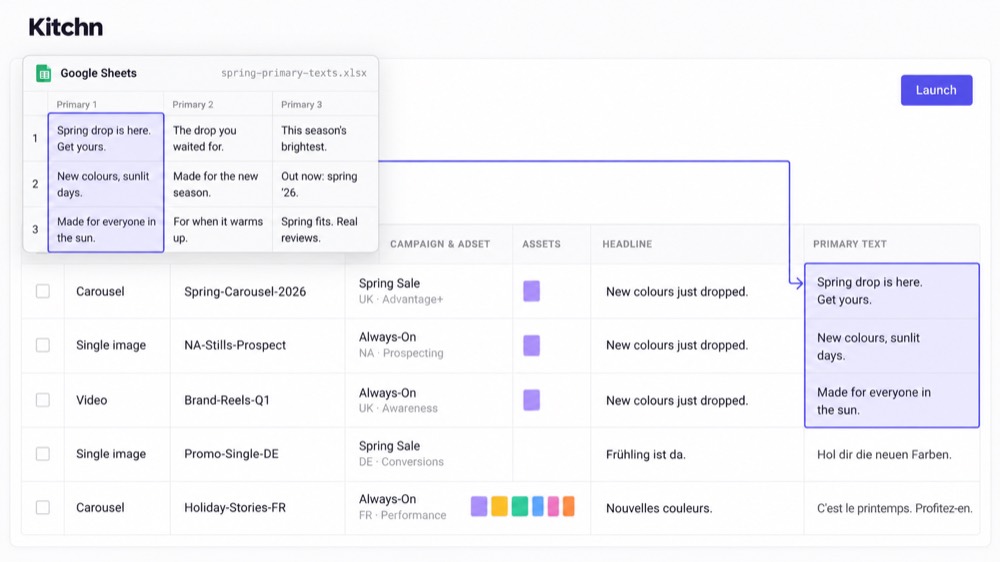
Bring your TikTok launch plan from the spreadsheet
A lot of paid social work already starts in Google Sheets or Excel. Creative names, copy, landing pages, testing variables, tracking. Kitchn lets you paste that structured data directly into the Launch Sheet, including full spreadsheet-style matrices and multi-line fields.
You can also paste data copied from tools such as Airtable or Notion where it is available in a compatible tabular format. They don't need to become separate Kitchn integrations for the workflow to work. The important part is removing another manual translation step between the plan and the launch.
Import TikTok creative from the tools your team already uses
Finished creative doesn't need to be downloaded and re-uploaded one file at a time. Kitchn supports asset workflows including:
For larger batches, assets can also be grouped using filename tokens. That makes it easier to move a high-volume creative pipeline into the media-buying workflow without rebuilding the creative-production process itself.
Automate repetitive TikTok campaign operations
Kitchn's Rule Engine works across TikTok campaigns, ad groups and ads. Set the conditions your team cares about and let Kitchn monitor them on a schedule.
For TikTok, rules can trigger actions including:
- Pause
- Slack notification
- Webhook
That makes rules useful for operating procedures such as “if this condition happens, pause the entity and tell the team”, or “if performance moves outside our threshold, send the information into the workflow where we can act on it”.
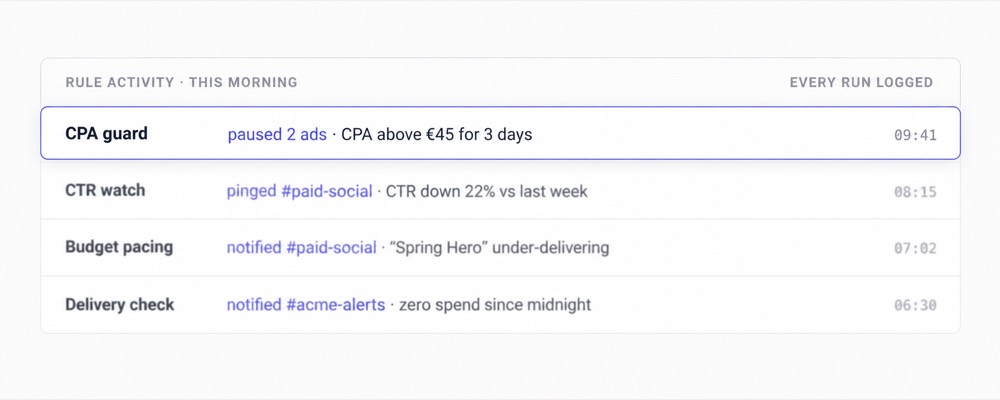
Keep TikTok automation deterministic
The Kitchn approach to automation is deliberately rule-based. Your team decides what should be monitored, which conditions matter, and what should happen when those conditions are met.
Rules run on a recurring schedule, so routine campaign monitoring continues without somebody manually checking the same conditions throughout the day.
You're automating the procedure.
Not outsourcing the strategy.
Launch into the TikTok structures you already control
Kitchn isn't designed to invent your TikTok campaign architecture from scratch. Your media buyer decides the structure. Kitchn helps execute within it.
Ads can be created into existing TikTok ad groups. When a new ad group is needed, Kitchn can use an existing structure as the basis for duplication, including supported Smart+ workflows. That keeps the campaign strategy with the person responsible for performance while reducing the execution work required to repeat it.
TikTok creative reporting that connects performance back to the ads
More creative tests only matter if your team can understand what is actually working. Kitchn Creative Reporting supports TikTok alongside Meta, Google Ads and Pinterest. Build reusable views around:
- Ad
- Ad name
- Kitchn creative
- Custom dimensions
Custom dimensions can be derived from naming conventions using techniques such as splitting, matching, regex and formulas. That lets teams analyse the testing variables they actually care about instead of relying only on the hierarchy available inside the ad platform.
Find winning TikTok creative faster
Creative reports can include:
- Calculated metrics
- Conditional formatting
- Top and bottom performer filters
- Ad screenshots
- Different reporting views
- Shared reports
The screenshot library makes the analysis practical. Instead of asking what UGC_Hook03_V7 was again, the performance data sits alongside the creative itself. That makes it easier for media buyers and creative teams to turn results into the next testing brief.
Connect TikTok reporting to the rest of your workflow
Your reporting workflow doesn't have to stop inside Kitchn. Google Sheets read and write is available through Kitchn Automations, and webhooks can send information into other systems.
Move faster when creative volume increases
TikTok's creative demands expose an operational bottleneck quickly. More testing means more files, ads, copy variations, launch setup, checks, reporting and media-buyer time. Kitchn is designed so output can increase without the manual workload increasing at the same rate.



“With Kitchn.io we can handle tasks that would otherwise require a much bigger team: automated creative reports, and bulk-creating ads across 10+ countries and accounts. The customizability and flexibility of the platform definitely stands out.”
Three ways to automate your TikTok workflow
Launch TikTok ads faster
Prepare, edit and launch large creative batches without building every ad manually.Explore high-volume launchingAutomate TikTok campaign tasks
Use rule-based monitoring to take repeatable actions and notify your team when defined conditions are met.Explore AutomationsAnalyse TikTok creative performance
Turn TikTok performance data into reusable creative reports that show the team what to test next.Explore Creative Reporting
Is Kitchn right for your TikTok automation workflow?
Kitchn makes the most sense when:
- TikTok creative volume is increasing
- Media buyers are spending too much time on repetitive launch work
- Testing plans already live in spreadsheets
- Several accounts or markets need repeatable execution
- The team wants rules around recurring campaign operations
- Creative reporting is still too manual
- Increased testing shouldn't automatically require more headcount
If the bottleneck is getting more TikTok creative launched, monitored and analysed, Kitchn is built around that workflow.
14 Day Free TrialNo CC Required
Automate the repetitive work around TikTok campaigns
Walk through your team's workflows with us.
14 Day Free TrialNo CC Required
