
When Meta uploading is only one part of the job
Ads Uploader is built to get Meta ads live quickly: upload a folder of creative, match placement variations, reuse an existing setup and launch, with unlimited accounts and uploads on a simple subscription. Kitchn is built for teams where that upload sits inside a larger operating process.
At that point you're no longer comparing $44 software with €499 software. You're comparing the cost of two different operating models. If the single block is all you need, it is the better buy.
If fast Meta uploading is the whole problem, Ads Uploader is a strong fit.
If you need a repeatable paid social launch workflow around it, Kitchn goes further.
Kitchn vs Ads Uploader: the short answer
| If you need to… | Better fit |
|---|---|
| Bulk launch Meta ads cheaply | Ads Uploader |
| Get unlimited Meta accounts and uploads | Ads Uploader |
| Run launches through a CLI or AI agent | Ads Uploader |
| Connect ChatGPT, Claude or Cursor through MCP | Ads Uploader |
| Duplicate winning Meta ads while preserving the Post ID | Ads Uploader |
| Build Flexible and Carousel ads in a focused Meta workflow | Ads Uploader |
| Prepare launches in a spreadsheet-like operating workspace | Kitchn |
| Paste full launch data directly from Sheets or Excel | Kitchn |
| Run deterministic structural validation before ad creation | Kitchn |
| Keep review statuses, comments and previews attached to individual ads | Kitchn |
| Track before-and-after changes around launch rows | Kitchn |
| Repeat a launch across another account or geography | Kitchn |
| Launch across multiple paid social platforms | Kitchn |
| Connect launching with creative reporting and operational automation | Kitchn |
Both tools make media buyers faster. The difference is how much of the operating process you need the software to handle.
Ads Uploader is more capable than a basic bulk uploader
Ads Uploader has become a serious Meta-specific execution tool. Its current product supports workflows including:
- Drag-and-drop creative uploads and Google Drive imports
- Automatic aspect-ratio matching and thumbnail attachment
- Single image, video, Carousel and Flexible ads
- Saved presets and saved builds
- Ad naming patterns and multiple text fields
- Meta creative-enhancement controls
- Scheduled or paused launches
- Test Mode
- Existing Post ID duplication
- Direct Meta API launching and XLSX export
- CLI and MCP access
For a media buyer who mainly wants to get a lot of Meta creative live quickly, that is a compelling toolset.
Kitchn starts with a different question
Ads Uploader asks how to remove the repetitive work from uploading Meta ads. Kitchn asks how this team should run paid social launches. That becomes a different problem once you have:
- Multiple media buyers
- Multiple accounts
- Multiple markets
- Different client or brand standards
- Review before launch
- High creative throughput
- Different paid social platforms
- A Head of Paid Social who needs visibility into execution
At that point, the upload itself is only one part of the workflow.
Kitchn.io vs Ads Uploader at a glance
| Capability | Kitchn.io | Ads Uploader |
|---|---|---|
| Primary focus | Paid social launch operations | Meta bulk ad execution |
| Bulk ad creation | ✓Yes | ✓Yes |
| Spreadsheet-style working environment | ✓Launch Sheet | Different uploader and build workflow |
| Paste directly from Google Sheets or Excel | ✓Yes | AI and MCP can work with spreadsheet copy; no equivalent native Launch Sheet workflow |
| Bulk creative import | ✓Yes | ✓Yes |
| Filename-based creative grouping | ✓Yes | ✓Yes |
| Google Drive import | ✓Yes | ✓Yes |
| Dropbox import | ✓Yes | ✕Not documented as a native source |
| Frame.io import | ✓Yes | ✕Not documented |
| SharePoint import | ✓Yes | ✕Not documented |
| Reusable setup | ✓Ad Templates and sheet defaults | ✓Presets and saved builds |
| Naming templates or patterns | ✓Yes | ✓Yes |
| Meta creative-enhancement control | ✓Yes | ✓Yes |
| Pre-launch validation | ✓Failing rows are not created | Test Mode, previews and build or config validation |
| Row-level workflow status | ✓Yes | ✕No equivalent documented |
| Comments on individual launch rows | ✓Yes | ✕No equivalent documented |
| Public ad previews | ✓Yes | Preview workflow available; no equivalent client-review layer documented |
| Approval technically blocks launch | ✕No | ✕No hard approval workflow documented |
| Per-row before/after change history | ✓Yes | Saved builds and history serve a different purpose |
| Wider operational audit log | ✓Yes | ✕No equivalent product-level audit log documented |
| Existing Post workflows | ✓Yes | ✓Particularly strong Duplicator |
| Post-ID duplication | Partial, different workflow | ✓Yes |
| CLI | ✕No equivalent public end-user CLI | ✓Yes |
| MCP | ✕No | ✓24-tool MCP surface documented |
| Multi-channel launching | ✓8 channels, 3 beta | Meta |
| Creative Reporting | ✓Yes | ✕No equivalent core reporting product |
| Operational automation rules | ✓Yes | ✕Not the core proposition |
| Pricing tied to ad spend | ✕No | ✕No |
| Unlimited Meta uploads | ✕Kitchn uses a different commercial model | ✓Yes |
Kitchn turns the sheet into the launch
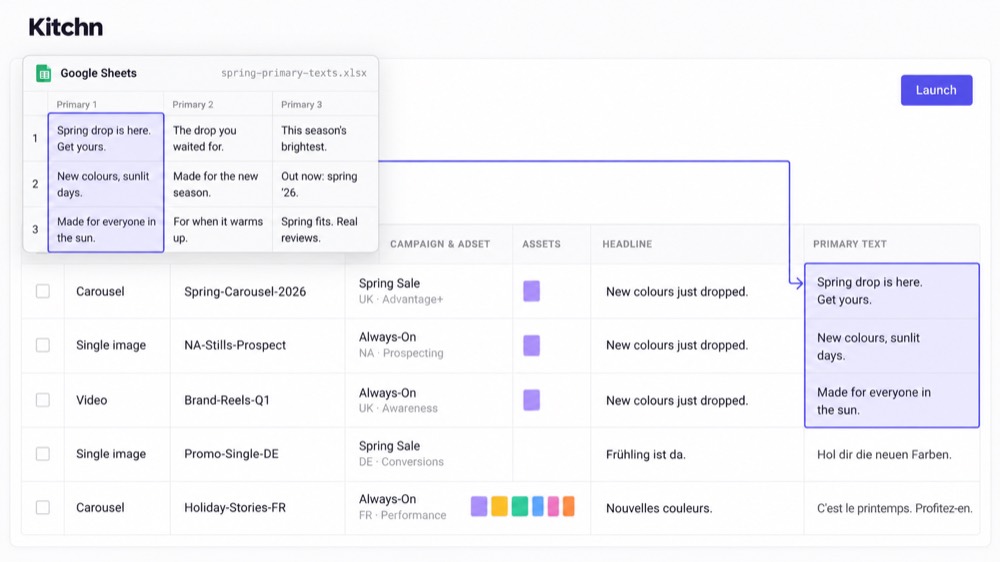
Paid social planning already tends to happen in spreadsheets: creative IDs, primary text, headlines, landing pages, UTMs, testing variables, account structure. The inefficient part is often transferring that plan into an advertising interface afterwards.
Kitchn's Launch Sheet removes more of that handoff. One row is one ad, and teams can paste directly from Google Sheets or Excel.
- A single cell
- A complete column
- A full spreadsheet matrix
- Multi-line copy fields
For process-driven teams, that is materially different from uploading a folder and configuring the batch around a model ad.
Ads Uploader's model-ad and preset workflow is very efficient
There is a reason Ads Uploader works well for Meta. Pick an existing ad that is already configured correctly, use its setup as the model, upload the new creative and launch the new ads into the same structure.
Presets can save much of that configuration for reuse, including campaign structure, targeting, placements, optimisation goals, enhancement settings, budget and scheduling. That can be extremely fast. If your account has a clear existing structure that you want to reproduce repeatedly, there is very little wrong with that model.
Kitchn is more flexible when one account contains several workflows
Kitchn defaults are sheet-level, not account-level. That distinction matters, because one account might contain:
Each Launch Sheet can carry the defaults appropriate to that particular batch. Reusable Ad Templates can then be deliberately applied when needed. Templates are not automatically inherited by every new ad, which gives teams standardisation without quietly applying yesterday's setup to the wrong launch.
Both products take Meta creative enhancements seriously
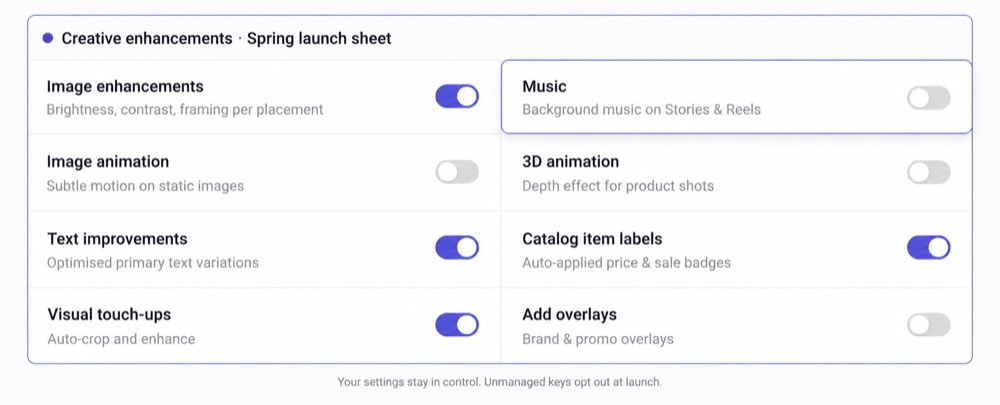
This gap is narrower than it used to be. Ads Uploader now exposes individual Meta creative-enhancement controls and can send explicit opt-outs for supported enhancement settings.
Kitchn has a different implementation. Its enhancement registry currently tracks 86 enhancement keys at last count and automatically forces unmanaged keys to opt out.
That means the policy is: if your team hasn't deliberately enabled an enhancement, Kitchn doesn't quietly assume you wanted Meta to apply it. For agencies that have built increasingly long manual checklists around Meta's enhancement behaviour, that is a useful default.
Kitchn adds a deterministic structural gate before creation
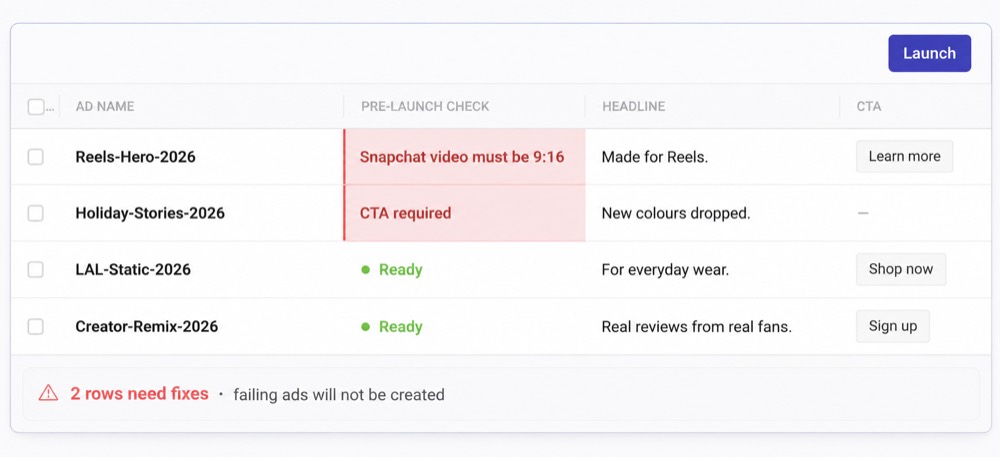
Kitchn validates each launch row before the ad is created. A row that fails validation enters an error state, and that ad is not created. This is the real Kitchn QA story.
- Required fields
- Schema rules
- Length requirements
- Pattern requirements
- URL formatting
- URL-parameter formatting
- Platform specifications
- Meta creative-enhancement configuration
Ads Uploader has Test Mode and validation too
Ads Uploader does not launch blind. It includes preview workflows, confirmation before creation, a Test Mode that creates nothing, CLI and MCP build validation, configuration checks, and Meta-side requirements around supported formats and campaign structures. Its CLI and agent workflows also use deterministic build specifications rather than giving a model unrestricted access to invent account structures.
So the difference isn't that Ads Uploader doesn't check anything. It does. The Kitchn distinction is that structural validation is built directly into every row of the Launch Sheet and applies across the wider launch workflow.
Kitchn reads the copy too
This matters if you are buying either tool to make fewer mistakes. Kitchn does not stop at whether the ad is built correctly. It reads what the ad says.
- Typos and spelling in the ad copy
- Wording the client has approved, and the brand voice they expect
- British or American spelling, whichever the account runs on
- Required fields, character limits and format rules
- Landing page URLs and their tracking parameters
- Creative sized for the placement it will run in
- Meta enhancements nobody on your team switched on
- Ad names that do not follow your conventions
Test Mode and previews give the buyer somewhere to look. The difference is who does the looking. With Kitchn the checking happens on every row whether anybody remembers to do it or not, and the batch waits until it passes.
Kitchn keeps team review attached to the individual ads
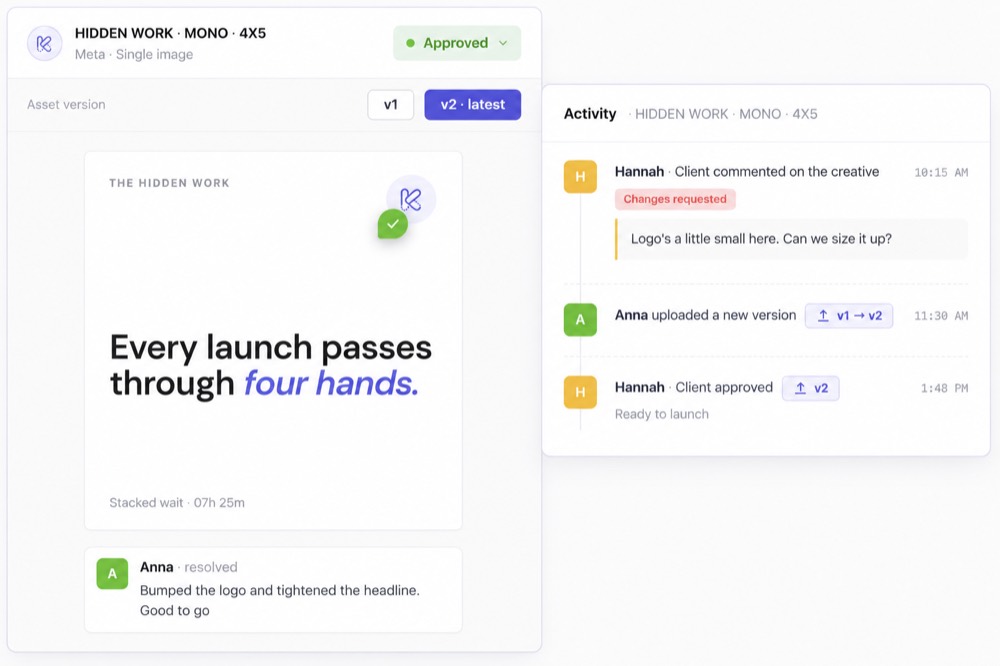
Uploading becomes a different problem when somebody besides the media buyer needs to look at the work. Each Kitchn launch row can carry its own context.
- A configurable status
- Comments
- An ad preview
- Change history
A client, creative lead or stakeholder can review the actual output instead of trying to work out which screenshot corresponds with which spreadsheet row.
But approval status does not technically stop a Kitchn launch
Kitchn supports statuses such as Needs Review, In Progress and Approved, but the Launch action does not read that status as a technical gate. An unapproved row can still be launched by the operator.
So the claim should not be "someone must sign off before anything spends." The accurate claim is that the team can see review status, comments and the actual ad before launch, with those changes recorded in the workflow. The media buyer still owns the final action.
The AI-agent workflow is genuinely ahead
CLI and MCP
Ads Uploader has both a dedicated CLI and a documented MCP server. Its MCP exposes tools that let AI agents browse accounts, campaigns and ad sets, upload creative, work with saved builds, apply presets, edit ad text, preview builds and create ads. Saved builds can move between the web interface, MCP and CLI without rebuilding the setup.
For teams moving towards agent-driven Meta execution, that is a genuinely strong feature, and Ads Uploader wins this one outright. Kitchn has an API, but nothing equivalent for agents.
Post ID duplication
Ads Uploader's Duplicator is purpose-built for taking an existing Meta ad and copying it into another ad set while retaining the same underlying Post ID, which keeps likes, comments and social proof attached.
Kitchn supports Existing Post ads, including existing Facebook and Instagram content, but that is not the same workflow, and duplication actions are available on request rather than as standard. If scaling winners through Post-ID duplication is central to how you work, Ads Uploader has the cleaner product.
Kitchn supports a wider set of Meta launch formats
Kitchn verified Meta formats
- Single Image
- Single Video
- Carousel
- Collection
- Flexible
- Catalog Carousel
- PAC Carousel
- Existing Post
Ads Uploader currently documents
- Single Image
- Single Video
- Carousel
- Flexible
Its own support documentation says catalogue and DPA creative is not currently a supported model for the uploader. If catalog-driven Meta launching forms a meaningful part of your workload, that difference matters.
The bigger difference is what happens when Meta isn't the only channel
Ads Uploader is unapologetically Meta-focused. Its current website, documentation, CLI and MCP centre on Facebook and Instagram through the Meta Marketing API, and that focus is a feature if Meta is where your business lives.
| Meta (Facebook & Instagram) | Generally available |
| TikTok | Generally available |
| Google Ads (Demand Gen) | Generally available |
| Generally available | |
| Snapchat | Generally available |
| Beta | |
| Spotify | Beta |
| AppLovin | Beta |
X can connect, but Kitchn cannot currently launch ads to X, and functionality is not identical on every channel. Google Demand Gen ads, for example, are launched paused into existing ad groups. Kitchn does not create Google campaigns from scratch.
More channels only matter if you actually use them
This isn't a checkbox competition. If your team spends all of its time on Meta, Kitchn supporting Pinterest adds precisely zero value, and Ads Uploader's Meta focus may actually make the product easier to justify.
Meta today.
TikTok tomorrow.
Pinterest for another client.
Snapchat for the next campaign.
Kitchn's broader channel footprint becomes commercially relevant when the same media buyer or paid social function moves between them. At that point, keeping a more consistent operating workflow across those channels starts to matter.
Ads Uploader pricing is extremely difficult to beat
Ads Uploader's current Solo Unlimited plan is advertised at $44/month when billed annually, or $528 for the year. That includes unlimited Meta ad accounts, unlimited ad spend, unlimited ad uploads and all product features. Its Team plan adds centralised billing, team management and shared presets, and there are no upload-volume or connected-account tiers on the core product.
That's an excellent price for what it does. Kitchn's current Launch Team price is €499/month. So if the buying question is what's the cheapest capable way to bulk upload unlimited Meta ads, Kitchn loses. Ads Uploader is the obvious answer.
The economics change when manual process is the expensive part
Kitchn becomes more commercially sensible when the costs are coming from:
- Senior buyers checking junior buyers' setup
- Repeated manual QA
- Client or stakeholder review
- Several account conventions
- Launches repeated across markets
- More than one paid social platform
- Work being reconstructed from spreadsheets
- Trying to find out what changed after something goes wrong
- More manual work every time creative output grows
Unlimited uploads is a real advantage
If your team wants to upload 10,000 Meta ads through Ads Uploader, the subscription doesn't increase because of the upload count. Kitchn doesn't need to pretend that's bad. The reason teams pay more is not because Kitchn makes limited better than unlimited. It's because the product includes a different layer around the launch, and you should only pay for that layer if you need it.
Kitchn connects launch with the rest of paid social operations
The launch isn't the end of the Kitchn workflow. Creative Reporting analyses creative performance across Meta, TikTok, Google Ads and Pinterest using custom dimensions, calculated metrics and ad screenshots. Automation builds repeatable workflows around assets, reporting, notifications and ad operations. Rules run on Meta and TikTok.
Post-launch QA monitors Meta pixel setup, URL health, UTMs and disapprovals through scheduled checks.
Ads Uploader is deliberately more focused. It gets ads into Meta and then lets Ads Manager and the rest of your stack handle the wider operation. Again, neither approach is universally better.
Which should you choose?
Choose Kitchn if
- Paid social launching is a team process
- Your launch data already lives heavily in spreadsheets
- Structural validation before ad creation matters
- Different ads in a batch need individual review context
- You want comments and statuses attached to launch rows
- Before-and-after change history matters
- You regularly repeat launches across accounts or geographies
- Meta isn't the only paid social platform your team manages
- You want creative reporting and automation around the same operating workflow
- Your Head of Paid Social needs more visibility into how execution happens
Choose Ads Uploader if
- Meta is your main or only launch channel
- Fast uploading is the primary problem
- Unlimited uploads and accounts matter
- You want a very low-cost tool
- Post ID duplication is a regular workflow
- Existing ad presets give you enough standardisation
- Test Mode and your own review process give you enough QA
- You want a proper CLI for Meta execution
- You want Claude, ChatGPT or Cursor working through a documented MCP server
- You don't need a broader paid social operating layer
Don't pay €499 to solve a $44 problem
If one experienced media buyer runs Meta and simply hates creating ads manually, Ads Uploader is a very sensible product. Use it.
The argument for Kitchn starts when the problem becomes how to make this whole function operate consistently, rather than how to upload these files faster. That usually appears as the team grows.
More accounts.
More creative.
More markets.
More buyers.
More review.
More chances for small mistakes to become expensive ones.
That is the layer Kitchn is built to systemise.
Ads Uploader makes Meta execution efficient. Kitchn makes the launch process repeatable.
That's the actual choice. Ads Uploader is a focused tool built by a media buyer to remove Meta upload busywork. Kitchn is built for process-driven paid social teams that want more structure around how finished creative becomes live advertising.
If the simple tool solves everything you need, keep the simple tool.
If the upload is now only one moving part in a larger operation, compare the workflow around it.
Kitchn.io vs Ads Uploader: common questions
Is Kitchn a good Ads Uploader alternative?
Yes, if your requirements extend beyond Meta bulk uploading. Kitchn adds a spreadsheet-like Launch Sheet, row-level structural validation, review statuses, comments, change history, multi-account reuse and broader paid social channel support.
If Meta uploading is the only bottleneck, Ads Uploader is considerably cheaper.
Can both tools bulk launch Meta ads?
Yes. Bulk Meta launching is central to both products.
Ads Uploader uses media uploads, model ads, presets and saved builds. Kitchn uses the Launch Sheet, where individual ads live as rows and can be bulk edited and validated before creation.
Does Ads Uploader have QA?
It has several pre-launch safety mechanisms, including previews, confirmation, Test Mode and configuration validation.
Kitchn's difference is its dedicated structural validation gate on each Launch Sheet row. A failing Kitchn row enters an error state and isn't created.
Does Kitchn require client approval before launch?
No. Kitchn provides approval statuses, comments and previews, but approval status does not technically prevent an operator from launching an ad.
It is a collaboration and visibility layer, not a hard publishing permission.
Does Kitchn check ad copy?
Yes. As well as checking the setup, it reads what the ad says: typos, wording the client has ruled out, and British against American spelling for whichever market the account runs in.
Ads Uploader gives you a preview and a Test Mode to look at the batch yourself. The difference is who has to spot the problem.
Does Ads Uploader control Meta creative enhancements?
Yes. Ads Uploader's current workflow includes individual Meta enhancement controls and explicit opt-outs for supported settings.
Kitchn also controls enhancements and currently maintains a registry of 86 enhancement keys at last count. This is no longer a sensible area to claim Ads Uploader has no control.
Which is better for AI-agent workflows?
Ads Uploader currently has the stronger publicly documented offering. It provides both a CLI and an MCP server that can be used by tools such as Claude, ChatGPT, Claude Code and Cursor.
Kitchn has no equivalent CLI or MCP product.
Which is better for Post ID duplication?
Ads Uploader has the cleaner dedicated workflow. Its Duplicator is specifically built to copy running ads while keeping the underlying Post ID and social proof.
Kitchn supports Existing Post ads, but that's a different workflow.
Which supports more ad platforms?
Kitchn. It currently launches across Meta, TikTok, Google Demand Gen, Pinterest and Snapchat, with LinkedIn, Spotify and AppLovin in beta.
Ads Uploader's documented launching product is Meta-focused.
Which is cheaper?
Ads Uploader by a large margin at entry level. Its current Solo Unlimited price is $44/month when billed annually. Kitchn's current Launch Team price starts at €499/month.
The case for Kitchn is the wider paid social operating workflow, not cheaper Meta uploading.
Can I use both?
Technically, yes. But there is substantial overlap on Meta launching.
Unless Ads Uploader's CLI, MCP or Post ID duplication solves a specific workflow you want to retain, most teams will probably be better off choosing whichever launch system matches the wider way they operate.
