
A more focused AdManage alternative for paid social teams
AdManage is a broad ad management platform. Kitchn is built around one of the most expensive operational problems inside paid social: getting large volumes of finished creative prepared, checked, reviewed and launched consistently across accounts, without turning media buyers into upload operators.
Which platform does more?
AdManage. Campaign creation, deeper live automation, competitor ad research, AI creative generation, comment moderation, a public MCP product, and launching to channels Kitchn does not support, including X, Reddit and Taboola.
AdManage wins the raw breadth comparison outright.
Which platform solves the expensive problem inside our team?
That depends entirely on what the expensive problem actually is.
If your team wants one platform spanning ad research, AI creative, campaign creation, automation and comment moderation, AdManage offers more breadth.
If your problem is the day-to-day operating workflow between approved creative and live ads, Kitchn is built much more specifically around it.
Kitchn vs AdManage: which is better for paid social operations?
| Your operational requirement | Better fit |
|---|---|
| Prepare hundreds of ads in a spreadsheet-like launch workspace | Kitchn |
| Paste existing launch plans directly from Sheets or Excel | Kitchn |
| Validate structural setup before each ad is created | Kitchn |
| Keep status, comments and previews attached to individual ads | Kitchn |
| See exactly what changed on an individual launch row | Kitchn |
| Standardise repeatable launch setup across a team | Kitchn |
| Reuse an existing launch across accounts or markets | Kitchn |
| Keep campaign strategy with the media buyer | Kitchn |
| Analyse creative performance inside the wider paid social workflow | Kitchn |
| Create campaign structures automatically | AdManage |
| Research competitor ads inside the same platform | AdManage |
| Generate AI creative | AdManage |
| Run deeper live campaign automation | AdManage |
| Launch to channels Kitchn does not currently support | AdManage |
The key difference is focus. AdManage tries to manage more of advertising. Kitchn goes deeper on how paid social teams actually prepare and execute launches.
Kitchn is built around the workflow your media buyers repeat every week
For most established paid social teams, the strategic decisions aren't the bottleneck. The campaign exists. The targeting exists. The creative is finished. The copy has been written. The testing plan is in a spreadsheet. The media buyer now has to turn all of that into live ads.
- Copying from spreadsheets
- Downloading and re-uploading assets
- Applying URLs and UTMs
- Repeating naming conventions
- Checking settings
- Creating previews
- Getting feedback
- Fixing mistakes
- Repeating the same work across another account or market
Kitchn is designed around removing that operational mess.
The Launch Sheet is the core product, not an import step
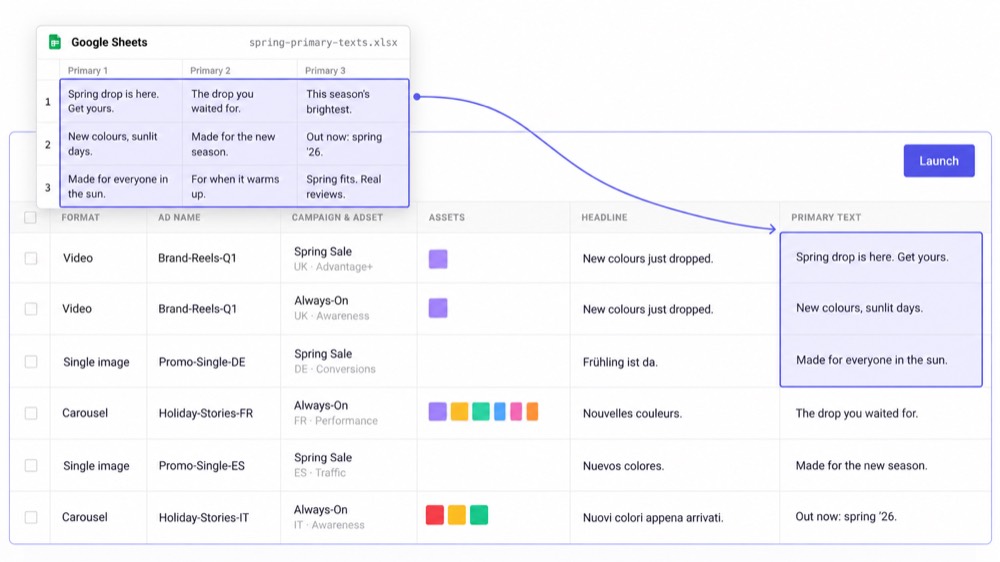
Kitchn doesn't simply accept spreadsheet data. It gives the team a spreadsheet-like environment where the launch itself is managed. One row is one ad, with creative, copy, destination, campaign and ad-set information in columns.
- Individual cells
- Full columns
- Complete matrices
- Multi-line text
Then the team keeps working on the launch inside Kitchn: bulk edit the rows, apply defaults, add assets, review status, fix validation errors, launch. The spreadsheet-style structure doesn't disappear after import. It becomes the operating object.
That matters when several people touch the same launch
Bulk uploading is easy to understand when one buyer owns everything. It becomes a different problem when the launch involves media buyers, Heads of Paid Social, creative teams, clients, internal stakeholders, multiple markets and multiple accounts.
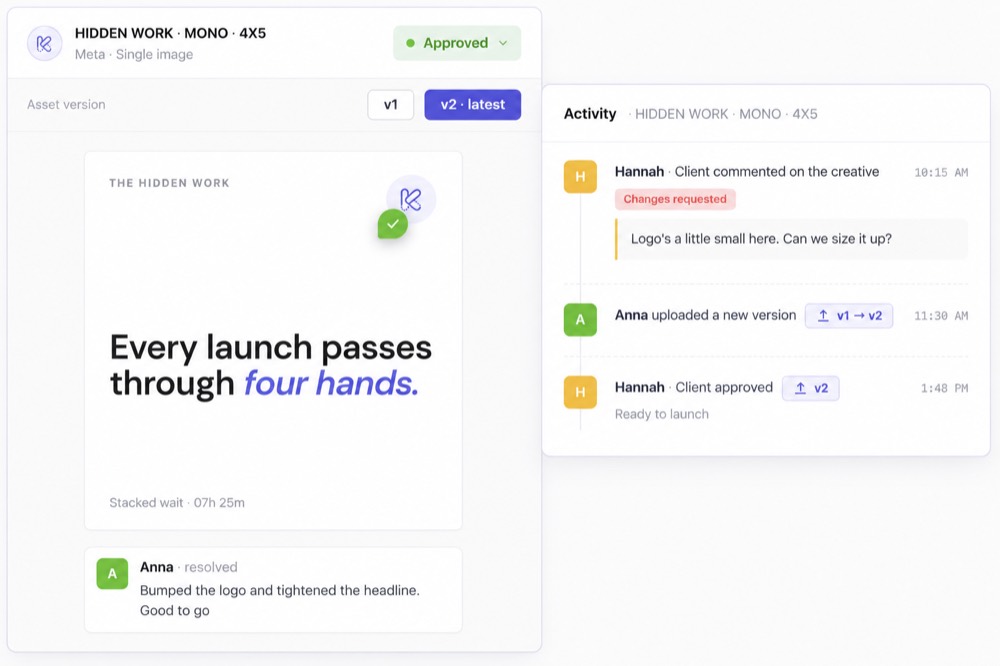
Kitchn gives each launch row its own context.
- Configurable status
- Comments
- Ad preview
- Validation state
- Change history
Instead of coordinating the launch across Sheets, Slack, screenshots and Ads Manager, more of the actual working context stays with the ad.
Kitchn.io vs AdManage
| Capability | Kitchn.io | AdManage |
|---|---|---|
| Core product philosophy | Paid social launch operating workflow | Broad ad management platform |
| Native spreadsheet-like launch workspace | ✓Launch Sheet | Different draft and import model |
| Paste directly from Sheets or Excel | ✓Yes | ✓Google Sheets workflows supported |
| Bulk ad creation | ✓Yes | ✓Yes |
| Bulk editing before launch | ✓Yes | ✓Yes |
| Sheet-level defaults | ✓Yes | ✓Reusable launch settings |
| Reusable Ad Templates | ✓Yes | ✓Equivalent reusable configurations |
| Naming templates | ✓Yes | ✓Yes |
| Dedicated row-level validation state | ✓Yes | Validation exists, but the workflow differs |
| Failed validation prevents creation | ✓Yes | Invalid launches can also be rejected |
| Status attached to individual launch row | ✓Yes | Different draft and batch model |
| Comments attached to individual launch row | ✓Yes | —No equivalent launch-row discussion model documented |
| Public ad previews | ✓Yes | ✓Yes |
| Per-row before/after change history | ✓Yes | Broader audit and history tooling |
| Batch undo | ✓Yes | Different workflow |
| Copy launch into another account or geo | ✓Yes | Broader duplication tools |
| Non-blocking launches | ✓Yes | Different execution model |
| Campaign creation from scratch | —Intentionally not the core job | ✓Yes |
| Creative Reporting | ✓Yes | ✓Yes |
| Automation rules | ✓Focused operational layer | ✓Broader automation |
| Competitor ad research | —No | ✓Yes |
| AI creative generation | —No | ✓Yes |
| Public MCP product | —No | ✓Yes |
The table looks less dramatic when you stop rewarding every adjacent feature equally. For Kitchn's buyer, launch workflow depth matters more than whether the same subscription also generates AI images.
Structural QA happens before Kitchn creates the ad
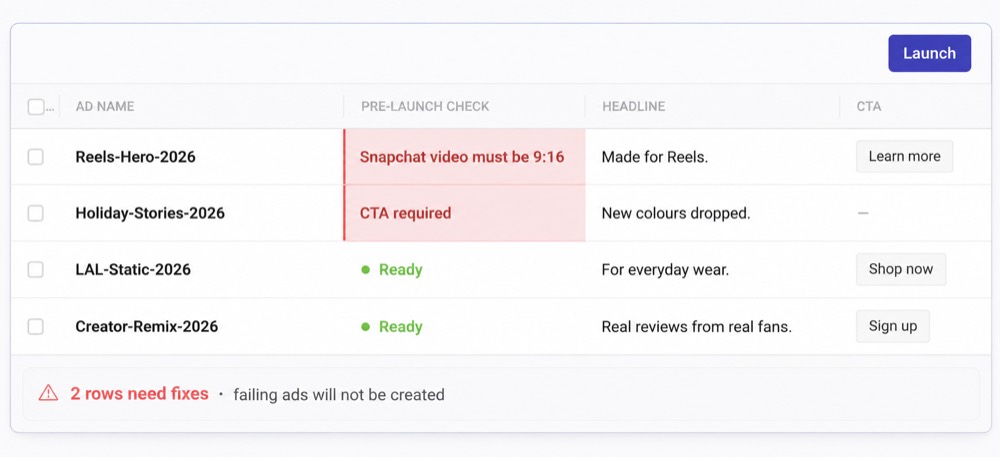
Kitchn validates each launch row before creation. If a row fails structural validation, the ad isn't created. It remains in an error state until the problem is fixed.
- Required fields
- Schema rules
- Length requirements
- Pattern requirements
- URL formatting
- URL-parameter formatting
- Platform-specific specifications
- Meta creative-enhancement configuration
That gives media buyers a deterministic checkpoint between preparing the launch and sending it into the ad account.
Kitchn also keeps Meta's enhancement settings under control
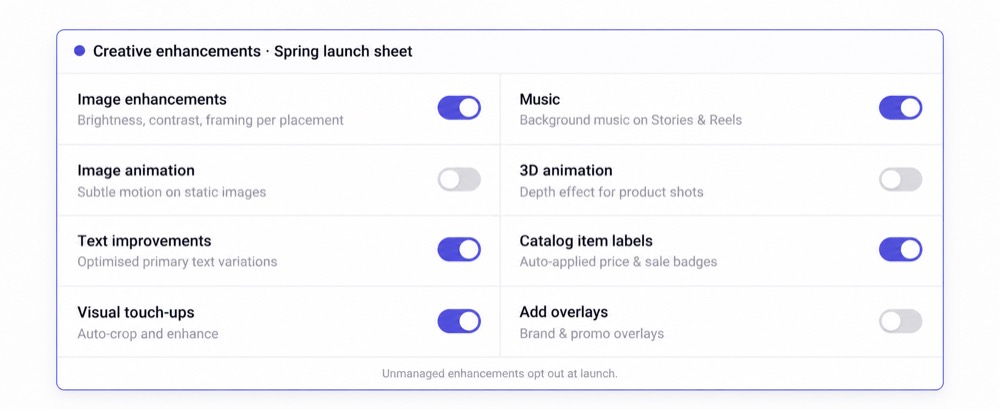
Meta's constantly changing creative enhancements are one of the recurring headaches paid social teams have to manage. Kitchn maintains its own enhancement registry, currently covering 86 enhancement keys at last count. Settings the team hasn't explicitly enabled are forced to opt out.
That removes another class of "why did Meta turn this on?" from the launch workflow.
AdManage also controls Meta creative settings. The Kitchn advantage is that those controls sit alongside the rest of the structural validation on each working launch row.
What Kitchn actually checks
The question is not only whether the ad is put together well enough to be created. Kitchn checks it against how your team wants it to read, which means the copy as well as the setup.
- Typos and spelling in the ad copy
- Wording the client has approved, and the brand voice they expect
- British or American spelling, whichever the account runs on
- Required fields, character limits and format rules
- Landing page URLs and their tracking parameters
- Creative sized for the placement it will run in
- Meta enhancements nobody on your team switched on
- Ad names that do not follow your conventions
Judgement stays with the team. The repetitive part of the checking does not.
Review is part of the launch rather than another process
When somebody needs to inspect an ad before it goes live, Kitchn lets that review sit directly on the relevant row. Teams can use statuses, add comments, inspect the preview and see what changed.
That makes the workflow particularly useful when one launch contains dozens or hundreds of ads in different states.
Approval is visible, but the operator stays responsible
Kitchn approval status is not a technical hard gate. An operator can still launch an ad whose status isn't Approved. That's intentional to state clearly.
Kitchn gives the team visibility, process and accountability. It doesn't pretend software should take responsibility away from the media buyer running the account. For professional paid social teams, that's often the right balance.
See exactly what changed before launch
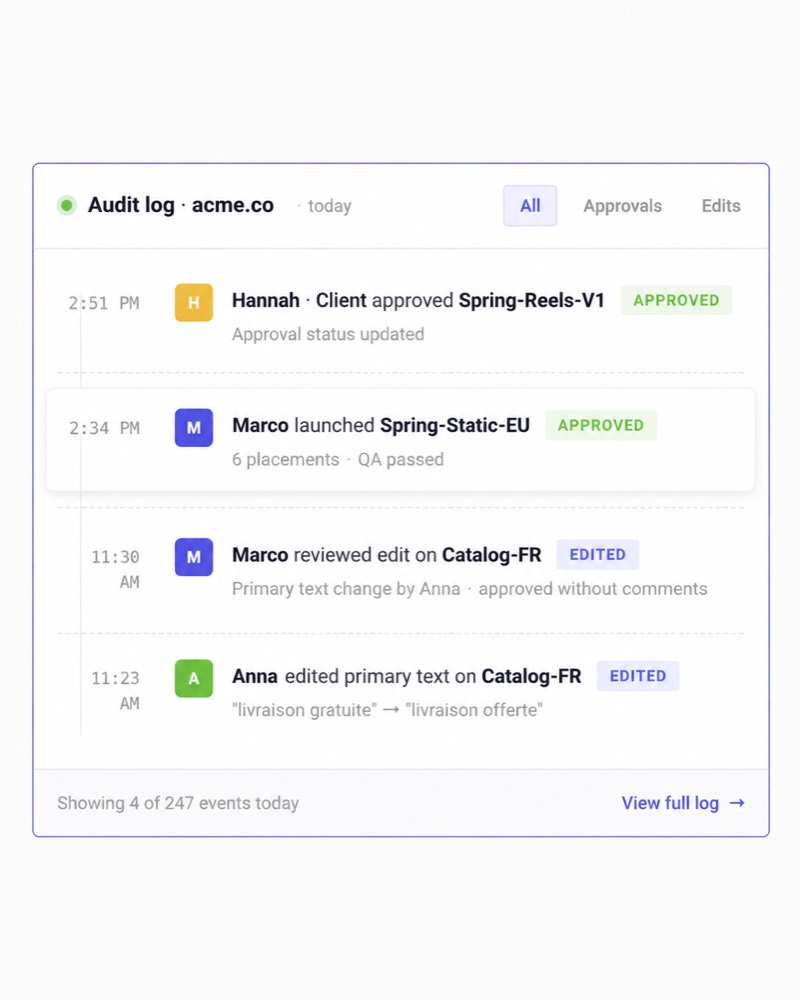
Every launch row has its own change history, giving the team before-and-after context around edits. If somebody changes a URL, copy, a setting, an ad assignment or another launch field, the team has a much clearer record of what happened.
Kitchn also supports batch undo and a broader organisation audit trail around operational events.
That matters when you're no longer managing a single buyer's personal workflow.
You're managing a paid social function.
Reuse successful launch workflows instead of rebuilding them
A launch frequently doesn't happen once. It gets repeated in another ad account, another market, another geography or another brand context. Kitchn lets teams copy a Launch Sheet into another context and remap the relevant account structure, so the existing working launch becomes the starting point.
For multi-account and multi-geo teams, that is considerably more useful than treating every new market as a fresh uploading project.
Standardise execution without making every launch identical
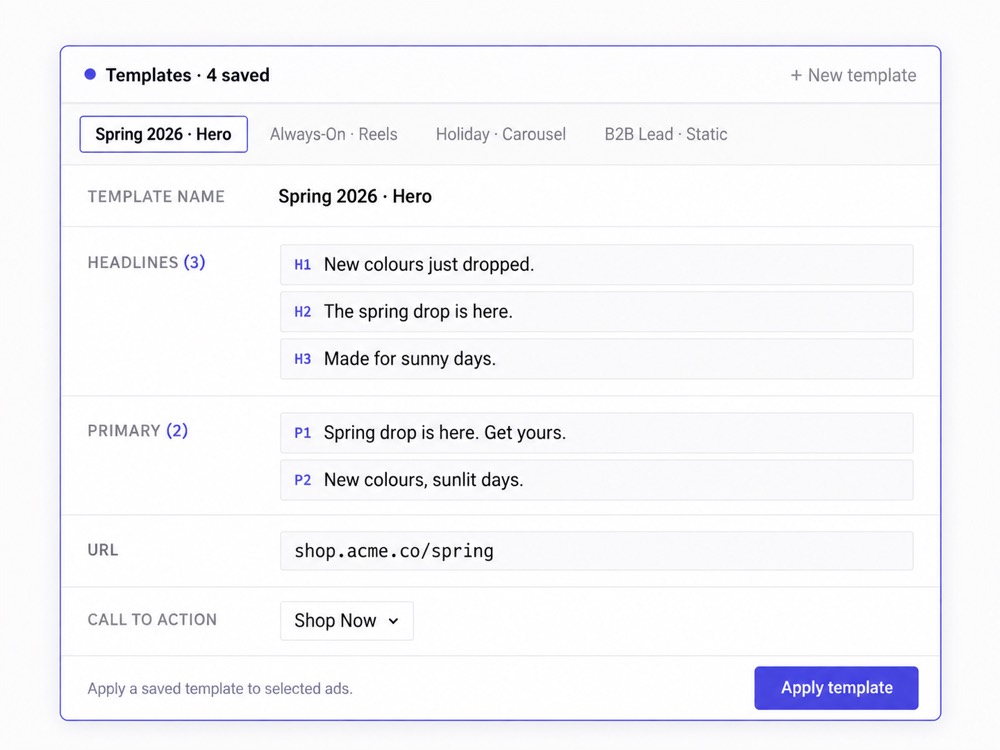
Kitchn gives teams several ways to make recurring work easier to repeat. Sheet defaults apply common launch values across the batch. Ad Templates save reusable ad attributes and deliberately apply them to selected ads. Naming templates generate names using the team's preferred conventions.
One important distinction
Naming is applied, not hard-enforced. Kitchn will not refuse to launch simply because somebody manually altered the generated name. The product makes the preferred process easier to follow. It doesn't pretend software can completely enforce organisational discipline.
Kitchn stays out of campaign strategy on purpose
AdManage can create campaigns and ad sets. Kitchn generally doesn't. That may look like a missing feature until you consider the actual Kitchn buyer. A senior media buyer often already knows which campaign the creative belongs in, which ad set should receive it, how targeting should be structured and how budget should be allocated.
They don't need software to redesign the campaign. They need to get a large amount of finished creative into the existing structure quickly and correctly. Kitchn focuses product depth on that execution layer.
Narrower can be better when you already have a working stack
Paid social teams commonly already have tools for creative production, competitor research, attribution, analytics, project management and media buying. Kitchn isn't trying to replace all of them, which reduces the amount of change required to improve the launch workflow.
Your designers can keep designing where they already design.
Your buyers can keep deciding strategy.
Your attribution stack can stay where it is.
Kitchn becomes the operating layer that turns finished work into live ads.
Asset workflows plug into the systems teams already use
Kitchn supports finished creative from sources including:
Assets can also be grouped automatically using filename tokens. That helps bridge the gap between creative production and media buying without demanding that the entire organisation migrate into a new DAM or creative suite.
Kitchn still covers the major paid social launch channels
Support varies by platform, and Kitchn does not claim identical functionality everywhere.
| Meta — Facebook & Instagram | Generally available |
| TikTok | Generally available |
| Google Demand Gen | Generally available |
| Generally available | |
| Snapchat | Generally available |
| Beta | |
| Spotify | Beta |
| AppLovin | Beta |
Google Demand Gen, for example, launches ads paused into existing ad groups. Kitchn does not create Google campaigns from scratch.
For most paid social teams, the relevant question isn't who has the biggest number. It's whether the product supports the channels your team actually operates.
Where AdManage genuinely goes further
AdManage is the better fit when you specifically want a broader platform.
Platform breadth
Campaign construction. AdManage can create campaigns and ad sets. Kitchn intentionally does less here.
Deeper automation. AdManage offers a broader live automation product, including more sophisticated budget, duplication and execution workflows. Kitchn's Rule Engine is narrower.
Competitor research. AdManage includes competitor-ad research. Kitchn doesn't.
AI creative generation. AdManage generates creative. Kitchn works from finished creative.
Adjacent products
Comment moderation. AdManage includes a dedicated social-comment moderation product. Kitchn does not have an equivalent core proposition.
Public AI-agent workflows. AdManage offers a public MCP product, so AI agents can drive it directly. Kitchn does not.
Additional launch channels. AdManage currently supports channels outside Kitchn's launch set, including X, Reddit and Taboola. If you need those, that's a genuine reason to choose AdManage.
The question is whether you actually need those things in your launcher
This is where the comparison becomes more useful. If your team already has a creative production system, a media-buying strategy, competitor research tools, reporting tools and an automation stack, then buying another platform because it also does all of those things may not solve the bottleneck.
If the real issue is still that your media buyers are spending too much time preparing, checking and coordinating ad launches, then that's the problem worth solving first.
Kitchn is built around paid social capacity
A process problem that looks small at 50 ads a month becomes expensive at 1,000. Teams operating at exactly that kind of volume:
The recurring value isn't finding another place to click Launch. It's capacity. More creative can move through the same team.
Kitchn helps media buyers stay media buyers
The daily user
The media buyer shouldn't become a file downloader, spreadsheet copier, UTM checker, naming police, screenshot generator, approval coordinator or full-time uploader.
Those tasks exist. But they shouldn't consume the person's working week. Kitchn systemises more of that operational layer so media buyers can spend more time on creative strategy, testing, performance, clients and actual media buying.
The champion
The Head of Paid Social has a different problem. They need to know work is being done, standards are being followed, ads have been reviewed, mistakes aren't constantly reaching clients, the team isn't inventing a new process for every account, and increased volume won't require proportionally more people.
Kitchn's Launch Sheet, statuses, validation, history, templates and auditability give that leader more visibility into the operating process, without asking them to personally check every ad.
Which should you choose?
Choose Kitchn if
- Paid social execution is the operational bottleneck
- Your team already has a functioning creative-production process
- Media buyers work heavily from spreadsheets
- Several people touch launches
- Structural mistakes need to be caught before creation
- Different ads in a batch need their own status and review context
- You want per-row before/after history
- Launches get repeated across accounts or markets
- You want a focused paid social workflow rather than a broader adtech suite
- Increasing team capacity matters more than adding another feature category
Choose AdManage if
- You want campaign creation inside the platform
- You need deeper live automation
- You need X, Reddit or Taboola launching
- You want competitor-ad research
- You want AI creative generation
- Comment moderation matters
- Public MCP and AI-agent workflows are a requirement
- You specifically want more of the paid advertising stack consolidated into one product
More features aren't automatically more useful
AdManage wins the raw breadth comparison. That's fine. Kitchn doesn't need to be a creative generator, a competitor research tool, a comment moderation platform, a complete campaign builder or an everything-advertising suite.
It needs to make the operational workflow that high-volume paid social teams repeat every day materially better. For teams where that workflow is the bottleneck, focus is an advantage.
AdManage manages more of advertising.
Kitchn is designed to make paid social operations run better.
Kitchn.io vs AdManage: common questions
Is Kitchn a good AdManage alternative?
Yes. Kitchn is particularly strong as an AdManage alternative for teams that don't need a broad ad-management suite and instead want a focused system for preparing, validating, reviewing and launching paid social ads.
Which is better for paid social teams?
If the team's main problem is launch operations, Kitchn is the more focused fit.
If the team wants one broader system covering campaign construction, automation, competitor research, AI creative and additional channels, AdManage has more breadth.
Can both bulk launch ads?
Yes. Both can launch ads at scale.
The distinction is the workflow surrounding that capability. Kitchn's Launch Sheet is designed to make the batch itself the working operational environment.
Does AdManage support Google Sheets?
Yes. AdManage can create launch drafts from Google Sheets.
Kitchn's distinction is that the spreadsheet-like interface remains the native working environment after the data is brought in.
Which has stronger pre-launch QA?
Both have validation capabilities.
Kitchn's strength is the deterministic structural validation attached directly to every Launch Sheet row before ad creation. A Kitchn row that fails validation is not created.
Does Kitchn check ad copy?
Yes. It reads the copy as well as the setup, so typos and wording the client has ruled out get picked up alongside things like missing fields, broken URLs and the wrong creative size.
Anything it finds holds the batch until somebody fixes it.
Does Kitchn require approval before launch?
No. Kitchn has statuses, comments and ad previews, but approval status does not technically block the Launch action.
The media buyer remains responsible for the final launch.
Which has stronger automation?
AdManage has the broader live campaign automation product. Kitchn's Rule Engine is narrower and should not be positioned as equivalent.
Which supports more launch channels?
AdManage currently has the larger channel count.
But Kitchn supports the platforms most paid social teams actually run on: Meta, TikTok, Pinterest, Snapchat and Google Demand Gen. Choose based on the channels you use.
Which is better for AI-agent workflows?
AdManage. It offers a public MCP product for AI-agent workflows. Kitchn does not.
Why choose Kitchn if AdManage has more features?
Because feature count isn't the objective.
Kitchn is more tightly designed around the operational workflow between finished creative and live advertising. For teams where that process is consuming media-buyer capacity, creating mistakes or becoming difficult to standardise across accounts, that focus can be more valuable than buying a broader platform.
