
Google-Demand-Gen-Anzeigen im großen Stil mit Kitchn launchen
Wenn dein Team Creatives in hohem Volumen produziert, sollte es nicht zum nächsten Einzel-Upload werden, jede neue Demand-Gen-Anzeige in Google Ads zu bringen. Kitchn gibt Paid-Social-Agenturen einen strukturierten Workflow, um Google-Demand-Gen-Anzeigen im großen Stil vorzubereiten und in bestehende Anzeigengruppen zu launchen.
Über Kitchn erstellte Anzeigen starten pausiert, damit dein Media Buyer die Kontrolle behält, bevor irgendetwas aktiviert wird.
Anzeigen starten pausiert
Hol Demand Gen in deinen Launch-Workflow mit hohem Volumen
Deine Media Buyer betreuen neben Google vielleicht schon Meta, TikTok, Pinterest oder Snapchat.
Die Plattform wechselt.
Die repetitive Arbeit rund um das Launchen von Creatives bleibt.
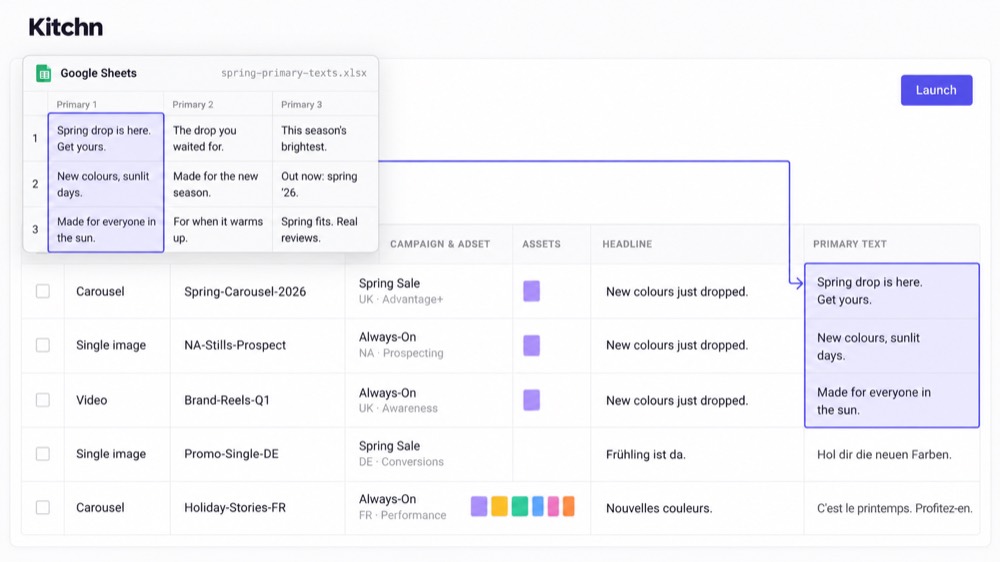
Kitchn holt Google Demand Gen in denselben Launch-Sheet-Workflow im Tabellenformat. So bereiten Teams große Mengen an Anzeigen einheitlicher vor, ohne den operativen Prozess für jeden Kanal neu zu bauen.
Demand-Gen-Anzeigen in einem Launch Sheet vorbereiten
Statt jedes neue Creative als eigene Upload-Aufgabe zu behandeln, organisierst du den Batch in Kitchn.
- In Zeilen arbeiten.
- Die Anzeigen vorbereiten.
- Änderungen für den ganzen Batch machen.
- Das Setup prüfen.
- Dann launchen, wenn alles bereit ist.
Für Teams, die Texte, Creatives und Ziel-URLs ohnehin in Spreadsheets abstimmen, fällt so mehr von dem Hin und Her zwischen der Planung des Batches und dem eigentlichen Weg in Google Ads weg.
In bestehende Google-Demand-Gen-Anzeigengruppen launchen
Die Google-Ads-Unterstützung von Kitchn ist gezielt auf Demand Gen ausgelegt. Anzeigen werden in bestehende Anzeigengruppen gelauncht. Kitchn erstellt keine Google-Ads-Kampagnen von Grund auf.
Diese Grenze ist gewollt: Dein Media Buyer behält die Kontrolle über die Kampagnen- und Anzeigengruppen-Strategie in Google Ads, während Kitchn mehr vom Workflow rund um das Erstellen von Anzeigen in hohem Volumen übernimmt.
Jede Demand-Gen-Anzeige startet pausiert
Anzeigen, die über Kitchn in Google Demand Gen gelauncht werden, werden pausiert angelegt. Damit hat der Buyer einen klaren Kontrollpunkt zwischen dem Moment, in dem ein Batch im Konto landet, und dem Moment, in dem er Budget ausgeben darf.
- Die Creatives im großen Stil vorbereiten.
- Den Batch in die richtigen bestehenden Anzeigengruppen schieben.
- Prüfen, was angelegt wurde.
- Aktivieren, wenn der Media Buyer so weit ist.
Weniger repetitive Launch-Arbeit, während das Creative-Volumen wächst
Bei kleinem Volumen wirkt es trivial, noch eine Anzeige von Hand anzulegen. Bei Agentur-Volumen ist die Vervielfachung das Problem.
Mehr Kunden.
Mehr Märkte.
Mehr Creative-Iterationen.
Mehr Tests.
Kitchn macht aus mehr von dieser repetitiven Umsetzung einen strukturierten Batch-Workflow. So bedeutet mehr Creative-Output nicht automatisch im gleichen Maß mehr Upload-Arbeit.
Der Media Buyer behält die Kontrolle
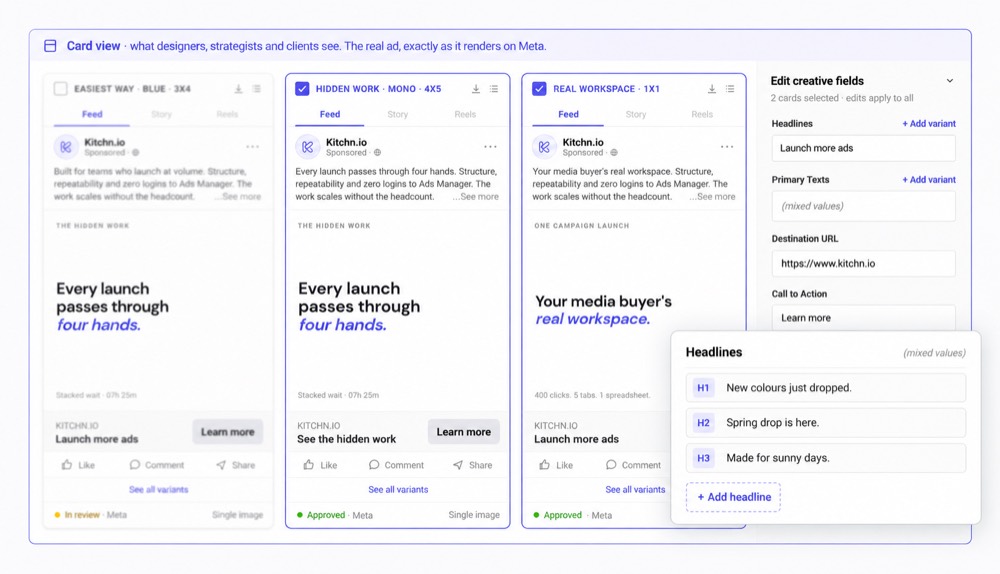
Kitchn will Google Ads nicht ersetzen und auch nicht deine Demand-Gen-Strategie für dich machen. Kampagnenstrategie, Kontostruktur und Aktivierung bleiben beim Media Buyer.
Kitchn übernimmt die operative Ebene rund um das Vorbereiten und Launchen großer Mengen an Demand-Gen-Creatives in die Strukturen, die dein Team schon betreut. So bleibt Buyern mehr Zeit für die Arbeit, die wirklich ihr Urteil braucht, statt immer wieder Anzeigen anzulegen.
Google-Ads-Creatives neben Paid Social auswerten
Google Ads wird auch im Kitchn Creative Reporting unterstützt. Teams analysieren die Creative-Performance mit Ansichten, berechneten Metriken und eigenen Dimensionen, die auf den Namenskonventionen aufbauen, die ohnehin überall im Einsatz sind.
Für Agenturen, die Demand Gen neben Meta, TikTok und Pinterest betreuen, landet so mehr vom Creative-Feedback-Loop in einem Reporting-Workflow.
Demand-Gen-Unterstützung, ohne so zu tun, als könne Kitchn alles in Google Ads
Kitchn unterstützt das Launchen von Google-Ads-Demand-Gen-Anzeigen. Kitchn baut keine Kampagnen für Google Search, Shopping oder Display und erstellt deine Demand-Gen-Kampagnen nicht von Grund auf.
Gebaut ist es für die operative Aufgabe, in der Kitchn am stärksten ist: große Mengen an Anzeigen effizient vorbereiten und in eine Kontostruktur launchen, die deine Media Buyer schon kontrollieren.
Weniger repetitives Setup.
Mehr Launch-Kapazität.
Und ein klarer Pausenzustand, bevor irgendetwas Budget ausgibt.
Verwalte mehr Werbekonten
mit demselben Team.
Geh mit uns die Workflows deines Teams durch.
14 Tage kostenlos testenKeine Kreditkarte nötig
