
Wenn Bulk-Launching mehr braucht als Tempo
Blip ist sehr gut darin, Meta-Launches schneller zu machen. Es gibt Media Buyern einen einfachen Bulk-Launcher, dauerhafte Kontoeinstellungen, das Skalieren per Post-ID, Partnerschaftsanzeigen und unbegrenzte Launches zu einem niedrigen Monatspreis. Kitchn löst das nächste operative Problem: Wie bleiben Launches schnell, wenn mehrere Leute, Konten, Märkte und Kanäle beteiligt sind, ohne dass du die Kontrolle über den Prozess verlierst?
- Ein Buyer betreut das Konto von Anfang bis Ende
- Meta ist die Operation
- Tempo ist das Problem, für das du Software kaufst
- Der aktuelle Review- und QA-Prozess funktioniert schon
- Mehrere Buyer arbeiten am selben Launch
- Mehrere Konten, Marken oder Märkte
- Mehr als ein Paid-Social-Kanal
- Die Operation selbst ist zum Engpass geworden
Wenn du vor allem einen schnellen, günstigen Meta-Launcher brauchst, ist Blip eine starke Wahl.
Wenn der Launch selbst Validierung, Review, wiederholbare Standards und Sichtbarkeit in einem Paid-Social-Team braucht, geht Kitchn weiter.
Kitchn vs Blip: die kurze Antwort
| Wenn du Folgendes brauchst … | Passt besser |
|---|---|
| Meta-Anzeigen schnell und zu niedrigen Monatskosten launchen | Blip |
| Unbegrenzte Launches und Nutzerplätze bekommen | Blip |
| Bestehende Post-IDs in Bulk skalieren | Blip |
| Meta-Partnerschaftsanzeigen launchen | Beide |
| Dauerhafte Meta-Einstellungen pro Werbekonto speichern | Blip |
| Meta-Analytics und umsetzbare Empfehlungen im Launcher bekommen | Blip |
| Launch-Daten im Tabellenformat in einen strukturierten Arbeits-Workflow verwandeln | Kitchn |
| Das strukturelle Setup prüfen, bevor Anzeigen erstellt werden | Kitchn |
| Status, Kommentare und Vorschauen an einzelnen Launch-Zeilen halten | Kitchn |
| Sehen, was sich in einer Launch-Zeile geändert hat und wer es geändert hat | Kitchn |
| Einen Launch für ein anderes Konto oder einen anderen Markt wiederverwenden | Kitchn |
| Auf Meta, TikTok, Pinterest, Snapchat und Google Demand Gen launchen | Kitchn |
Beide Tools nehmen repetitive Arbeit aus dem Launchen von Anzeigen. Der Unterschied ist, wie viel Prozess du rund um den Launch-Button brauchst.
Blip optimiert das Launch-Tempo. Kitchn optimiert die Launch-Operation.
Blip hat ein bewusst einfaches Versprechen: Creatives schnell in Meta bringen. Das aktuelle Produkt unterstützt Bulk-Launching, Importe aus Drive und Dropbox, gespeicherte Templates, dauerhafte Einstellungen, Zuordnung zu Platzierungen, Post-IDs, Partnerschaftsanzeigen und eine Reihe von Meta-Formaten. Dazu kommen Analytics für das Media Buying, Anomalie-Erkennung und Empfehlungen per Klick.
Das ist nützlich. Kitchn versucht nicht so zu tun, als gäbe es diese Features nicht. Der Unterschied ist, was passiert, wenn der Workflow verlässlich in einem Team funktionieren muss, statt nur einen einzelnen Buyer schneller zu machen.
Kitchn.io vs Blip auf einen Blick
| Funktion | Kitchn.io | Blip |
|---|---|---|
| Kernaufgabe | Strukturierte Paid-Social-Launch-Operations | Schnelles Bulk-Launching auf Meta |
| Bulk-Launching von Anzeigen | ✓Ja | ✓Ja |
| Launch-Arbeitsbereich im Tabellenformat | ✓Zentrales Launch Sheet | Bulk-Launcher statt eines vergleichbaren Launch-Sheet-Workflows |
| Ganze Spreadsheet-Matrizen einfügen | ✓Ja | Anderer Workflow |
| Import aus Google Drive | ✓Ja | ✓Ja |
| Import aus Dropbox | ✓Ja | ✓Ja |
| Import aus Frame.io | ✓Ja | Auf der aktuellen Blip-Website als bald verfügbar gelistet |
| Import aus SharePoint | ✓Ja | ✕Nicht dokumentiert |
| Dauerhafte Defaults | ✓Auf Sheet-Ebene | ✓Pro Werbekonto |
| Namenstemplates | ✓Ja | ✓Ja |
| Wiederverwendbare Templates | ✓Ja | ✓Ja |
| Validierung vor dem Launch | ✓Fehlerhafte Zeilen werden nicht erstellt | Review- und Bestätigungs-Workflow dokumentiert |
| Steuerung von Metas Creative Enhancements | ✓Zuletzt 86 Schlüssel | ✓Gespeicherte Advantage+-Präferenzen |
| Workflow-Status pro Zeile | ✓Ja | ✕Nichts Vergleichbares dokumentiert |
| Kommentare pro Zeile | ✓Ja | ✕Nichts Vergleichbares dokumentiert |
| Öffentliche Anzeigenvorschauen | ✓Ja | ✓Anzeigenvorschauen verfügbar |
| Freigabe sperrt den Launch technisch | ✕Nein | ✕Kein harter Freigabe-Workflow für Kunden dokumentiert |
| Änderungshistorie mit Vorher/Nachher pro Zeile | ✓Ja | ✕Nichts Vergleichbares dokumentiert |
| Audit-Log der Organisation | ✓Ja | ✕Nichts Vergleichbares dokumentiert |
| Workflows mit Post-ID und bestehenden Beiträgen | ✓Ja | ✓Eine Stärke von Blip |
| Partnerschaftsanzeigen | ✓Ja | ✓Ja |
| Meta-Analytics | Regeln und Creative Reporting | ✓Analytics, Anomalien und Empfehlungen |
| Automatisierte Optimierungsempfehlungen | ✕Nein | ✓Ja |
| Launchen auf mehreren Kanälen | ✓Ja | Die aktuelle Seite zum Kernprodukt bleibt auf Meta fokussiert |
| Preis an den Ad Spend gekoppelt | ✕Nein | ✕Nein |
| Unbegrenzte Launches | ✕Tarife basieren auf Uploads | ✓Ja |
| Unbegrenzte Nutzerplätze | ✕Kitchn macht diese Zusage nicht | ✓Ja |
Wenn Tempo die einzige Anforderung ist, ergibt Blip viel Sinn
Das sollte man klar sagen. Blip startet derzeit bei 49 $/Monat für ein Werbekonto, mit unbegrenzten Anzeigen-Launches und unbegrenzten Nutzerplätzen in jedem Tarif. Der Pro-Tarif ist mit 370 $/Monat für unbegrenzte Werbekonten gelistet.
- Du launchst vor allem auf Meta
- Du arbeitest allein oder in einem kleinen Team
- Du bist mit deinem aktuellen Review-Prozess zufrieden
- Du bist mit deinem aktuellen QA-Prozess zufrieden
- Du willst vor allem repetitive Klicks im Ads Manager loswerden
Wenn das auf dich zutrifft, ist beim Preis kaum gegen Blip zu argumentieren. Du solltest nicht mehr Betriebssystem kaufen, als du tatsächlich brauchst.
Kitchn wird nützlicher, wenn das Launchen kein Ein-Personen-Job mehr ist
Das Problem verändert sich, wenn Paid Social zum Teamprozess wird. Eine Person bereitet Creatives vor. Eine andere schreibt oder passt Texte an. Ein Media Buyer baut die Anzeigen. Ein Lead prüft den Launch. Ein Kunde oder Stakeholder will ihn vielleicht sehen. Dann muss derselbe Launch in ein anderes Konto oder einen anderen Markt.
An diesem Punkt ist reines Upload-Tempo weiterhin nützlich. Aber es reicht nicht. Die Operation muss beantworten:
Was ist bereit?
Was wurde geprüft?
Was hat einen Fehler?
Was hat sich geändert?
Wer hat es geändert?
Können wir das wiederverwenden, ohne alles neu zu bauen?
Genau um diese Ebene ist Kitchn gebaut.
Das Launch Sheet wird zur Arbeitsumgebung
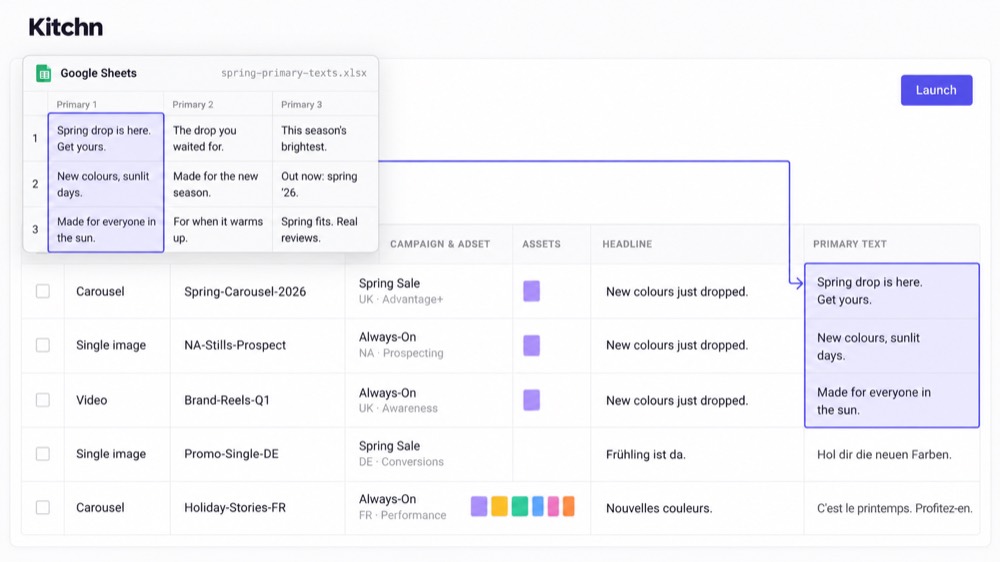
Das Kernprodukt von Kitchn ist das Launch Sheet. Eine Zeile ist eine Anzeige, mit Creative, Text, Ziel-URL sowie Kampagnen- und Anzeigengruppen-Infos in Spalten. Teams fügen direkt aus Google Sheets oder Excel ein.
- Eine Zelle
- Ganze Spalten
- Matrizen im Tabellenformat
- Mehrzeilige Felder
Dann arbeitet der Buyer über die Zeilen hinweg, statt jede Anzeige über eine Abfolge von Formularen neu anzulegen. Das passt dazu, wie viele Paid-Social-Teams Launch-Arbeit ohnehin organisieren. Das Spreadsheet muss nicht von Hand in den Umsetzungsprozess übersetzt werden. Es wird zum Umsetzungsprozess.
Arbeite über den ganzen Batch
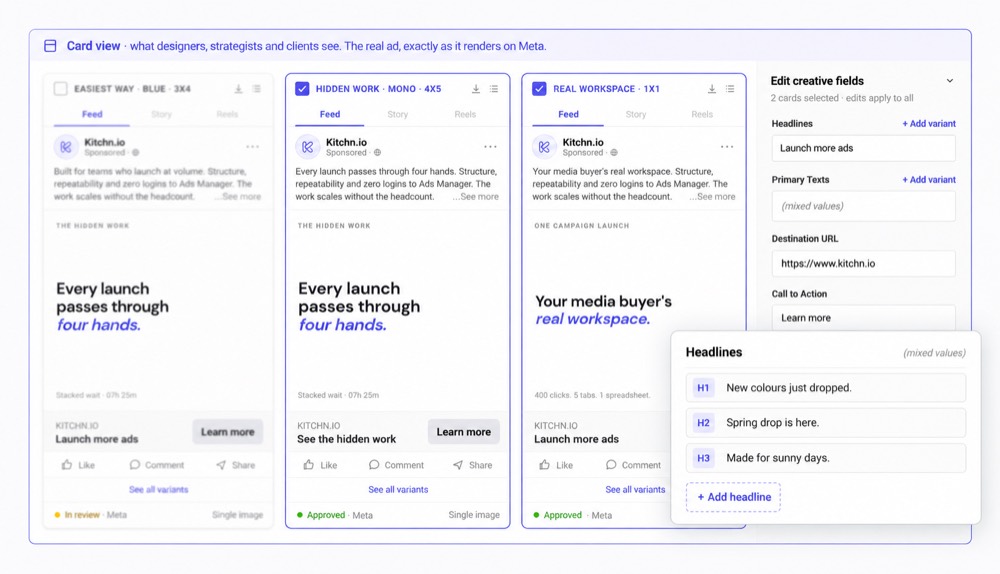
Kitchn unterstützt Bulk-Bearbeitung über Zeilen hinweg, und Defaults auf Sheet-Ebene lassen sich auf den ganzen Launch anwenden. Ad Templates liefern wiederverwendbare Konfigurationen, die gezielt auf ausgewählte Anzeigen angewendet werden, und Namenstemplates erzeugen Namen nach der bevorzugten Struktur des Teams.
- Headlines
- Primärtext
- URLs
- CTAs
- Anzeigen-Setup
- Mehrere Anzeigengruppen
Die dauerhaften Kontoeinstellungen von Blip sind wirklich gut
Blip verfolgt einen etwas anderen Ansatz. Einstellungen lassen sich pro Meta-Werbekonto speichern, darunter Namenskonventionen, Links, UTMs, Texte und Creative-Präferenzen, und diese Templates können sich im Team synchronisieren. Für einen Workflow mit viel Meta ist das eine echte Stärke. Konto wählen, wiederkehrende Einstellungen laden, launchen.
Die Defaults von Kitchn gelten dagegen pro Sheet, was nützlicher sein kann, wenn dasselbe Konto unterschiedliche Launch-Kontexte, Märkte oder Workflows enthält. Keines der beiden Modelle ist immer besser. Es hängt davon ab, wie deine Operation aufgebaut ist.
Kitchn validiert jede Zeile vor dem Erstellen
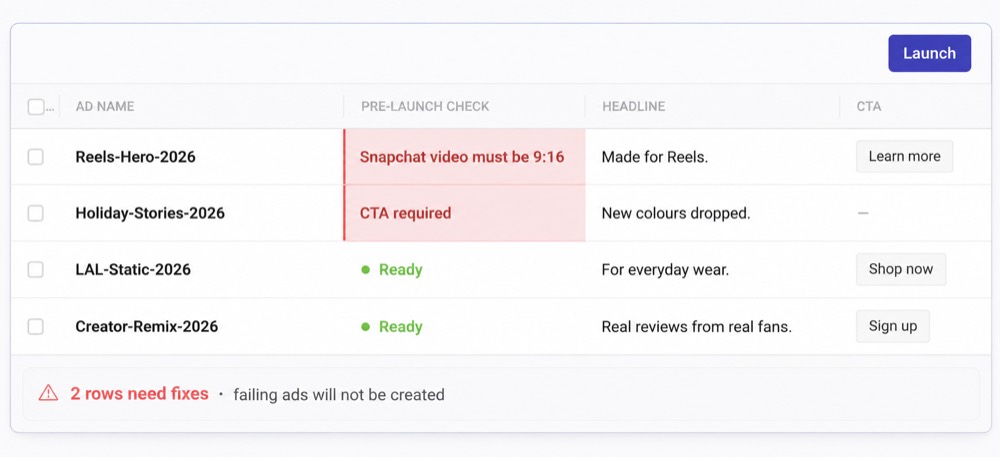
Kitchn lässt die strukturelle Validierung laufen, bevor die Anzeige erstellt wird. Besteht eine Zeile die Validierung nicht, geht sie in einen Fehlerstatus, und die Anzeige wird nicht erstellt.
- Pflichtfelder
- Schema-Regeln
- Vorgaben zu Länge und Muster
- URL-Formatierung
- Formatierung der URL-Parameter
- Plattformspezifische Specs
- Konfiguration von Metas Creative Enhancements
Auf Snapchat zum Beispiel kann eine ungültige 9:16-Spezifikation die Zeile hart blockieren. Kitchn verwaltet außerdem zuletzt 86 Schlüssel für Metas Creative Enhancements und schaltet nicht verwaltete Einstellungen ausdrücklich ab.
Blip hat einen eigenen Review-Workflow
Blip launcht nicht blind. Es bietet Anzeigenvorschauen und einen Bestätigungsschritt rund um das Launchen, und das aktuelle Produkt lässt Teams Präferenzen für Advantage+ Creatives speichern. So hat der Media Buyer die Gelegenheit, das Setup zu prüfen.
Der Unterschied bei Kitchn ist die deterministische strukturelle Schranke: Wenn eine unterstützte strukturelle Anforderung nicht erfüllt ist, wird diese Zeile nicht erstellt. Für Teams, die Setup-Fehler auf Meta bisher mit immer längeren manuellen QA-Checklisten ausgeglichen haben, kann das den Workflow spürbar verändern.
Kitchn liest auch die Texte
Die Prüfung dreht sich nicht nur um Pflichtfelder, Formate und URLs. Kitchn liest, was tatsächlich in der Anzeige steht, sodass ein Tippfehler oder eine Formulierung, die der Kunde ausgeschlossen hat, im selben Durchgang auffällt wie ein fehlerhafter Tracking-Parameter.
- Tippfehler und Rechtschreibung im Anzeigentext
- Formulierungen, die der Kunde freigegeben hat, und die Markenstimme, die er erwartet
- Britische oder amerikanische Schreibweise, je nachdem, womit das Konto arbeitet
- Pflichtfelder, Zeichenlimits und Formatregeln
- Landingpage-URLs und ihre Tracking-Parameter
- Creatives im richtigen Format für die Platzierung, in der sie laufen
- Meta-Enhancements, die niemand in deinem Team eingeschaltet hat
- Anzeigennamen, die nicht deinen Konventionen folgen
Was auch immer auffällt, der Batch wartet, bis es behoben ist. Das ist der Teil, den dir ein Vorschau-Bildschirm nicht abnehmen kann: Jemand muss es trotzdem bemerken.
Das Review hängt an jeder Launch-Zeile
Für Teams, bei denen mehrere Leute an einem Launch arbeiten, gibt Kitchn jeder Zeile ihren eigenen operativen Kontext. Ein Kunde oder Mitwirkender kann außerdem eine teilbare Vorschau bekommen, statt in den Ads Manager geschickt zu werden.
- Konfigurierbare Status
- Kommentare
- Anzeigenvorschauen
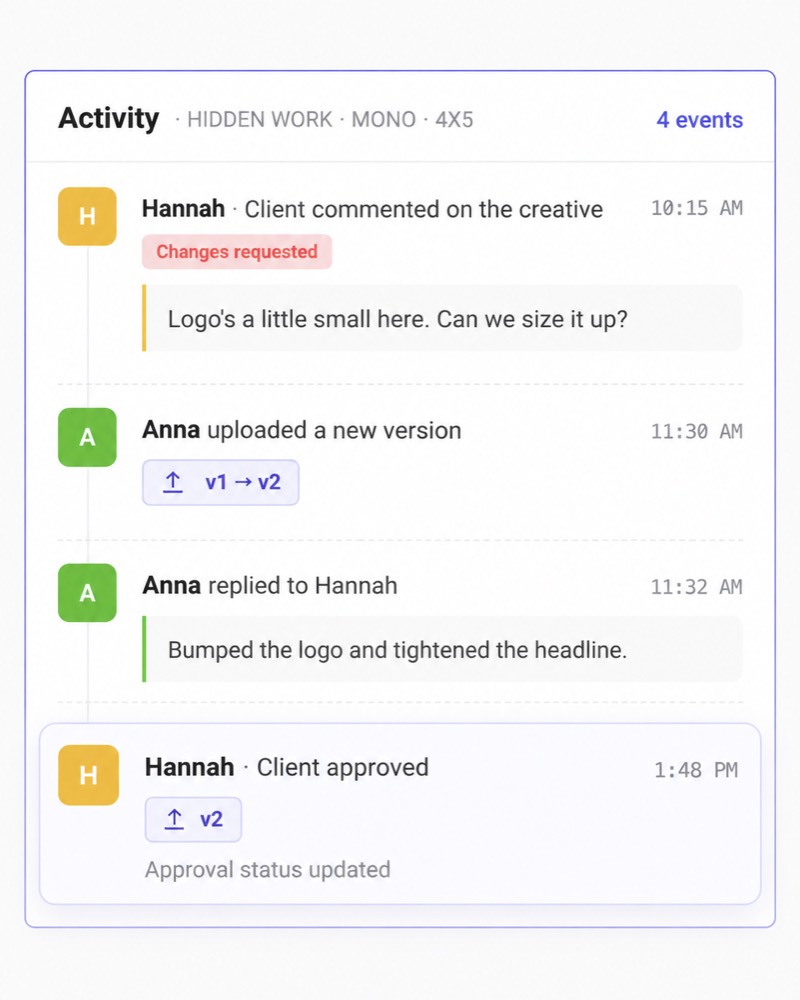
- Änderungshistorie
So wird das Review über einen ganzen Batch nützlich. Nicht „Hier ist die Kampagne, gib sie frei“, sondern „Hier sind die tatsächlichen Anzeigen, die wir vorbereiten, ihr Status, ihre Vorschauen und das Gespräch darüber“.
Der Freigabestatus ist keine harte Sperre
Kitchn hat konfigurierbare Freigabestatus, aber eine nicht freigegebene Zeile kann trotzdem gelauncht werden. Beim Launch liest nichts den Freigabestatus aus und deaktiviert den Button.
Was du bekommst, sind Sichtbarkeit und Verantwortlichkeit rund um das Review, keine Sperre auf dem Launch-Button. Die Person, die den Launch fährt, bleibt für die finale Entscheidung verantwortlich.
Wissen, was sich geändert hat, bevor die Anzeige live ging
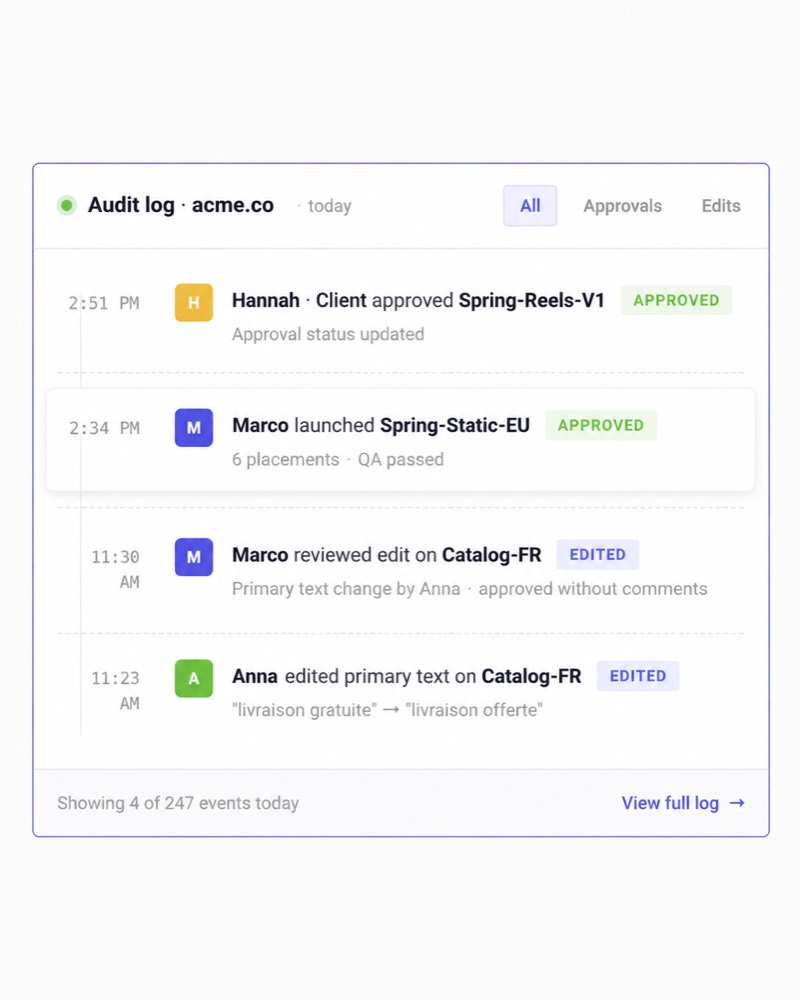
Kitchn führt pro Zeile eine Änderungshistorie, sodass das Team Vorher- und Nachher-Werte zu Änderungen sieht, statt sich darauf zu verlassen, dass sich jemand erinnert, wie das Spreadsheet gestern aussah. Der übergreifende Audit-Trail protokolliert operative Ereignisse rund um den Workflow.
Das ist besonders für Heads of Paid Social und Operations relevant. Der Media Buyer will Tempo. Die Person, die die Funktion leitet, braucht auch eine Antwort, wenn etwas schiefgeht.
Wer hat das geändert?
Wie war es vorher?
Wurde es geprüft?
Das ist eine andere Anforderung, als einfach schnell hochzuladen.
Den Launch in einem anderen Konto oder Markt wiederverwenden
Einer der nützlicheren Kitchn-Workflows dreht sich gar nicht um den ersten Launch. Sondern um den zweiten. Ein Launch ist für ein Land bereit. Jetzt muss er in ein anderes oder in ein anderes Konto.
Statt ihn von Grund auf neu zu bauen, kopiert das Team das Launch Sheet und ordnet die passenden Anzeigengruppen neu zu. Der fertige Batch wird wiederverwendbar.
Das ist besonders nützlich, wenn Paid Social über
Konten × Märkte × Creatives skaliert
statt nur über mehr Anzeigen in einem Meta-Konto.
Blip ist besonders stark bei Meta-nativen Workflows
Meta-native Umsetzung
Blip verdient die stärkere Position, wenn die Meta-spezifische Umsetzung die Hauptaufgabe ist. Das aktuelle Produkt bewirbt gezielt:
- Skalieren per Post-ID
- Partnerschaftsanzeigen
- Beworbene Instagram-Beiträge
- Flexible-Anzeigen
- Karussells
- Formulare zur Leadgenerierung
- An Platzierungen angepasste Creatives
- Dauerhafte Einstellungen pro Meta-Konto
- Import von Texten und Setup aus Meta
Vor allem das Skalieren per Post-ID steht im Zentrum des Blip-Angebots. Wenn sich deine Operation vor allem darum dreht, bewährten Social Proof auf Meta schnell über Anzeigengruppen und Konten zu verteilen, passt Blip ganz natürlich.
Empfehlungen für das Media Buying
Das ist ein weiterer echter Vorteil von Blip. Das aktuelle Analytics-Produkt zeigt Anomalie-Erkennung, schwache Performer, Kontoübersichten, Empfehlungen und Aktionen wie Reduzieren, Duplizieren, Skalieren, Bündeln und Pausieren. Diese Empfehlungen können auch in Slack erscheinen.
Kitchn sollte bei diesem Versprechen nicht mitbieten. Kitchn hat eine Rule Engine und Creative Reporting, bietet aber nicht dasselbe empfehlungsgetriebene Media-Buying-Erlebnis. Wenn du Software willst, die deinem Buyer sagt, dass eine Kampagne besser läuft und Skalieren lohnt, hat Blip die stärkere Produktgeschichte.
Kitchn geht über die Paid-Social-Kanäle hinweg breiter
Kitchn unterstützt das Launchen von Anzeigen derzeit auf acht Kanälen.
| Meta (Facebook & Instagram) | Allgemein verfügbar |
| TikTok | Allgemein verfügbar |
| Google Ads (Demand Gen) | Allgemein verfügbar |
| Allgemein verfügbar | |
| Snapchat | Allgemein verfügbar |
| Beta | |
| Spotify | Beta |
| AppLovin | Beta |
X lässt sich mit Kitchn verbinden, aber das Launchen wird derzeit nicht unterstützt. Der Funktionsumfang unterscheidet sich je nach Plattform, und Kitchn behauptet nicht, auf allen acht dieselbe Tiefe zu haben.
Was ist mit Blip und TikTok?
In diesem Bereich sind die öffentlichen Informationen zu Blip derzeit widersprüchlich. Die aktuellen Haupt- und Startseiten des Produkts beschreiben den Launcher weiterhin als auf Meta fokussiert, und die Produkt-FAQ dokumentiert Meta-Formate. Einige neuere redaktionelle Vergleichsinhalte von Blip aus 2026 sagen dagegen, dass das Launchen auf TikTok inzwischen verfügbar ist.
Wenn TikTok für dich wichtig ist, frag Blip
Weil sich diese beiden Quellen widersprechen, prüf die aktuelle Verfügbarkeit von TikTok direkt bei Blip, bevor du dich darauf verlässt. Kitchn launcht in jedem Tarif auf TikTok.
Der Preis ist eines der stärksten Argumente von Blip
Die Preise von Blip sind einfach, und jeder Tarif bewirbt unbegrenzte Launches und unbegrenzte Nutzerplätze.
| Starter · 1 Werbekonto | 49 $/Monat |
| Light · bis zu 5 Werbekonten | 199 $/Monat |
| Pro · unbegrenzte Werbekonten | 370 $/Monat |
Das Preismodell von Kitchn ist anders. Die Preise von Kitchn richten sich nach der Nutzung von Konten und Uploads statt nach unbegrenzten Launches. Wenn dein Kaufkriterium der günstigste Weg ist, viele Meta-Anzeigen in Bulk zu launchen, ist Blip das stärkere Angebot. Punkt.
Kitchn muss den Unterschied über die Operations verdienen
Das Argument für Kitchn ist nicht, dass 499 € irgendwie günstiger wären als 49 $. Das sind sie nicht. Das Argument ist, ob dein aktueller Prozess teuer ist. Wie viele Paid-Social-Stunden verschwinden in:
- Vorbereitung von Uploads
- Prüfung des Setups
- Abstimmung von Reviews
- Behebung von Fehlern
- Neuaufbau von Launches
- Umgang mit mehreren Kontokonventionen
- Übertragung derselben Arbeit in andere Märkte
- Suche danach, wer etwas geändert hat
Für einen Buyer, der allein arbeitet, rechtfertigt diese operative Ebene womöglich keine zusätzlichen Softwarekosten. Für ein prozessorientiertes Paid-Social-Team kann sie es.
Was solltest du wählen?
Wähle Kitchn, wenn
- mehrere Leute am Launch-Prozess beteiligt sind
- die Paid-Social-Arbeit ohnehin in Spreadsheets beginnt
- strukturelle Validierung vor dem Erstellen wichtig ist
- du Kommentare, Status und Änderungshistorie an einzelnen Anzeigen brauchst
- du mehrere Kunden, Marken oder Märkte betreust
- du Launch-Workflows regelmäßig wiederverwendest
- Meta nicht dein einziger Paid-Social-Kanal ist
- Heads of Paid Social besseren Einblick in die Umsetzung brauchen
- operative Einheitlichkeit neben dem Launch-Tempo zählt
Wähle Blip, wenn
- Meta das Zentrum deiner Paid-Social-Operation ist
- deine größte Anforderung schlicht schnelleres Launchen ist
- das Skalieren per Post-ID zentral für deinen Workflow ist
- Partnerschaftsanzeigen ein wichtiger Anwendungsfall sind
- du dauerhafte Einstellungen pro Meta-Konto speichern willst
- dich eingebaute Meta-Analytics und Empfehlungen ansprechen
- unbegrenzte Launches wichtig sind
- du preissensibel bist
- du keine schwerere Ebene für Review und Kontrolle rund um jeden Batch brauchst
Kauf Kitchn nicht nur, weil es mehr Prozess hat
Mehr Prozess ist nicht automatisch besser. Wenn ein erfahrener Media Buyer das Konto von Anfang bis Ende betreut und Blip aus einem einstündigen Launch fünf Minuten macht, hast du das Problem gelöst. Status, Audit-Logs und Workflow-Kontrollen, die niemand braucht, schaffen keinen Wert.
Kitchn wird nützlicher, wenn die Operation selbst der Engpass ist:
Mehrere Buyer.
Mehrere Konten.
Unterschiedliche Standards.
Reviews.
Märkte.
Einblick für Kunden oder Stakeholder.
So viel Durchsatz, dass manuelles Prüfen anfängt, die Kapazität des Teams aufzufressen.
Genau dort beginnt sich Struktur auszuzahlen.
Blip macht den Buyer schneller. Kitchn macht das Team wiederholbar.
Das ist der klarste Unterschied. Blip ist ein beeindruckendes Tempo-Tool für Media Buyer mit viel Meta. Kitchn ist für Paid-Social-Organisationen gebaut, die Launch-Tempo und einen wiederholbaren Weg brauchen, die Arbeit drumherum zu steuern.
Weniger repetitive Umsetzung für den Buyer.
Mehr Einblick für den Paid-Social-Lead und mehr Einheitlichkeit in der ganzen Operation.
Und mehr Kapazität, ohne dass jedes Plus an Output zu mehr manueller Abstimmung wird.
Kitchn.io vs Blip: häufige Fragen
Ist Kitchn eine Alternative zu Blip?
Ja. Beide Produkte launchen Paid-Social-Anzeigen in Bulk und überschneiden sich bei Meta-Workflows stark.
Kitchn wird zur stärkeren Alternative, wenn die Anforderung bis zu struktureller Validierung, Zusammenarbeit pro Zeile, Änderungshistorie, Wiederverwendung über Konten und breiterer Unterstützung von Paid-Social-Kanälen reicht.
Was ist besser für das Bulk-Launching von Meta-Anzeigen?
Beide sind gebaut, um genau dieses Problem zu lösen.
Blip ist für einen unkomplizierten Meta-Workflow besonders attraktiv, wegen des niedrigen Preises, unbegrenzter Launches, dauerhafter Kontoeinstellungen und starker Unterstützung für Post-IDs.
Kitchn ist nützlicher, wo Bulk-Launching Teil eines größeren Arbeitsprozesses im Team ist.
Unterstützt Blip das Skalieren per Post-ID?
Ja. Das Skalieren per Post-ID in Bulk ist eine der Kernfunktionen von Blip und eine echte Stärke des Produkts.
Kitchn unterstützt ebenfalls Workflows mit bestehenden Beiträgen, aber Blip ist in diesem Bereich stark.
Hat Kitchn die bessere QA?
Kitchn hat eine dokumentierte strukturelle Validierungsschranke vor dem Erstellen der Anzeige. Eine fehlerhafte Zeile wird nicht erstellt.
Blip hat einen Review- und Vorschau-Workflow und gespeicherte Konfigurationen.
Der nützliche Unterschied ist also deterministische strukturelle Validierung gegenüber einem Review vor allem durch die Person, die launcht, nicht „Kitchn prüft Anzeigen und Blip nicht“.
Prüft Kitchn die Anzeigentexte?
Ja. Kitchn liest die Texte und prüft das Setup, sodass ein Tippfehler oder eine Formulierung, die der Kunde ausgeschlossen hat, im selben Durchgang auffällt, und der Batch wartet, bis der Fehler behoben ist.
Verlangt Kitchn eine Freigabe vor dem Launch?
Nein. Kitchn hat Status, Kommentare und Vorschauen rund um Launch-Zeilen, aber der Freigabestatus deaktiviert den Launch technisch nicht.
Welches hat die besseren Analytics?
Blip hat die stärkere eingebaute Empfehlungsebene für das Media Buying auf Meta. Das Produkt zeigt Anomalien, schwache Performer und empfohlene Maßnahmen.
Kitchn Creative Reporting ist stattdessen darauf ausgelegt, die Creative-Performance über Meta, TikTok, Google Ads und Pinterest zu analysieren.
Was ist günstiger?
Blip. Die aktuellen öffentlichen Preise starten bei 49 $/Monat mit unbegrenzten Launches.
Kitchn richtet sich an Teams, bei denen der operative Workflow rund um den Launch selbst ein größeres geschäftliches Problem ist.
Ist Blip nur für Meta?
Die aktuellen Seiten zum Kernprodukt von Blip bleiben auf Meta fokussiert, während einige neuere redaktionelle Blip-Seiten angeben, dass das Launchen auf TikTok verfügbar ist.
Weil sich diese Quellen widersprechen, klär die Verfügbarkeit von TikTok mit Blip, wenn sie für deine Entscheidung wichtig ist.
Lassen sich Kitchn und Blip zusammen nutzen?
Technisch ja. Anders als bei Birch oder Madgicx gibt es aber deutlich mehr Überschneidung, weil beide Produkte im Kern mit dem Launchen von Anzeigen zu tun haben.
Für die meisten Teams ist es sinnvoller, den Launcher zu wählen, dessen Workflow am besten zur Operation passt, statt für beide zu zahlen.
So passt Kitchn zu deinem Workflow
Geh mit uns die Workflows deines Teams durch.
So funktioniert Kitchn →