
Eine Adnova-Alternative für Teams, die mehr Kontrolle über jeden Launch brauchen
Adnova verbindet Creative-Recherche, Analytics, Asset-Management und Bulk-Launching in einer Suite für den Creative-Workflow. Kitchn verfolgt einen fokussierteren Ansatz: einen strukturierten Workflow, um Anzeigen vorzubereiten, zu prüfen, zu validieren und zu launchen, mit den operativen Kontrollen, die es braucht, wenn mehrere Leute, Konten und Märkte beteiligt sind.
- Creative-Inspiration
- Tracking der Konkurrenz
- Creative Hub und Asset-Versionierung
- KI-Creative-Recherche
- Assets importieren
- Defaults anwenden
- Texte über Anzeigen hinweg bearbeiten
- Große Batches launchen
- Strukturelle Validierung in jeder Zeile
- Status, Kommentare und Vorschauen
- Änderungshistorie und Audit-Log
- Wiederverwendung über Konten und Märkte
Wenn du Creative-Inspiration, Konkurrenzrecherche und Asset-Management neben einem günstigeren Bulk-Launcher willst, ist Adnova eine starke Option.
Wenn der Launch-Prozess selbst in deinem Team wiederholbarer, sichtbarer und kontrollierter werden muss, genau dort passt Kitchn.
Kitchn vs Adnova: die kurze Antwort
| Wenn du Folgendes brauchst … | Passt besser |
|---|---|
| Große Batches fertiger Anzeigen erstellen und launchen | Beide |
| Mit einem Launch-Workflow im Tabellenformat arbeiten | Kitchn |
| Strukturelle Validierung direkt vor dem Erstellen der Anzeige ergänzen | Kitchn |
| Status, Kommentare und Änderungen an einzelnen Launch-Zeilen verfolgen | Kitchn |
| Wiederholbare Launch-Defaults und Namenstemplates anwenden | Kitchn |
| Launch-Workflows über Konten oder Märkte wiederverwenden | Kitchn |
| Auf dem breiteren, verifizierten Kanal-Set von Kitchn launchen | Kitchn |
| Creatives der Konkurrenz recherchieren | Adnova |
| Eine große Bibliothek mit Anzeigen-Inspiration durchsuchen | Adnova |
| Creative-Assets, Versionen und visuelles Feedback verwalten | Adnova |
| KI-gestützte Creative-Analyse und -Recherche nutzen | Adnova |
| Einen eigenständigen Meta-Bulk-Launcher zu einem niedrigeren Einstiegspreis kaufen | Adnova |
Das ist kein Vergleich zwischen einem Tool, das in Bulk launchen kann, und einem, das es nicht kann. Beide können es. Der Unterschied ist, worum jedes Produkt gebaut ist.
Adnova umgibt den Creative-Workflow. Kitchn umgibt den Launch.
Am deutlichsten überschneiden sich die Produkte beim Bulk-Launching. Aber sie starten an unterschiedlichen Stellen.
Adnova
Adnova positioniert sich als breitere Plattform für den Creative-Workflow. Zur Produkt-Suite gehören Creative Analytics, Creative Inspiration, Tracking der Konkurrenz, Creative Hub, Ad Templates, ein Bulk Ad Launcher und KI-gestützte Creative-Tools.
Der Launcher ist ein Teil dieses größeren Creative-Systems.
Kitchn
Kitchn setzt ein, wenn Creative und Texte bereit sind, Anzeigen zu werden. Das Launch Sheet ist der zentrale Arbeitsbereich, und eine Zeile ist eine Anzeige. Creative, Text, Ziel-URL sowie Kampagnen- und Anzeigengruppen-Infos stehen in Spalten.
Assets importieren. Texte einfügen. Setup anwenden. Batch prüfen. Strukturelle Fehler beheben. Launchen.
Kitchn konzentriert sich bewusst darauf, diesen operativen Prozess in einem Paid-Social-Team leichter wiederholbar zu machen.
Kitchn.io vs Adnova auf einen Blick
| Funktion | Kitchn.io | Adnova |
|---|---|---|
| Hauptaufgabe | Paid-Social-Launch-Operations | Creative-Workflow und Bulk-Launching |
| Bulk-Launching von Anzeigen | ✓Ja | ✓Ja |
| Workflow in Tabelle oder Raster | ✓Zentrales Launch Sheet | ✓Tabellenbasierter Bulk-Workflow |
| Bulk-Bearbeitung von Texten | ✓Ja | ✓Ja |
| Bulk-Import von Assets | ✓Ja | ✓Ja |
| Cloud-Quellen für Assets | ✓Ja | ✓Ja |
| Wiederverwendbare Defaults | ✓Auf Sheet-Ebene | ✓Launch-Einstellungen |
| Ad Templates | ✓Ja | ✓Ja |
| Namenstemplates | ✓Ja | ✓Namensmuster |
| Steuerung von Metas Creative Enhancements | ✓Zuletzt 86 Schlüssel | ✓Ja |
| Validierung vor dem Launch | ✓Eigene Validierung von Texten und Setup in jeder Zeile | ✓Prüfung von Pflichtdaten und Launch-Kompatibilität dokumentiert |
| Fehlgeschlagene Kitchn-Validierung verhindert das Erstellen | ✓Ja | Anderes Validierungsmodell |
| Workflow-Status pro Zeile | ✓Ja | ✕Kein vergleichbares Statussystem für Launch-Zeilen dokumentiert |
| Kommentare an Launch-Zeilen | ✓Ja | Kommentare und Annotationen sitzen vor allem an Creative-Assets |
| Öffentliche Anzeigenvorschauen | ✓Ja | ✓Meta-Anzeigenvorschauen werden unterstützt |
| Freigabe sperrt den Launch technisch | ✕Nein | ✕Keine vergleichbare harte Launch-Freigabe dokumentiert |
| Änderungshistorie pro Zeile | ✓Ja | Versionierung von Creative-Assets; eine vergleichbare Historie für Launch-Zeilen ist nicht dokumentiert |
| Audit-Log der Organisation | ✓Ja | ✕Vergleichbares Launch-Audit-Log nicht dokumentiert |
| Versionierung von Creative-Assets | ✕Nicht das Kernprodukt von Kitchn | ✓Ja |
| Creative-Inspirationsbibliothek | ✕Nein | ✓Ja |
| Tracking von Konkurrenz-Creatives | ✕Nein | ✓Ja |
| KI-Creative-Recherche | ✕Nein | ✓Ja |
| Reporting zur Creative-Performance | ✓Ja | ✓Ja |
| Einstiegspreis als eigenständiger Launcher | Höher | ✓Adnova ist günstiger |
Beide Tools können in Bulk launchen. Das ist nicht der interessante Teil.
Eine Vergleichsseite mit der Aussage „Kitchn launcht Anzeigen in Bulk und Adnova nicht“ wäre schlicht falsch. Adnova hat einen fähigen Bulk-Launcher. Er kann Assets importieren, Defaults anwenden, Texte über Anzeigen hinweg bearbeiten und große Batches launchen.
Die Kaufentscheidung muss also eine Ebene tiefer gehen. Was passiert, wenn:
mehrere Leute am Launch arbeiten?
jeder Kunde oder jede Marke andere Standards hat?
derselbe Workflow in einen anderen Markt wandert?
Hunderte Zeilen geprüft werden müssen?
jemand vor dem Launch etwas ändert?
ein struktureller Fehler gestoppt werden muss, bevor die Anzeige erstellt wird?
Genau dort wird das Arbeitsmodell von Kitchn relevanter.
Das Launch Sheet ist der operative Arbeitsbereich
Kitchn behandelt Bulk-Upload nicht als Button, der an ein anderes Produkt angehängt ist. Im Launch Sheet passiert die Arbeit.
Media Buyer fügen direkt aus Excel oder Google Sheets ein, einzelne Zellen, ganze Spalten und Matrizen im Tabellenformat.
- Einzelne Zellen
- Ganze Spalten
- Matrizen im Tabellenformat
Das zählt, weil die Paid-Social-Planung oft ohnehin in Spreadsheets passiert. Das Problem ist nicht unbedingt, noch eine Kampagnenstrategie zu entwerfen. Es ist, das schon Geplante in korrekt konfigurierte Anzeigen zu verwandeln.
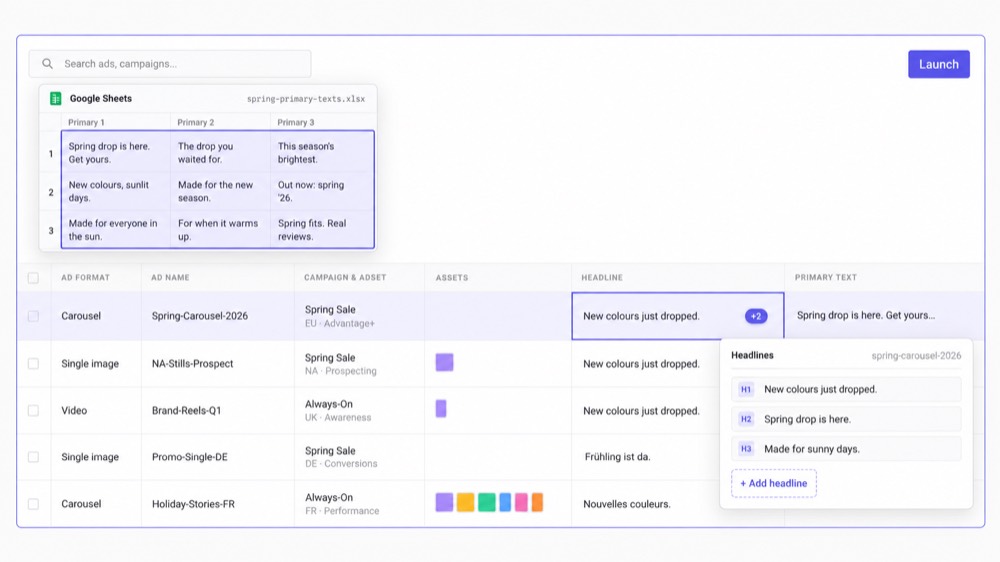
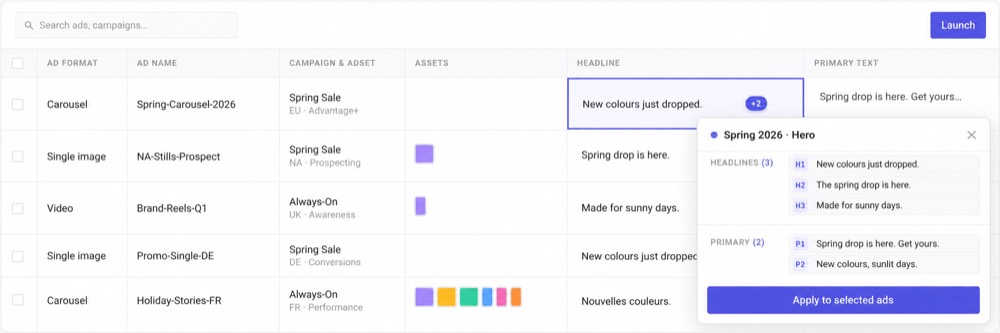
Den Batch bauen, ohne das Setup zu wiederholen
Wenn das Launch-Volumen wächst, werden kleine wiederholte Handgriffe zur eigentlichen Arbeitslast. Mit Kitchn wenden Teams Setup auf ganze Zeilen an, statt es immer wieder neu anzulegen.
- Defaults auf Sheet-Ebene
- Bulk-Bearbeitung
- Ad Templates
- Namenstemplates
- Bulk-Import von Assets
- Mehrere Anzeigengruppen in einem Sheet
Templates werden gezielt angewendet, nicht automatisch überall übernommen, und Namenstemplates werden angewendet, aber beim Launch nicht hart erzwungen. Dieser Unterschied ist wichtig. Kitchn macht den bevorzugten Prozess leichter einzuhalten, ohne so zu tun, als ersetze Software das Urteil der Person, die den Launch fährt.
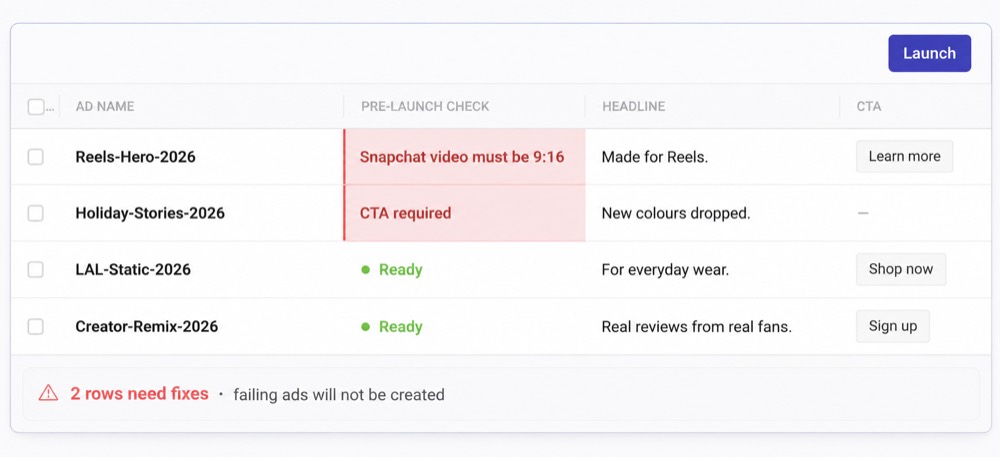
Strukturelle QA ist direkt in den Kitchn-Launch eingebaut
Bevor eine Anzeige erstellt wird, validiert Kitchn die Launch-Zeile. Besteht eine Zeile die Validierung nicht, geht sie in einen Fehlerstatus, und die Anzeige wird nicht erstellt.
- Pflichtfelder
- Schema-Regeln
- Vorgaben zu Länge und Muster
- URL-Formatierung
- Formatierung der URL-Parameter
- Plattformspezifische Specs
- Konfiguration von Metas Creative Enhancements
Bei Metas Creative Enhancements verwaltet Kitchn derzeit zuletzt 86 Enhancement-Schlüssel und schaltet nicht verwaltete Einstellungen ab, solange sie nicht bewusst aktiviert wurden. Damit hat der Media Buyer direkt vor dem Erstellen eine strukturelle Schranke.
Adnova hat durchaus eine Launch-Validierung
Die aktuelle Dokumentation von Adnova zeigt eine Validierung: Seine Launch-API prüft Anforderungen wie die Kompatibilität der Anzeigengruppe, Conversion-Orte, unterstützte Anzeigentypen, Links und Zeitplanbedingungen, bevor bestimmte Launches angenommen werden. Auch die Launcher-Oberfläche verlangt wichtige Launch-Informationen, bevor der Batch weiterlaufen kann.
„Adnova hat keine QA vor dem Launch“ zu sagen, wäre also zu pauschal. Der bessere Unterschied ist, dass Kitchn eine eigene strukturelle Validierungsebene für jede Zeile im Launch Sheet hat, die URL-Formatierung, Schema- und Spec-Prüfungen und die Richtlinie zu Metas Enhancements zusätzlich zu den Basisinformationen abdeckt, die zum Erstellen der Anzeige nötig sind. Das ist ein glaubwürdigerer Vergleich, als so zu tun, als würde der Wettbewerber nichts tun.
Kitchn prüft die Worte, nicht nur die Verkabelung
Man könnte leicht annehmen, die Prüfung höre dort auf, wo es darum geht, ob die Anzeige korrekt gebaut ist. Tut sie nicht. Kitchn liest auch die Texte, sodass ein Tippfehler, eine Formulierung, die der Kunde ausgeschlossen hat, oder die falsche Schreibweise für den Markt unterwegs gefunden wird.
- Tippfehler und Rechtschreibung im Anzeigentext
- Formulierungen, die der Kunde freigegeben hat, und die Markenstimme, die er erwartet
- Britische oder amerikanische Schreibweise, je nachdem, womit das Konto arbeitet
- Pflichtfelder, Zeichenlimits und Formatregeln
- Landingpage-URLs und ihre Tracking-Parameter
- Creatives im richtigen Format für die Platzierung, in der sie laufen
- Meta-Enhancements, die niemand in deinem Team eingeschaltet hat
- Anzeigennamen, die nicht deinen Konventionen folgen
Alles, was auffällt, hält den Batch an, bis jemand es behebt. Es geht darum, dass ein Fehler, ob kaputte URL oder falsch geschriebener Produktname, stoppt, bevor er zur Live-Anzeige wird.
Das Review hängt am Launch
Wenn mehrere Leute an der Paid-Social-Umsetzung arbeiten, wird das Review schnell zum nächsten zersplitterten Prozess: ein Spreadsheet, Slack, Screenshots, E-Mail, Ads Manager. Kitchn gibt stattdessen jeder Launch-Zeile ihren eigenen Datensatz.
- Konfigurierbarer Status
- Kommentare
- Änderungshistorie
- Anzeigenvorschau
Öffentliche Vorschauen und das Teilen mit Gästen erlauben es Leuten außerhalb der Kitchn-Organisation, die relevanten Anzeigen zu sehen, ohne das Konto selbst zu bedienen. So bleibt mehr Kontext am eigentlichen Launch.
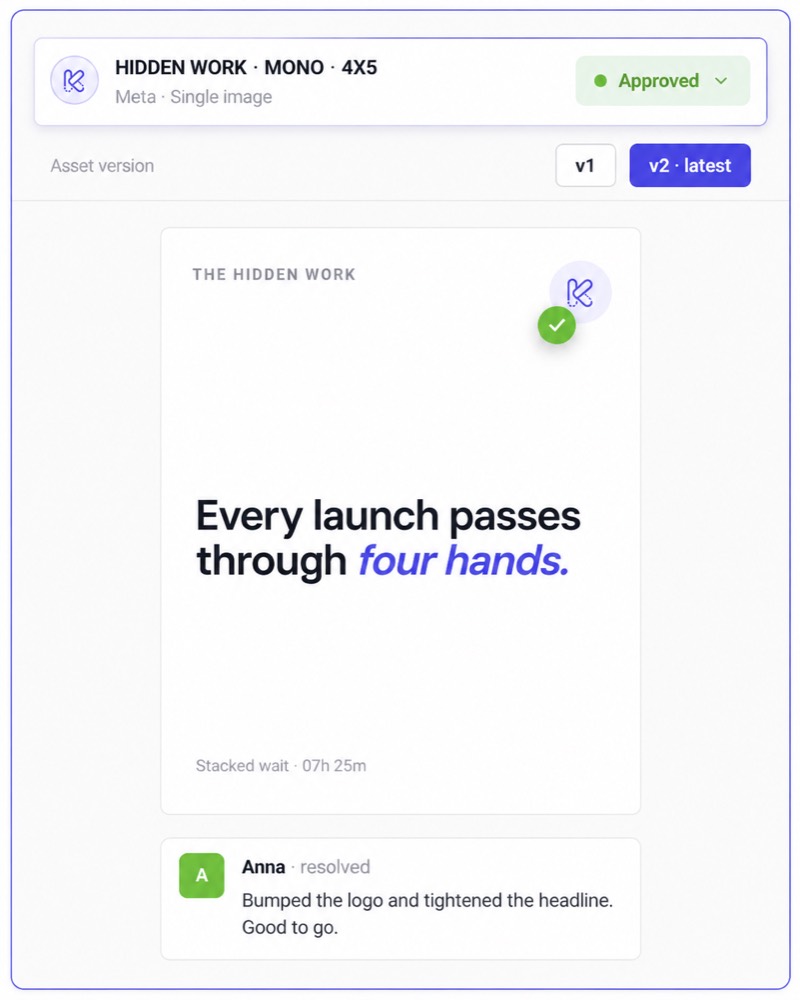
Der Freigabestatus in Kitchn sperrt den Launch nicht
Die bisherige Seite Kitchn vs Adnova betont „Freigabe vor dem Launch“ zu stark. Kitchn hat Freigabestatus wie Needs Review, In Progress und Approved, verhindert aber technisch nicht, dass eine nicht freigegebene Zeile gelauncht wird. Beim Launch prüft nichts den Freigabestatus als harte Sperre.
Der Wert ist Sichtbarkeit. Das Team sieht, ob die Anzeige geprüft wurde, Kommentare sitzen an der Zeile, Änderungen an der Freigabe werden protokolliert, und die Vorschau zeigt, was tatsächlich vorbereitet wird. Die finale Launch-Entscheidung bleibt beim Media Buyer.
Adnova ist früher im Creative-Workflow stärker
Creative Hub
Adnova enthält einen eigenen Workflow für Asset-Management mit Boards, Asset-Organisation, Creative-Suche, Kommentaren, visuellen Annotationen, Kommentaren mit Zeitstempel in Videos und Versionierung.
Kitchn bindet Systeme zur Creative-Speicherung an. Es versucht nicht, ein komplettes DAM oder eine Creative-Review-Umgebung zu ersetzen. Wenn das Ziel ist, Asset-Management und Creative-Review zu bündeln, hat Adnova das stärkere Produkt.
Creative-Inspiration und Konkurrenzrecherche
Adnova geht auch vor der Produktion des Creatives deutlich weiter, mit einer großen Inspirationsbibliothek und Tools zum Beobachten und Analysieren der Werbung von Wettbewerbern: Creative-Tracking, Anzeigen-Inspiration, Blickwinkel, Hooks, Botschaften, Themen, Recherche zu Landingpages sowie KI-gestützte Suche und Analyse.
Kitchn kann das nicht. Es ist keine Plattform für Wettbewerbsanalyse. Wenn dein Team Recherche, Inspiration, Creative-Management und Launch in einem System will, ist diese Breite ein echter Vorteil von Adnova.
Kitchn setzt ein, wenn das Creative bereit zum Ausspielen ist
Diese engere Grenze ist für das richtige Team auch einer der Vorteile von Kitchn. Deine Organisation hat vielleicht schon Designer, Figma, Canva, Frame.io, Google Drive, Dropbox, einen Prozess für Creative-Strategie und einen Recherche-Stack.
Du musst nicht unbedingt all das ersetzen, nur um die Paid-Social-Umsetzung zu verbessern.
Kitchn setzt bei der operativen Übergabe an.
Das Creative existiert. Jetzt muss es korrekt und effizient live gehen.
Für Teams, deren Creative-Prozess schon funktioniert, verhindert dieser Fokus, dass Probleme gelöst werden, die sie gar nicht haben.
Einen bestehenden Launch über Konten und Märkte wiederverwenden
Ein häufiges Paid-Social-Problem ist nicht, einen Batch zu erstellen. Es ist, diesen Batch woanders neu zu erstellen: in einem anderen Konto, einem anderen Land, einem anderen Markt, für eine andere Marke.
Mit Kitchn kopieren Teams ein Launch Sheet in einen anderen Kontext und ordnen die passenden Anzeigengruppen neu zu, statt die operative Arbeit bei null zu beginnen.
Für Teams mit mehreren Konten oder internationalen Launches ist das ein wichtiger Unterschied zwischen einem bloßen Bulk-Upload-Button und einem wiederholbaren Arbeitsprozess.
Wissen, was sich geändert hat
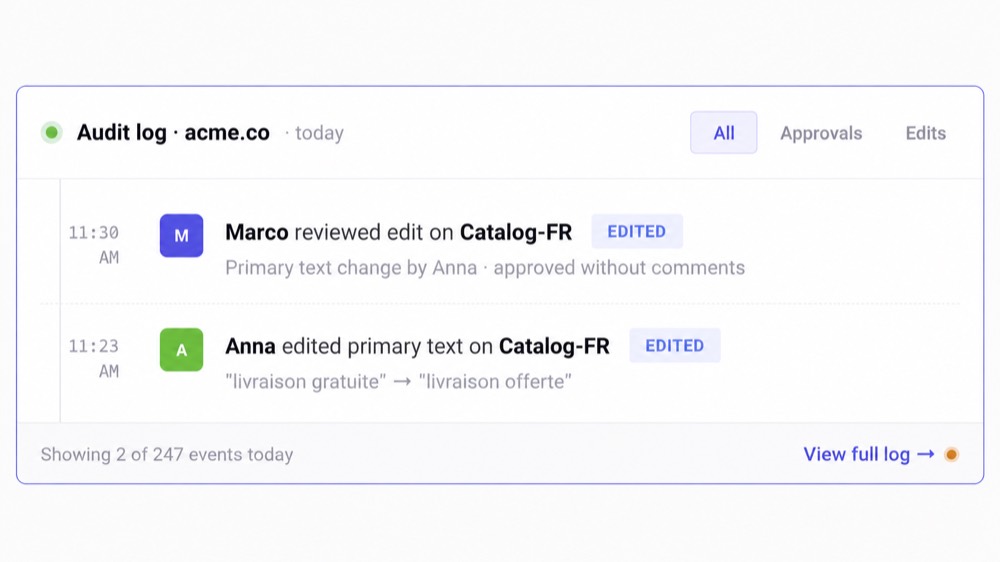
Kitchn führt pro Zeile eine Änderungshistorie mit Vorher- und Nachher-Werten und bietet ein Batch-Undo. Sein übergreifendes Audit-System protokolliert außerdem operative Ereignisse wie Launches, Bulk-Änderungen, Freigaben zum Teilen, Änderungen am Freigabestatus, Rollenänderungen und Integrationen.
So haben Heads of Paid Social und Operations eine klarere Antwort, wenn jemand fragt: „Was hat sich geändert?“ oder „Wer hat das angefasst, bevor es live ging?“
Adnova bietet eine Versionshistorie für Creatives in seinem Creative Hub. In der geprüften öffentlichen Dokumentation ist kein vergleichbarer Audit-Trail für Änderungen an Launch-Zeilen dokumentiert. Das sind unterschiedliche Arten von Historie: Für die Creative-Produktion ist die Asset-Versionierung von Adnova nützlich, für die Kontrolle über Launches ist das Audit-Modell von Kitchn das relevantere.
Kitchn hat die breitere verifizierte Launch-Abdeckung
Kitchn unterstützt derzeit acht Launch-Kanäle.
| Meta (Facebook & Instagram) | Allgemein verfügbar |
| TikTok | Allgemein verfügbar |
| Google Demand Gen | Allgemein verfügbar |
| Allgemein verfügbar | |
| Snapchat | Allgemein verfügbar |
| Beta | |
| Spotify | Beta |
| AppLovin | Beta |
X lässt sich mit Kitchn verbinden, kann derzeit aber nicht launchen. Der Funktionsumfang unterscheidet sich je nach Plattform, und Kitchn behauptet nicht, dass jeder Kanal dieselbe Automatisierungstiefe hat.
Ein Hinweis zur Kanalunterstützung von Adnova
Die öffentlichen Marketingmaterialien von Adnova nennen derzeit Launch-Unterstützung über Meta hinaus, darunter TikTok und AppLovin, auf mehreren Vergleichs- und Redaktionsseiten. Die aktuelle Seite zum Bulk Ad Launcher ist jedoch gezielt auf Meta ausgerichtet, und die öffentliche Dokumentation der Ad Launcher API nennt Meta als einzige unterstützte Launch-Plattform per API.
Das kann schlicht an unterschiedlicher Verfügbarkeit in UI und API von Adnova liegen. Statt so zu tun, als sei die Antwort eindeutiger als Adnovas eigene Dokumentation, empfehlen wir, die genauen Kanäle, die du brauchst, vor der Entscheidung mit Adnova zu klären.
Adnova ist viel günstiger, wenn du nur einen Launcher willst
Adnova bewirbt seinen eigenständigen Ad Launcher derzeit ab 79 $/Monat für ein Werbekonto, mit weiteren Konten zu je 20 $ und unbegrenzten Anzeigen-Launches. Das Launch Team von Kitchn startet derzeit bei 499 €/Monat für fünf Werbekonten und 900 Anzeigen-Uploads pro Monat.
Wenn du einen günstigen Meta-Bulk-Launcher brauchst und sonst nichts, hat Adnova den offensichtlichen Preisvorteil.
Die Frage ist, was dich der manuelle Prozess kostet
Kitchn ergibt wirtschaftlich Sinn, wenn das Problem größer ist als „Ich will einen günstigeren Weg, 100 Anzeigen zu launchen“.
- Mehrere Media Buyer sind beteiligt
- Verschiedene Konten haben verschiedene Standards
- Launches müssen geprüft werden
- Fehler bergen ein Risiko bei Kunden oder Stakeholdern
- Dieselbe Arbeit muss in mehreren Märkten wiederholt werden
- Das Management braucht Einblick
- Manuelles Prüfen frisst die Zeit erfahrener Leute
- Das Hochladen begrenzt die Kapazität des Teams
An diesem Punkt geht es bei der Kaufentscheidung nicht nur um die Kosten pro Launch. Es geht um die Kosten, den Arbeitsprozess manuell zu lassen.
Überschneidende Fähigkeiten, unterschiedlicher Schwerpunkt
Beide Produkte haben Funktionen für Creative Analytics und Reporting.
Adnova
Creative Analytics steht im Zentrum des übrigen Adnova-Angebots. Es sitzt neben den Produkten für Inspiration und Wettbewerbsanalyse und soll Performance-Erkenntnisse in die Creative-Strategie zurückspielen.
Kitchn
Kitchn Creative Reporting deckt Meta, TikTok, Google Ads und Pinterest ab, mit eigenen Dimensionen, berechneten Metriken, bedingter Formatierung, Top- und Bottom-Filtern, einer Screenshot-Bibliothek für Anzeigen und teilbaren Reports.
Im Fokus steht, die eigene Paid-Social-Performance des Teams mit dem getesteten Creative zu verbinden. Eine Konkurrenzrecherche wie bei Adnova bietet Kitchn nicht.
So sieht das in der Praxis aus
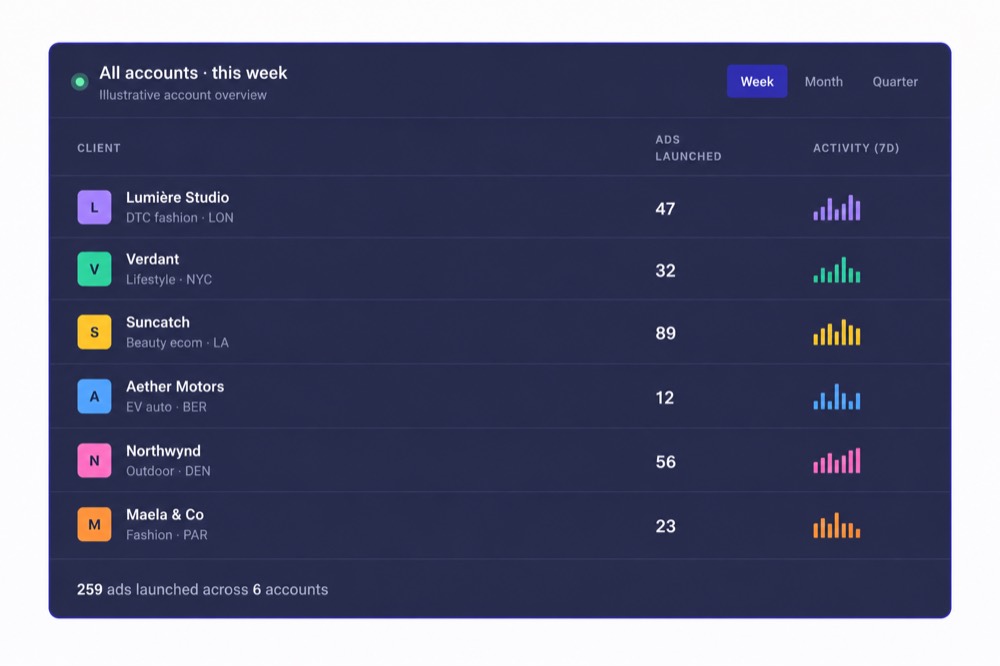
Teams, die ihre Launch-Operations in Kitchn fahren, messen den Unterschied an der Zeit, die der Prozess zurückgibt.



Was solltest du wählen?
Wähle Kitchn, wenn
- der Launch selbst zu einem wiederholbaren Teamprozess werden muss
- mehrere Leute an der Paid-Social-Umsetzung beteiligt sind
- du strukturelle Validierung willst, bevor Anzeigen erstellt werden
- du Status, Kommentare und Änderungshistorie an einzelnen Launch-Zeilen willst
- dein Team ohnehin viel mit Spreadsheets arbeitet
- unterschiedliche Konten unterschiedliches wiederholbares Setup brauchen
- du Launches regelmäßig über Konten oder Märkte wiederholst
- du die breitere, verifizierte Paid-Social-Kanalabdeckung von Kitchn brauchst
- Sichtbarkeit und operative Einheitlichkeit genauso zählen wie reines Upload-Tempo
Wähle Adnova, wenn
- du vor allem einen günstigen Bulk-Launcher willst
- Meta der wichtigste Launch-Workflow ist, den du verbessern willst
- Creative-Recherche ein großer Teil dessen ist, was die Software lösen soll
- dir das Tracking von Konkurrenz-Creatives wichtig ist
- du Inspiration, Analytics und Launching in derselben Suite willst
- dein Team einen eigenen Creative Hub mit Annotationen und Asset-Versionierung braucht
- die Software früher im Creative-Lebenszyklus mitarbeiten soll
Vielleicht musst du Adnova gar nicht ersetzen
Wenn dein Team viel aus der Inspirationsbibliothek, der Konkurrenzrecherche, dem Creative Hub, der KI-Recherche und den Creative Analytics von Adnova herausholt, gibt es vielleicht keinen Grund, diese Workflows aufzugeben.
Die nützlichere Frage ist, ob Adnova auch die operative Kontrolle rund um den Launch löst, die du brauchst. Wenn ja, bleib dabei. Wenn nein, lässt sich Kitchn für diese Ebene bewerten, ohne so zu tun, als müssten sich die beiden Produkte gegenseitig ausschließen.
Kitchn ist für den Teil zwischen freigegebenem Creative und Live-Anzeige gebaut
So lässt sich der Unterschied am einfachsten denken. Adnova deckt viel mehr vom Creative-Lebenszyklus ab. Kitchn konzentriert sich darauf, die operative Übergabe in Paid Media verlässlich zu machen.
Für Teams, bei denen diese Übergabe zu einem Durcheinander aus Spreadsheets, Dateien, manuellen Prüfungen und wiederholtem Konto-Setup geworden ist, zählt Fokus. Denn das Ziel ist nicht, mehr Software zu besitzen.
Es ist, Media Buyern weniger repetitive Arbeit zu geben,
Paid-Social-Leads mehr Kontrolle über die Umsetzung,
und mehr Volumen zu stemmen, ohne dass das Hochladen von Anzeigen zur nächsten Stelle wird.
So passt Kitchn zu deinem Workflow
Geh mit uns die Workflows deines Teams durch.
So funktioniert Kitchn →