
Ad Templates für einheitliche Paid-Social-Launches
Wenn deine Agentur Hunderte oder Tausende Anzeigen launcht, ist es verschwendete Arbeit, für jeden Batch dasselbe Setup neu zu bauen. Mit Ad Templates von Kitchn speichert dein Team wiederverwendbare Anzeigenbausteine und wendet sie bei Bedarf auf ausgewählte Anzeigen an.
Hör auf, dieselben Anzeigen immer wieder neu zu bauen
Wiederkehrende Kampagnen fangen selten bei null an. Die Headlines sind vielleicht vertraut. Das Tracking folgt derselben Struktur. Ziel-URLs, Produktsets oder Formulare stehen oft schon fest.
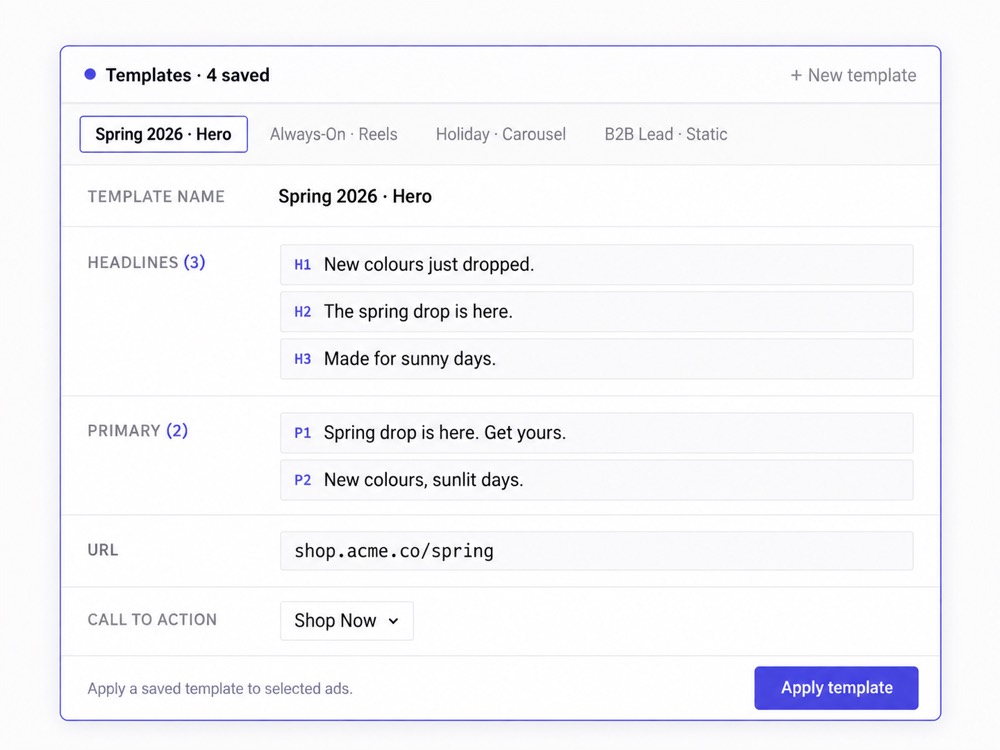
Mit Ad Templates speichert dein Team diese wiederverwendbaren Bausteine und holt sie in künftige Launches, statt sie jedes Mal von Hand neu einzurichten. Templates können zum Beispiel diese Felder enthalten:
- Primärtexte
- Headlines
- Beschreibungen
- URL-Parameter
- Ziel-URLs
- Product-Set-IDs
- Leadgen-Formular-IDs
Und weitere unterstützte Anzeigenattribute.
Templates auf viele Anzeigen gleichzeitig anwenden
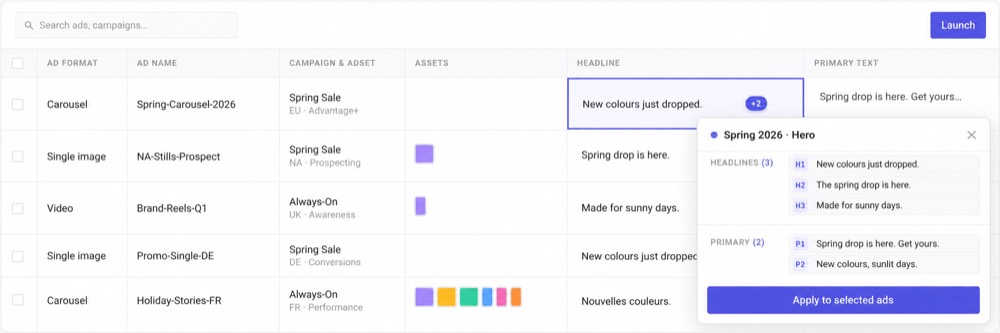
Templates werden nicht stillschweigend auf jede neue Anzeige übertragen. Dein Media Buyer entscheidet, wann sie angewendet werden.
Wähle die passenden Zeilen im Launch Sheet aus, such das Template aus und wende die gespeicherten Attribute in Bulk auf die ganze Auswahl an.
So bekommen Teams das Tempo der Standardisierung, ohne dem Buyer, der den Launch fährt, die Kontrolle zu nehmen.
Mach aus einer bestehenden Anzeige einen wiederverwendbaren Ausgangspunkt
Schon etwas gebaut, das der Rest des Teams wiederverwenden soll? Erstelle aus einer bestehenden Anzeige ein Ad Template und speichere die relevanten Felder für künftige Launches.
Statt ein funktionierendes Setup irgendwo anders zu dokumentieren und zu hoffen, dass alle es richtig nachbauen, machst du das Setup selbst wiederverwendbar.
Bau eine Template-Bibliothek rund um die Arbeitsweise deiner Agentur
Templates lassen sich in der ganzen Organisation ordnen und wiederverwenden, mit plattformspezifischen Templates und Ordnern, damit unterschiedliche Setups strukturiert bleiben.
Kitchn unterstützt außerdem CSV-Import und -Export für Ad Templates, was größere Template-Bibliotheken leichter verwaltbar macht. Templates können über Konten hinweg geteilt oder bei Bedarf auf ein bestimmtes Werbekonto beschränkt werden.
Nützlich für wiederkehrende Arbeit im großen Stil
Ad Templates helfen besonders, wenn dein Team Folgendes betreut:
Templates beschleunigen die Umsetzung. Sie ersetzen kein Urteilsvermögen.
Kitchn überträgt nicht automatisch jedes Ad Template auf jede neue Zeile. Templates werden bewusst angewendet, über Bulk-Aktionen oder konfigurierte Workflows.
Für Agenturen ist das wichtig: Standardisierung soll wiederkehrende Arbeit abnehmen, ohne still und leise das falsche Kunden-Setup auf den falschen Launch zu übertragen.
Mach das Wiederholbare wiederholbar
Deine besten Media Buyer sollten ihren Tag nicht damit verbringen, Einstellungen nachzubauen, die sie schon dutzendfach angelegt haben.
Einmal speichern.
Wiederverwenden, wenn es passt.
Das Team in Bewegung halten, während das Launch-Volumen wächst.
Verwalte mehr Werbekonten
mit demselben Team.
Geh mit uns die Workflows deines Teams durch.
14 Tage kostenlos testenKeine Kreditkarte nötig
